





Tundraboy44
Members
-
Joined
-
Last visited
-
@JorgeBUnfortunately woke to a rebooted server...... Logs attached, would appreciate any help you have. Running a memory test right now.
-
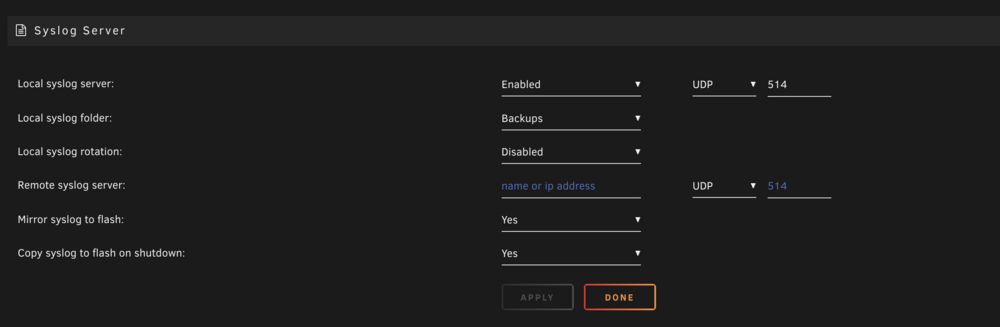
Sounds good - Will make this change and monitor. Seems like it only happens under load. Been trying to migrate about 10tb of data to the array over the past week and it's been having a ton of issues because of it. Really strange. Will report back on next crash with the data. Should I rotate the syslog?
-
Always! Looks like you may have to earn it..... Came back home to see the server in a null state again. Console was working (Via KVM) but all nics were down, no coms to it and required a hard reboot again. Noticed upon bringing it back up that the array worked fine, no errors this time, (running parity check as we speak), but that the VM i nuked before is now back. Certainly feel something is wrong with it, but not sure if it's hardware or software. Would be curious your thoughts -
-
Never thought to do that. Appreciate it a ton, Thanks!
-
WE ARE BACK BABY. Woo! Should I do anything with the old image? Or move the disk1 image to cache? Jorge, Thank you
-
Appears so, Worth noting that Disk1 was the disk that took a turn for the worst wednesday after the VM crashed. But this could be due to the hard shutdown and un-related.

-
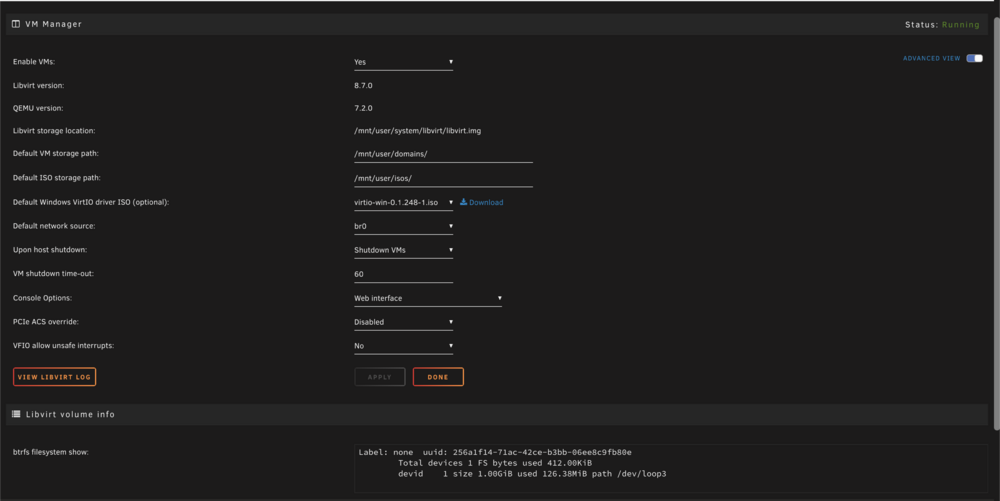
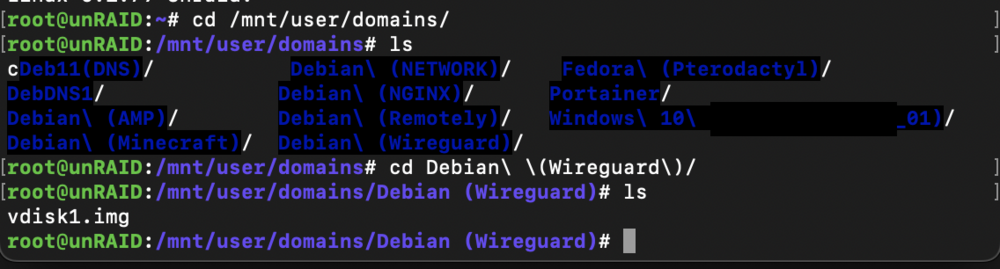
@JorgeB - Thanks for the help, Raid looks healthy after rebuild, does not appear to have any lost data or curruption. Woop! Go UnRaid! However, VM issue is still not resolved. This could be a totally seperate issue though, as the reason for the hard shutdown was due to power cycling a VM.... My portainer instance to be exact, was trying to stop it and the server spiked to 100% and the UI became un-responsive. Attached images showing the .img's are still intact, service is running, but no VM's show in UnRaid. Additionally, Diag attached. Any help would be deeply appreciated, beginning my own troubleshooting to see where it may have fallen. Thanks again

-
Jorge - Thank you my friend. I will update in 24hr when the rebuild is completed. Just to save my sanity, I will await a rebuild to complete. Thank you..... Seriously.
-
Attached
-
Getting the following for "VM"s, No Logs in the console for this. Need new Diag file?

-
Mounted, rebuild started.... I hope I didn't screw things up by trying to rebuild it before it could be mounted before.... Data appears to be good, I see the files I was missing in some locations, but VM's are still showing as none. I had 11 VM's existing on this drive, wondering once rebuold if a reboot will bring them back? Thank you so much Jorge.


-
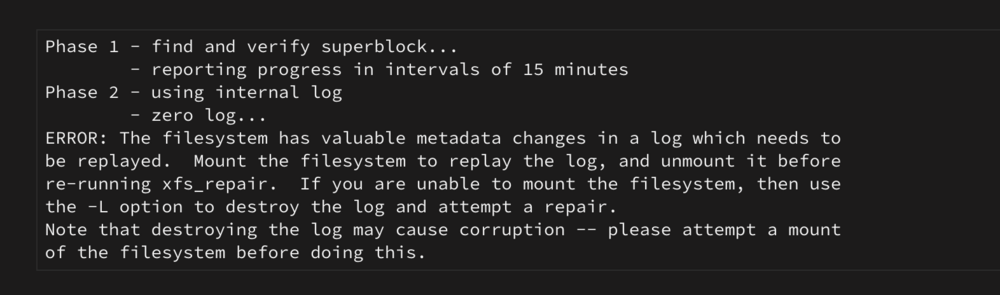
Output - Phase 1 - find and verify superblock... - reporting progress in intervals of 15 minutes Phase 2 - using internal log - zero log... ALERT: The filesystem has valuable metadata changes in a log which is being destroyed because the -L option was used. - 08:43:24: zeroing log - 59617 of 59617 blocks done - scan filesystem freespace and inode maps... clearing needsrepair flag and regenerating metadata sb_ifree 5990, counted 5991 sb_fdblocks 1708111470, counted 1711520244 - 08:43:26: scanning filesystem freespace - 112 of 112 allocation groups done - found root inode chunk Phase 3 - for each AG... - scan and clear agi unlinked lists... - 08:43:26: scanning agi unlinked lists - 112 of 112 allocation groups done - process known inodes and perform inode discovery... - agno = 45 - agno = 15 - agno = 60 - agno = 0 - agno = 90 - agno = 105 - agno = 30 - agno = 75 - agno = 31 - agno = 46 - agno = 32 - agno = 106 - agno = 61 - agno = 47 - agno = 33 - agno = 48 - agno = 76 - agno = 34 - agno = 35 - agno = 62 - agno = 49 - agno = 50 - agno = 36 - agno = 51 - agno = 37 - agno = 63 - agno = 52 - agno = 38 - agno = 53 - agno = 77 - agno = 91 - agno = 64 - agno = 54 - agno = 78 - agno = 39 - agno = 55 - agno = 65 - agno = 56 - agno = 79 - agno = 66 - agno = 57 - agno = 67 - agno = 92 - agno = 80 - agno = 107 - agno = 68 - agno = 40 - agno = 58 - agno = 69 - agno = 59 - agno = 81 - agno = 93 - agno = 70 - agno = 82 - agno = 41 - agno = 94 - agno = 71 - agno = 42 - agno = 83 - agno = 108 - agno = 95 - agno = 43 - agno = 72 - agno = 84 - agno = 109 - agno = 96 - agno = 44 - agno = 85 - agno = 73 - agno = 86 - agno = 97 - agno = 110 - agno = 74 - agno = 98 - agno = 87 - agno = 111 - agno = 99 - agno = 88 - agno = 100 - agno = 89 - agno = 101 - agno = 102 - agno = 103 - agno = 104 - agno = 16 - agno = 17 - agno = 18 - agno = 1 - agno = 19 - agno = 20 - agno = 21 - agno = 22 - agno = 23 - agno = 24 - agno = 25 - agno = 26 - agno = 27 - agno = 28 - agno = 29 - agno = 2 inode 642201633 - bad extent starting block number 4503567566493684, offset 0 correcting nextents for inode 642201633 bad data fork in inode 642201633 cleared inode 642201633 - agno = 3 - agno = 4 - agno = 5 - agno = 6 - agno = 7 - agno = 8 - agno = 9 - agno = 10 - agno = 11 - agno = 12 - agno = 13 - agno = 14 - 08:44:04: process known inodes and inode discovery - 659840 of 659840 inodes done - process newly discovered inodes... - 08:44:04: process newly discovered inodes - 112 of 112 allocation groups done Phase 4 - check for duplicate blocks... - setting up duplicate extent list... - 08:44:04: setting up duplicate extent list - 112 of 112 allocation groups done - check for inodes claiming duplicate blocks... - agno = 0 - agno = 2 - agno = 5 - agno = 8 - agno = 14 - agno = 18 - agno = 22 - agno = 7 - agno = 9 - agno = 13 - agno = 12 - agno = 11 - agno = 16 - agno = 17 - agno = 15 - agno = 4 - agno = 19 - agno = 20 - agno = 24 - agno = 6 - agno = 21 - agno = 23 - agno = 1 - agno = 25 - agno = 3 - agno = 10 - agno = 26 - agno = 27 - agno = 28 - agno = 29 - agno = 30 - agno = 31 - agno = 32 - agno = 33 - agno = 34 - agno = 35 - agno = 36 - agno = 37 - agno = 38 - agno = 39 - agno = 40 - agno = 41 - agno = 42 - agno = 43 - agno = 44 - agno = 45 - agno = 46 - agno = 47 - agno = 48 - agno = 49 - agno = 50 - agno = 51 - agno = 52 - agno = 53 - agno = 54 - agno = 55 - agno = 56 - agno = 57 - agno = 58 - agno = 59 - agno = 60 - agno = 61 - agno = 62 - agno = 63 - agno = 64 - agno = 65 - agno = 66 - agno = 67 - agno = 68 - agno = 69 - agno = 70 - agno = 71 - agno = 72 - agno = 73 - agno = 74 - agno = 75 - agno = 76 - agno = 77 - agno = 78 - agno = 79 - agno = 80 - agno = 81 - agno = 82 - agno = 83 - agno = 84 - agno = 85 - agno = 86 - agno = 87 - agno = 88 - agno = 89 - agno = 90 - agno = 91 - agno = 92 - agno = 93 - agno = 94 - agno = 95 - agno = 96 - agno = 97 - agno = 98 - agno = 99 - agno = 100 - agno = 101 - agno = 102 - agno = 103 - agno = 104 - agno = 105 - agno = 106 - agno = 107 - agno = 108 - agno = 109 - agno = 110 - agno = 111 entry "Sonickid51.dat" at block 8 offset 2264 in directory inode 642200377 references free inode 642201633 clearing inode number in entry at offset 2264... - 08:44:04: check for inodes claiming duplicate blocks - 659840 of 659840 inodes done Phase 5 - rebuild AG headers and trees... - 08:44:11: rebuild AG headers and trees - 112 of 112 allocation groups done - reset superblock... Phase 6 - check inode connectivity... - resetting contents of realtime bitmap and summary inodes - traversing filesystem ... rebuilding directory inode 642200377 - traversal finished ... - moving disconnected inodes to lost+found ... Phase 7 - verify and correct link counts... - 08:44:37: verify and correct link counts - 112 of 112 allocation groups done Maximum metadata LSN (1794:90613) is ahead of log (1:2). Format log to cycle 1797. done
-
Proceed with -L?
-
Sounds good - Will do.
-
Copy. Should I let the rebuild finish first? Even though it still shows the drive in "unmountable" state? Or kill the rebuild and run the -L





