Jagadguru
Members
-
Joined
-
Last visited
Everything posted by Jagadguru
-
Ok, I removed the balloon device from the VM definition XML and ran the my memory eater script again. This time when memory was filled up the system killed the memory eater process just like it should.
-
Does the virtual memory balloon device work in a MacOS VM? I notice when memory in the VM fills up there is no error thrown, but the entire Unraid server crashes. This happened once when I wrote a program that allocated memory without limit and once when I tried to open a 2.7G file in Wireshark.
-
It happens right at the point the control is handed over to the OS. It is not a kernel panic I checked for that many times. Hey, you helped me find the solution! I turned off the watchdog timer in config.plist and now it just booted 9/10 times without hiccup. The one time it didn't boot was a hang with all cores on 100% I guess my VM was just booting too slow and timing out. Thanks for pointing me to the debug options.
-
Ok, I've go logs. Hmm. The logs seem to be identical(except for timestamps, etc) on successful and unsuccessful boots. Does Opencore stop logging after control is handed over to the kernel? Here is the log. The last line is something to do with SMC opencore-2020-10-13-232826.txt
-
Thanks, that brought it right up. And with stock OVMF CODE and VARS. Seems pretty snappy. Audio and iServices still working, that's great. Boot-looped a few times before it came up, though. Is that normal?
-
With your EFI, the chooser comes up but choosing my boot I get the error: OCSB: No suitable signature. Security violation .. Recovery boots fine, though.
-
Wow @ghost82 thanks for posting those files. But for me it just hangs with no error in the logs. EDIT: Actually maybe I read the release notes wrong this issue https://github.com/Leoyzen/KVM-Opencore/issues/8 says the stock one doesn't work.
-
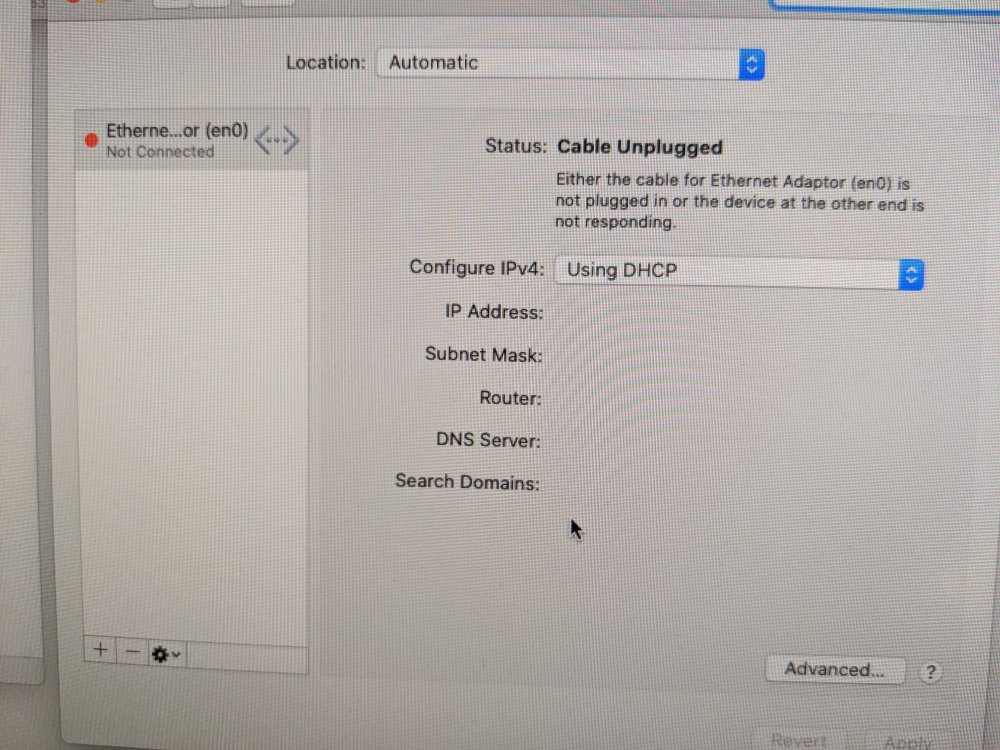
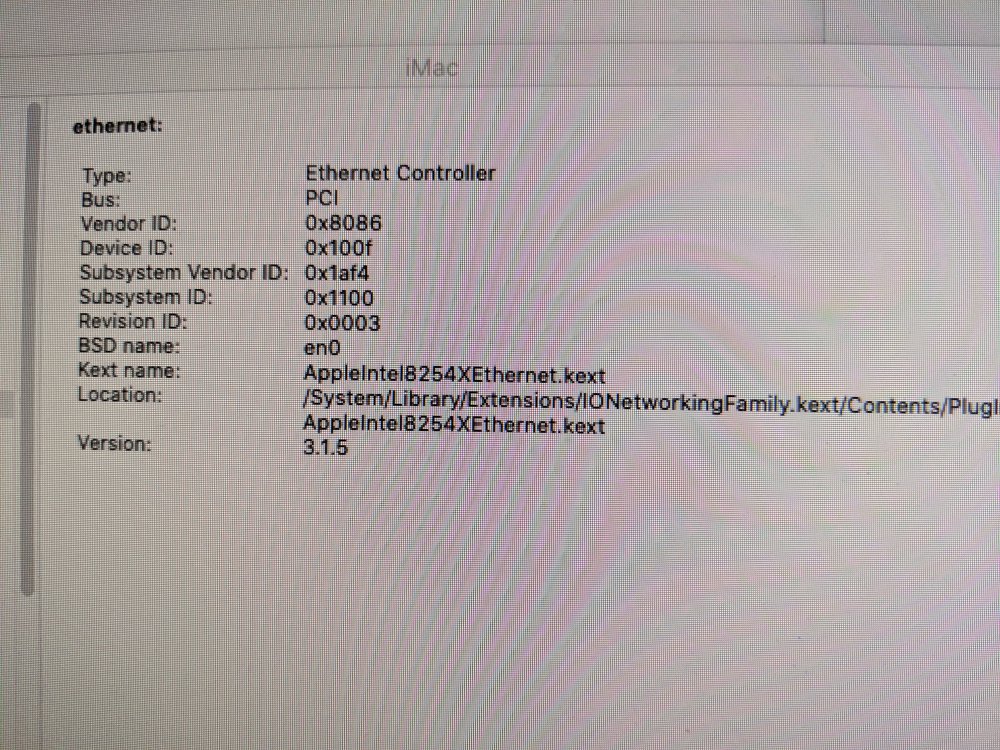
I just successfully converted my Macinabox Catalina daily driver VM from Clover to Opencore, because my VM was crashing at the very beginning of boot most of the time. I used https://github.com/Leoyzen/KVM-Opencore. Thank you @Leoyzen! I just replaced the EFI folder with the one on this repository. Then I used the guide https://khronokernel-2.gitbook.io/opencore-vanilla-desktop-guide/post-install/post-install/iservices to get iMessage working. The last snag I ran into was after following that guide to the "T" my VM would no longer connect to the network. That was fixed temporarily by using vmxnet3 for a virtual Ethernet NIC. The boot problem is exactly the same under Opencore. I've read that under Opencore you no longer have to use a patched OVMF, but I'm not sure how to convert that. Tried just changing <loader readonly='yes' type='pflash'>/mnt/user/domains/MacinaboxCatalina/ovmf/OVMF_CODE.fd</loader> <nvram>/mnt/user/domains/MacinaboxCatalina/ovmf/OVMF_VARS.fd</nvram> to <loader readonly='yes' type='pflash'>/usr/share/qemu/ovmf-x64/OVMF_CODE-pure-efi.fd</loader> <nvram>/mnt/user/domains/MacinaboxCatalina/ovmf/OVMF_VARS.fd</nvram> does not help. But overall the VM is 99% functional.
-
I think it as to be Renesas chipset. Here is the one I use: Inateck PCI-E to USB 3.0 (5 Ports) PCI Express Card and 15-Pin Power Connector, Red (KT5001)
-
I had to pass though a USB controller card the USB device plugged into that to get it to work well.
-
Press ESC or F2 while the VM is booting up to enter the UEFI configuration screen and there change the resolution.
-
NVIDIA GeForce GT 710
-
@steveBBB, domain is tainted error can be safely ignored. I just means you're running a configuration or some component that is not officially supported by the maintainers of either KVM or QEMU. That means that if you ever need to contact them to report a bug or get help, you would need to adjust your configuration such that it is purely running their supported code and not "tainted" or they will not try to fix it, because they don't support that use case or component added.
-
It seems to be caused by this: https://github.com/libfuse/libfuse/issues/128. A file is removed and then moved, presumably by Mover. I don't know what the fix is, though.
-
Last time I updated like that I just had to keep trying all of them and eventually it registered as updated in MacOS.
-
@RockDawg Only thing I can think is try removing <topology sockets='1' cores='4' threads='2'/>
-
Note the native resolution of your monitor. First boot MacOS and change the clover GUI resolution to the native for your monitor (using clover configurator or whatever way you're comfortable configuring clover. Drop passthrough for now and set up VM to use VNC. Using VNC, press F2 or esc as VM is booting, then when you get the BIOS menu choose (I forget which) and set the resolution to the native for your monitor. Then hit continue. After it boots successfully into the desktop, shut it down. Then passthrough your graphics card and see if it looks right. Boot order can be modified in the boot section of clover configurator on your MacOS desktop, after mounting EFI partition (I think "o") with the configurator.
-
Check that in Settings > Network, bridging is enabled and the bridge is named br0 and the bridge includes eth0 at least.
-
If you change the line <source bridge='virbr0'/> to <source bridge='br0'/> The Mac VM should pull an ip address in the range 192.168.1.0/24
-
iMessage, FaceTime and iCloud work for me after following a guide like this one. AirDrop I have read is tricky and you might have to passthrough Wi-Fi or Bluetooth hardware. I don't have Apple Pay or an iPhone/iPad.
-
Set resolution in OVMF. Press esc or F2 while booting.
-
Same problem here. Must be downloading the wrong recovery img.
-
@bland328 Thanks, kudos to you! The kext solved my problem.
-
Yes this is exactly my problem. But I also need bridging because I need my VM to have an address on the main subnet for automated ssh, etc. Yes vmxnet3 has a crippled slow upload speed, so it fails at some connections.
-
Glad to hear you finally got it! Now if I could get e1000-82545em to work with Catalina. Does the above pic look right? A lot of things break when that driver loads. Finder won't open, screenshot doesn't work, won't shut down, preferences crashes.