





PsyCl0ne
Members
-
Joined
-
Last visited
Everything posted by PsyCl0ne
-
Perfect, I figured out how to get the IPMI going. The only thing as of this year was Event ID Time Stamp Sensor Name Sensor Type Description 251 12/04/2023 16:41:04 Unknown [undefined] undefined - Asserted 250 09/18/2021 15:05:04 Unknown OS Critical Stop undefined - Asserted - Asserted
-
Apologies, how would I locate these logs? Is it the ones located at http://tower/log/syslog? If so, I have it attached, however I don't think I am seeing anything that stands out. It seems to be populated from after the server reset. syslog
-
Hey everyone, My server just crashed while I was streaming on Jellyfin, however this is a really strange crash as my server didn't fully restart. I'm not sure how to explain this, but I didn't hear it go through post and ramping up the chassis fans and then back down. I just heard the fans spin up for a moment and then go back down. However, unraid did have to boot back up, and I was able to connect to it once it was showing the IP address. The server is currently completing a parity check but in fix common problems I have the following error "Machine Check Events detected on your server" "Your server has detected hardware errors. You should install mcelog via the NerdPack plugin, post your diagnostics and ask for assistance on the Unraid forums. The output of mcelog (if installed) has been logged More Information" Trying to get more information for this error but installing NerdPack, I am unable to find that in the app store, I believe it was depreciated? There is, however, NerdTools, but I am unable to find that mcelog tool within it. I have attached the diagnostics from when the UI was accessible, but I am not sure if that would have information as to what happened. Any idea what direction I should move with this? tower-diagnostics-20230306-2238.zip
-
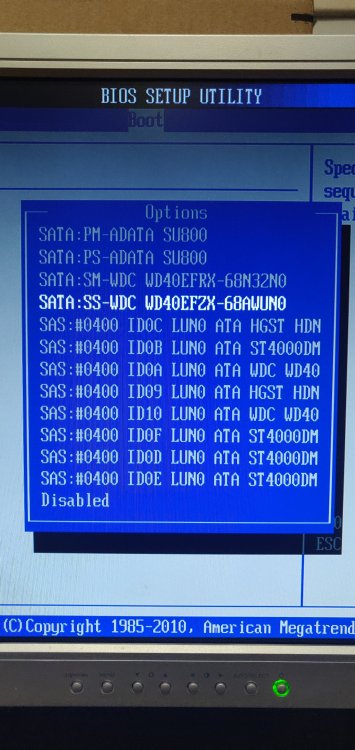
Thank you both, I don't have much experience with server hardware and didn't know that there was an option within the HBA to enable drives to boot from but it is sorted now! If anyone else does come across this issue, I have the following hardware: SAS9211-8i + SAS9207-8e. Info for the boot settings was found from https://support.osnexus.com/hc/en-us/articles/212131146-Setting-LSI-SAS-HBA-boot-support
-
In the bios it is seeing all of my drives and the USB drive but it just won't boot off of it...
 There is only one device enabled to boot off of.
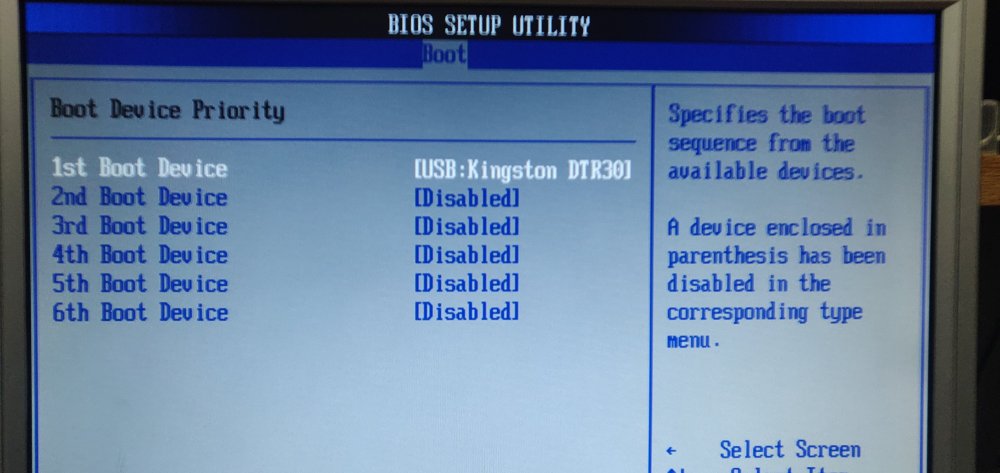 Fair point, I have the server set to only boot off of the USB stick and nothing else. Even rebooting the server and getting into the boot menu and selecting the USB drive ends up with the same result.Hey everyone, Recently I purchased some WD Reds 4 TB WD40EFZX drives to fill up the last slot I have on my server but when I have the drive inserted into the hot swap bay the server displays an error "Reboot and Select proper boot device or Insert Boot Media in selected Boot device and press a key" When I remove the new HDD the server boots fine. When Unraid is fully booted, and I insert the drive, it doesn't get detected, at least from what I can tell. I have tried the two internal USB ports as well as the two USB ports on the rear IO panel of the motherboard. I have no idea if this is an issue with the new drives, or maybe a configuration setting that I just don't know about. Currently, the server boots with 11 drives ( 2 SSD cache, 9 4TB mix between Seagate, HGST, WD). For more in formation I have attached the diag zip but if there is anything else I can provide please let me know! tower-diagnostics-20220227-2303.zipThank you for your time JorgeB. Attached the new diagnostics after following your steps. I did not reboot just yet but will shortly after posting this. tower-diagnostics-20210820-2115.zipRandomly I have lost the ability to start any dockers besides netdata. No updates or randomly power outages. Everything was working fine server uptime of 31 days. When trying to refresh web interfaces for dockers that were running, I was seeing some SQL errors. I tried to restart the docker service and now nothing will start up. Last time I was having issues I was advised to delete and recreate the docker image which worked so its a fairly new image. I don't think I have any hardware failure happening, as fix common problems doesn't see anything. Any advice would be appreciated. Diagnostics have been attached. tower-diagnostics-20210819-2149.zipAfter a recent random cut of power to my server I have been experiencing a bunch of issues. After the power outage the server came back and completed a check no problem. Followed by this I then saw both my docker image and logs being filled to 100%. Docker was running without issues prior to this. I tried to reboot the server and the first reboot everything came back clean and after starting the array everything fired up but shortly after the docker image was full again. Logs were fine at this point and sitting at ~1% as per gui. So I tried to reboot the server again just to see if I could get into some of the recently updated dockers to see if I had a config issue, but now the docker service won't even start. One thing that I did notice is that the reboot took forever to happen. I am not sure where to even begin with diagnostics here, so any help would be appreciated. Attached are my diagnostics logs. tower-diagnostics-20210715-0012.zip


