





Malibu
Members
-
Joined
-
Last visited
Everything posted by Malibu
-
Thanks so much for the info. This is the controller I currently have: https://www.amazon.com/dp/B00ESFEI2E and this is the one I'm going to pick up tomorrow: https://www.amazon.com/9300-8i-Controller-FreeNAS-Expander-SFF-8643/dp/B0BV2KMB2K?crid=2DEI1KVSSJARY&dib=eyJ2IjoiMSJ9.ga7U07k6WoDnMK-cW2EAtEBpB4W837-r-RqarIM_jH3pt8vwWKYcKFsj9kFdF7tyAAKVT7B7PRCWoIZOMLwLzgrqomez-sO8hBTYRiUYkL_xq7CV9oFgPrgBmpjrfMBFKBiwOJsxVci42tYMT-nr9i4aHMFLBC3_xywXmQqL44D6Mhm0DMFJhG5HrBGsYE5PTXqwVaNm8u-yu5AIHTH9MhaxgISOCYVyiztxMa9u0JM.AEZIi7dW2P80DbWMPzB3GnosKjmDdF4Ms9on6z8ZHEM&dib_tag=se&keywords=lsi+8+port+sas&qid=1779349248&sprefix=lsi+8+port+sas%2Caps%2C174&sr=8-1#averageCustomerReviewsAnchor
-
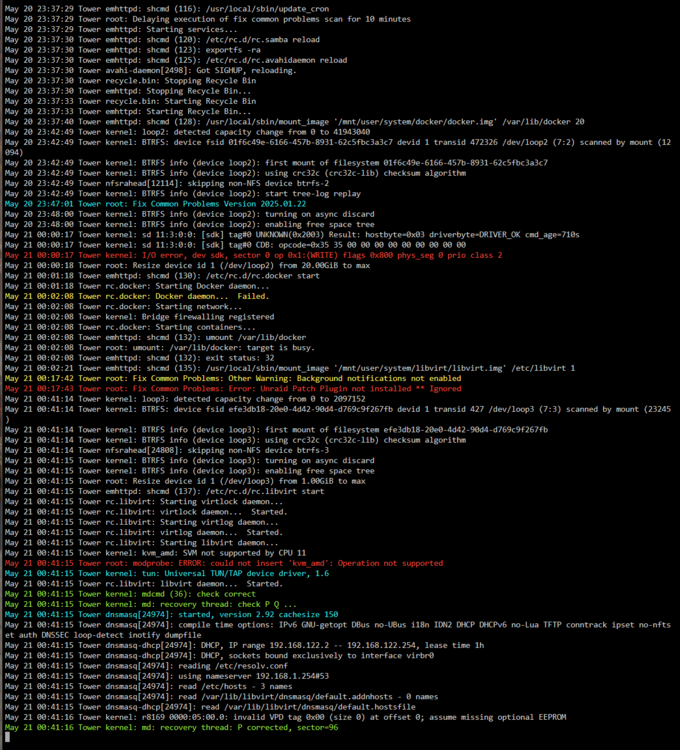
Just to add a bit more info, after leaving the server on for over an hour, it finally got through the "mounting disks" and 'starting services" steps and started a parity check. At this point I can access my files, but the GUI still says that the docker service failed to start, so nothing under docker or apps are working. Here are what the logs looked like as it went through the process.
-
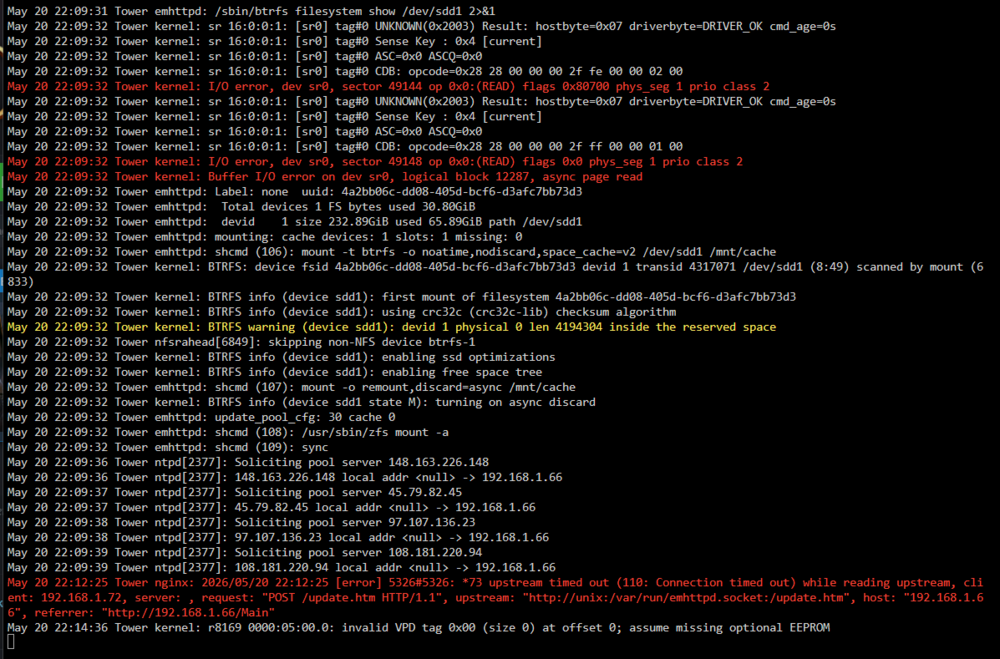
Hi all, so I just moved my unraid setup into a new Jonsbo N5 case and it was working flawlessly for the first 24 hours. After the first day I closed the case up, screwed the top on and... it seems to have broken somehow. Whenever I try to start the array it just says "mounting disks" and never moves on. There are a few errors that shoe up in the log but I'm not sure how to interpret them. Diagnostic download is attached. Thank you! My initial thought is that it might be an issue with the hotswap backplane not getting enough power? There are 2 sata power and 3 molex power connections on the back of it. When I first moved everything over, I only had the sata power connectors on because I read that you didn't necessarily need all 5 powered), but now I'm wondering if it's caused an issue. I don't have a power supply with that many sata cable slots to test powering all 5. Can anyone tell from these logs if that's a possible cause? tower-safemode-diagnostics-20260520-2214.zip
-
So I ended up testing the drives in another machine and they worked. After that, I figured I'd try them using some molex to sata connectors I had laying around, and even though they weren't shucked drives, that seemed to do the trick. I suppose I should try and look for a model of power supply that won't have that problem with the 3.3v pin if this issue can extend to WD Reds and Data Center drives?
-
I'll do just that--thank you!
-
Correct, they don't show up in the bios.
-
I have some shucked WD drives in the array that are running with molex adapters but these new ones aren't shucked. Two of them are WD Ultrastar drives and the third is a WD Red Plus. None of them are detected no matter where I plug them in, even if I try to swap a currently working drive out for one of them.
-
I have a Pro key and am only using 12 drives.
-
Hiya, I've got an 8 TB drive in my array that's beginning to fail and none of my replacement drives are getting detected by unraid. I've got three different spares, have tried plugging in one at a time with different ports and cables and... there's just no sign of them in unraid. If anyone knows what might cause this, I'd appreciate the helptower-diagnostics-20240722-0743.zip! Oh and the spares are all 14TB drives (as are both of my parity drives).
-
I'm actually trying that right now and the server has been up for a little over 4 hours with c-state disabled. Hopefully no more crashes but I'll make sure to update with more info if it does.
-
New user here, recently built an Unraid NAS for Plex. I'm loving nearly everything about it, except for the server crashing/freezing ~daily. Symptoms: I randomly lose all connection to the server via the web UI and on my network. The console stays on, but no longer accepts keyboard input, so I can't retreive any logs. There are no error messages shown, just the tower login prompt with blinking cursor. I've tried the Fix Common Problems plugin. I followed all of the advice it gave, including updating my Unraid version for Ryzen support as well as updating my BIOS firmware. The log file and diagnostics generated by FCP are attached. I also ran 3 passes of Memory Test with no errors. Specs: Unraid Ver. 6.4.0_rc14 (as advised to upgrade by FCP for my Ryzen CPU) on a Verbatim Store N' Go USB AMD Ryzen 5 1600x CPU Gygabyte GA-AB350M-Gaming 3 (Bios version F7a) Motherboard EVGA SuperNOVA 650w G2 Gold PSU 3x Seagate Ironwolf 8TB NAS Drives (1 parity, no errors detected on them) 1x Samsung 850 EVO 250 BM M.2 for Cache I'm also using brand new CAT6 cables with a gigabit switch. My desktop is connected to the same switch and doesn't seem to drop connection at all. Any help with this issue would be amazing, thank you. FCPsyslog_tail.txt tower-diagnostics-20171129-1703.zip tower-diagnostics-20171129-1733.zip tower-diagnostics-20171129-1803.zip tower-diagnostics-20171129-1833.zip tower-diagnostics-20171129-1903.zip tower-diagnostics-20171129-1933.zip


