hittingray
Members
-
Joined
-
Last visited
-
Only got a notification for this just now... Anyway, I ended up trying BinHex's rTorrent docker, and the scheduler worked properly in that, so I just moved to that. It's not too hard to transfer everything over.
-
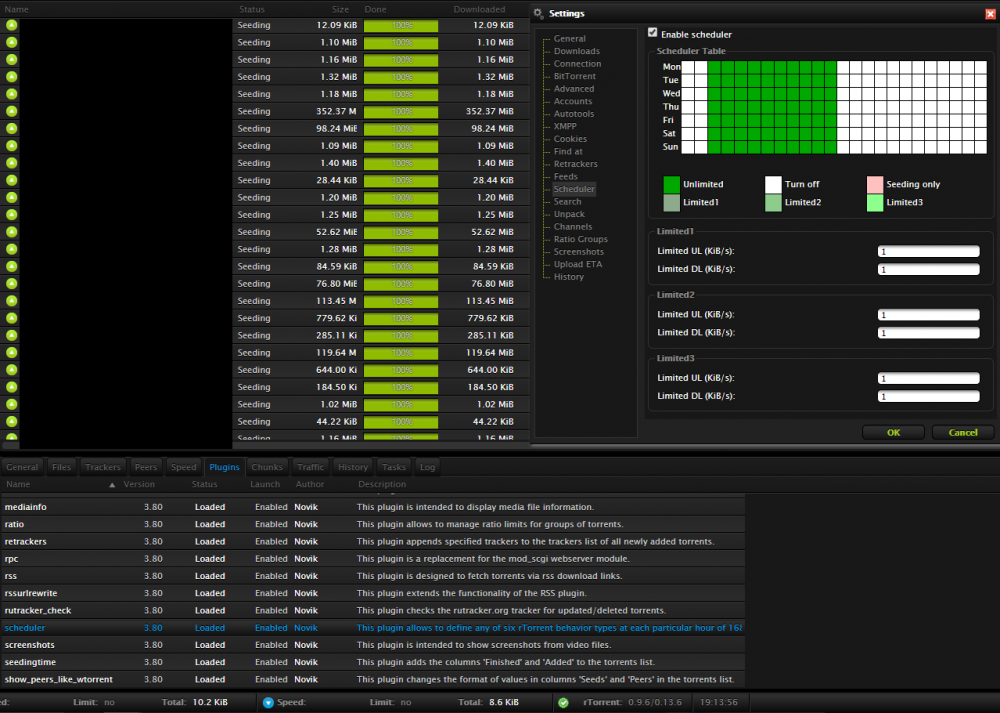
I gave that a try, and now the scheduler seems to operate, but not properly... My torrents seem to randomly be set to "Finished" not at the appropriate times, and it never changes them back to "Seeding". It also changes the DL/UL limit to 1 KiB/s but never back to unlimited... I turned off the scheduler for a couple days and I never encountered the above issues. Any ideas? Edit: Decided to screw around with Binhex's rTorrent docker and the functionality works exactly as I expect it to. If possible, I'd prefer to just get this working, but I'll just swap to Binhex's if I have to.
-
My scheduler does not appear to be working. Here is a screenshot of my ruTorrent. None of these torrents have the "Ignore Scheduler" option ticked either. Note the time is 19:13 in the screenshot and clearly all the boxes past midday are white. Any ideas?