





moose1207
Members
-
Joined
-
Last visited
-
The server ran steady for a couple of days, and I had a restart on the 25th . I'm attaching my syslog that covers 25-27th. Hopefully this helps narrow the issue down. syslog-previous
-
Syslog is showing 32 gigs. Is there a way to shrink it? or do I need to delete it and have it create a new one? Can I open it in kate or something and just grab the last few days? EDIT: I just changed it to mirror to flash drive, it was chosen to send to flash on shutdown - but I think because of the crash it wasn't getting added. I will update when it crashes again.

-
Over the past few days my server seems to randomly crash. I cannot log into the UI, and no reply if I ping the server. I also don't have any display out of the server and cannot SSH, requiring me to hard reset. After resetting, the server seems to operate just fine... until it randomly crashes again. I have attached diagnostics- I am not sure if it contains logs from before the shutdown, I have syslog enabled and as a side note - I just looked up the syslog share and the file appears to be 34 gigs? Could this be a problem? zeus-diagnostics-20250621-1608.zip
-
Yea, the options are not super intuitive. After clicking around I finally saw it list the mover actions. Is there a reason why mover ignores files that list the array as primary location? Thanks for the assist!
-
Nevermind! Figured it out. Had to set to use cache as primary, and move to the array. Setting save location to array doesn't move files apparently.
-
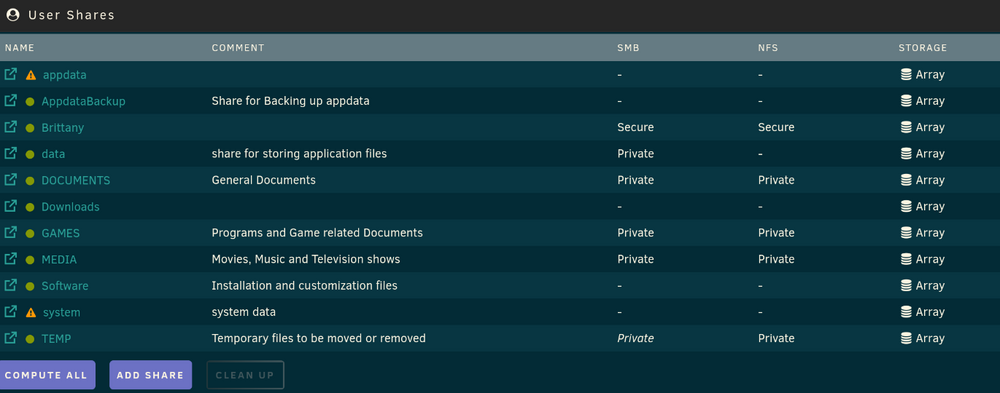
I suspect I'm having issues with my SATA cache SSD because I have spotted errors in the log here and there recently. I ran a short smart test and it says OK, though I did not run an extended test. Moving files on and off the drive is still working fine for now. I installed a new NVME SSD, (it's still unassigned currently) and want to set it up to be the new cache drive. I set all my shares to use the array, however mover isn't moving anything to the array. Docker and VM is disabled. Mover logs just say start, and stop. Am I missing a step? zeus-diagnostics-20250613-1403.zip
-
Ran memtest and it passed with no issues.
-
Nope. I just figured that had something to do with the OS itself. Been running Unraid for years, this is the first time I've seen this.
-
I saw those cache drive errors as well, I recently rebuilt my server and plan to change my cache to an nvme SSD within a week or so, so I ignored it. I'm not sure about the large docker.img What causes it to grow? I had a lot of problems with my previous server hardware- and constantly had issues with containers having faults - randomly being removed, hanging and such. Is there anything I can do to fix the file - does it even matter? Anything I can do about the swap errors? Thanks.
-
I woke up this morning to this error. I'm trying to be self sufficient so I dug through some of the logs and did some online searching in an attempt learn and possibly come up with a solution. The solution is that this is beyond my current capabilities lol. I did see some reoccurring errors. I found a I/O error, dev sdm - Looking through the array "Var" log I was able to locate that device by serial number and that device was listed as a historical unassigned device which I then promptly removed from UD, why is a historical device generating I/o errors? No other drive in my array appears to be using dev/sdm I'm thinking the big problem is that I am seeing get_swap_device: Bad swap file entry 3fd400979278f ### [PREVIOUS LINE REPEATED 1585193 TIMES] ### Searching for this problem didn't bring up anything helpful to me. I read that a reboot will temporarily help, but I haven't rebooted yet in case it may cause some other issue to arise. What do I need to do from here? zeus-diagnostics-20250527-1345.zip
-
Where do you look to find this? I would like to learn for future issues so I can fix on my own. Restarting fixed all my issues. Thanks so much!
-
Hoping someone can point me in the right direction. I was told by a family member they couldn't login to Audiobookshelf, I saw the container needed an update and chalked it up to maybe just needing a restart. It was running at the time, and I have been using the mobile app all morning. I updated the container and it did so without issues, but then didn't start. I noticed that If i try to start any currently stopped container I get the default execution error. All my other running containers are (or appear to be) working fine. I do have a drive failing, that I plan to replace in the next couple of days. I have attached logs. I haven't tried restarting docker or the server yet. Thanks! zeus-diagnostics-20250319-1414.zip
-
Changing cables seems to have fixed my issues. In an interest to learn, May I ask what you saw in the diagnostics that led you to the conclusion of the cache drive/ cables being the issue? Thanks again for your help!
-
OK, Thanks, I'll replace cables, restart and update.
-
Here they are. zeus-diagnostics-20240109-1120.zip

