unraidjfk
Members
-
Joined
-
Last visited
-
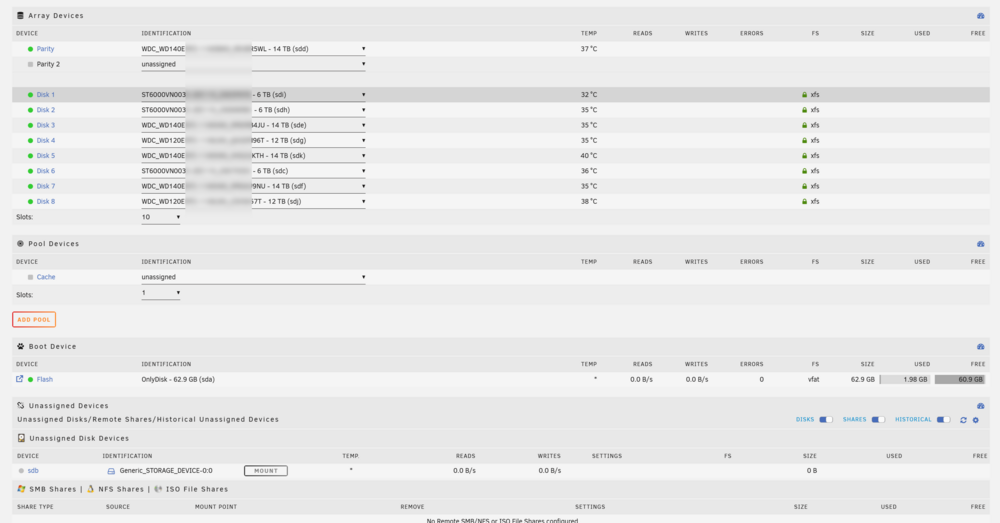
Found it thanks to this earlier post.. In the 2nd answer above, I didn't delete the pool. I just set the number of slots to 0 and the array started normally. Thanks all! John
-
I have started in SAFE mode (headless) so no plugins are loaded and I see the same error. 😞
-
Hi I have upgraded from Unraid 6.12.14 to 7.0.1 this morning which completed without errors. However, when attempting to start the array I get a "Wrong Pool State. cache - too many wrong or missing devices" error. I haven't added\removed any disks and there are no unassigned disks (to assign). The disk layout is exactly the same as it was on the earlier version (attached). I have no pool setup as this server was setup years ago. I backed-up the flash drive prior to the upgrade so I could downgrade if necessary but get the feeling the problem won't go away. I have read other threads about using the "Tools\New Config" option but don't know if this is the best course of action. What am I missing? Thanks for any help. John