Spazilton
Members
-
Joined
-
Last visited
Everything posted by Spazilton
-
OMG! Thank you so much! The filesystem on disc when I unassigned and mounted it with the array down is perfect!! I'm fully backing up the contents to a spare drive and then will let it rebuild the drive.
-
You got off easier than I did. I had several thousand files to go through and figure out what goes where. At least 90% of them were in named subfolders so I could figure out what it was.
-
This did it. Problem solved. Tons of files put in to lost and found but it doesn't look like I lost too much. Thanks again for all the help JorgeB!!
-
Had this exact same issue but with much more serious corruption. Try restarting the array, see if the disc comes back. If not stop the array, maintenance mode and run xfs_repair again without the -n. Here was my issue.
-
unraidserver-diagnostics-20211021-0529.zip I have another drive coming in this morning so that I can clone this drive before attempting any major repairs. I just want to preserve as much data as I possibly can. xfs_repair with -nL flags shows the repair would not complete successfully if attempted. Cost really isn’t object right now. Just need to know how to proceed.
-
After about 2000 lines it finished with would have junked entry "PO'ed" in directory inode 6784074706 entry "Syphon Filter 3" in shortform directory 6784074711 references non-existent inode 351228389 would have junked entry "Syphon Filter 3" in directory inode 6784074711 entry "ThousandArms" in shortform directory 6784074712 references non-existent inode 351228390 would have junked entry "ThousandArms" in directory inode 6784074712 entry "TOMBRAIDER CHRONICLES" in shortform directory 6784074713 references non-existent inode 351228392 would have junked entry "TOMBRAIDER CHRONICLES" in directory inode 6784074713 entry "SLUS01011" in shortform directory 6784074728 references non-existent inode 351228410 would have junked entry "SLUS01011" in directory inode 6784074728 entry "SCUS94309" in shortform directory 6784074731 references non-existent inode 351228411 would have junked entry "SCUS94309" in directory inode 6784074731 entry "SLUS01019" in shortform directory 6784074747 references non-existent inode 351279749 would have junked entry "SLUS01019" in directory inode 6784074747 entry ".." at block 0 offset 80 in directory inode 6796019529 references non-existent inode 351279788 No modify flag set, skipping phase 5 Inode allocation btrees are too corrupted, skipping phases 6 and 7 No modify flag set, skipping filesystem flush and exiting.
-
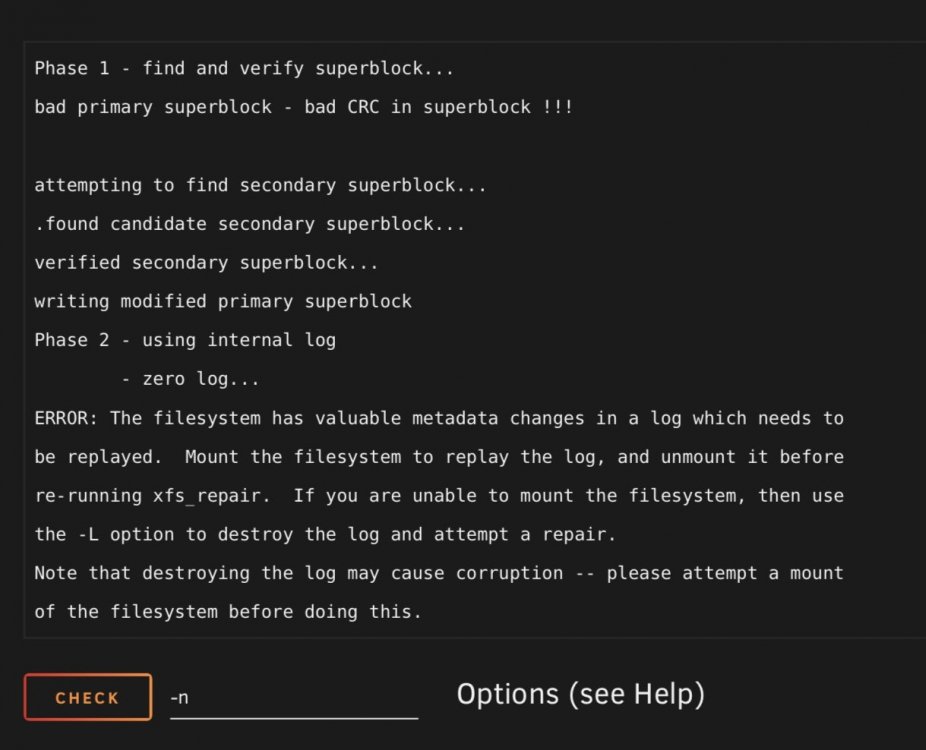
Did the first step and it appears to have been successful to a point. However when I attempted to start stray, brought it back down in maintenance mode and reran the check it appears to be bad.
-
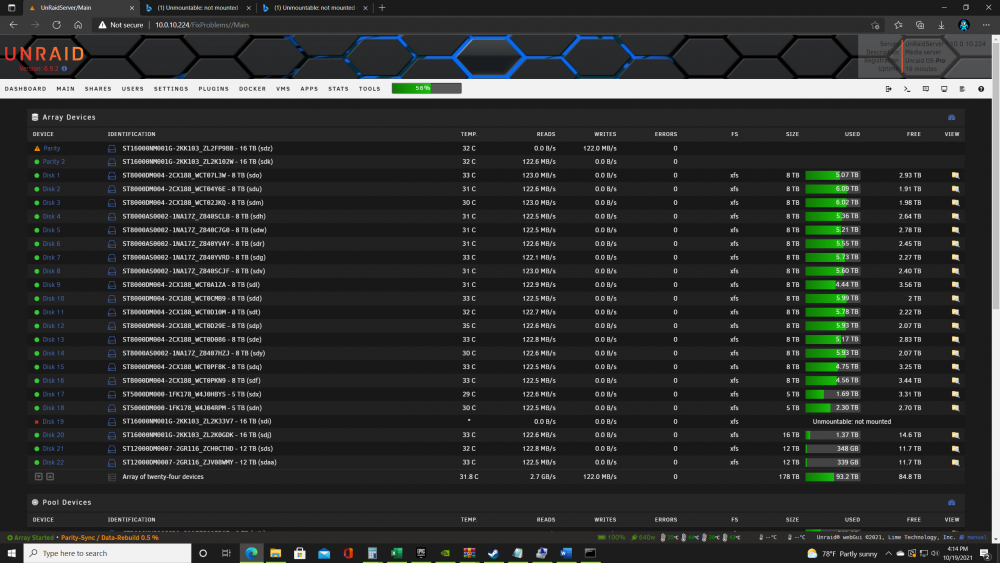
I'm assuming I should wait until the parity rebuild finishes? Since it needs to be in Maintenance mode to do the filesystem checks.
-
Thank you in advance for any assistance you can provide on this issue. unraidserver-diagnostics-20211017-2146.zip
-
Had a dual drive hiccup on my unraid server. My Parity 1 and Disk 19 both hiccupped at the same time. I shut the array down, attempted to restart to no avail. I am running dual parity discs. I instructed the array to rebuild the first parity disc but I do not have emulated contents for the data disk, what is going on? Shouldn't my drive have been protected with dual parity even with 2 drives going down? I have not touched the data drive that is being listed as unmountable. I am looking for advice on how to proceed while the Parity 1 disc rebuilds. Disk 19 is not available in any way. I am getting a ZFS error on disc 19 on array start in the log. I have no idea how to proceed after the parity rebuild.