clause
Members
-
Joined
-
Last visited
-
I ended up setting up Cloudflare and got it working that way.
-
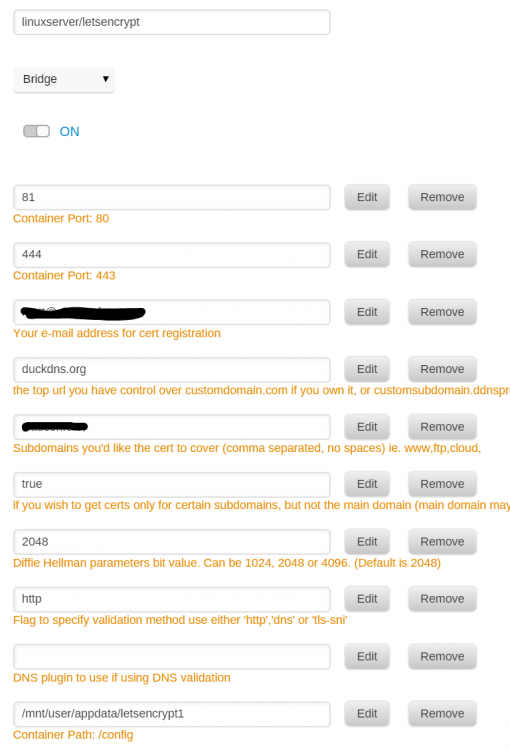
No HTTPVAL in my command. Here it is. root@localhost:# /usr/local/emhttp/plugins/dynamix.docker.manager/scripts/docker run -d --name='letsencrypt' --net='bridge' --privileged=true -e TZ="America/Los_Angeles" -e HOST_OS="unRAID" -e 'EMAIL'='XXXXXXXX' -e 'URL'='duckdns.org' -e 'SUBDOMAINS'='XXXXXXX,' -e 'ONLY_SUBDOMAINS'='true' -e 'DHLEVEL'='2048' -e 'VALIDATION'='http' -e 'DNSPLUGIN'='' -e 'PUID'='99' -e 'PGID'='100' -p '81:80/tcp' -p '444:443/tcp' -v '/mnt/cache/appdata/letsencrypt/':'/config':'rw' 'linuxserver/letsencrypt' d3a3282f734239ff8f7722288607e7cb56b6cd74a45022ed17f02f97b32a8b77 The command finished successfully!
-
Tried that. Still no luck.
-
I put up a regular nginx container with the same ports, and I was able to connect to it fine. Removed the nginx container and recreated the LE container, and still had the same error, so i think my forwarding is fine.
-
@d2dyno I tired forwarding my domain name to my duckdns and then removed subdomains, but it still isnt working.
-
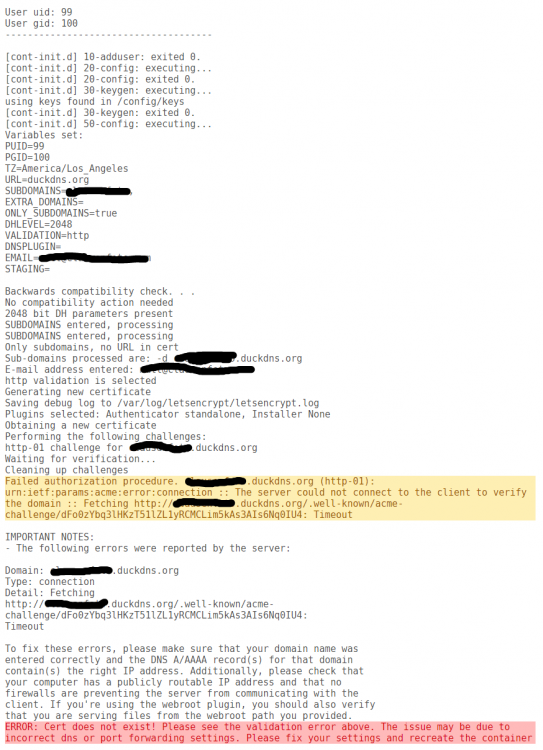
I am having issues with my install. It was working a few months ago, but then it was turned off for awhile and I upgraded the OS twice and updated the Docker. It was no longer working, Everything seems to be set up correctly, and I never changed any of the settings. I tried recreating the docker and removing the appdata folder.