thinkscotty
Members
-
Joined
-
Last visited
-
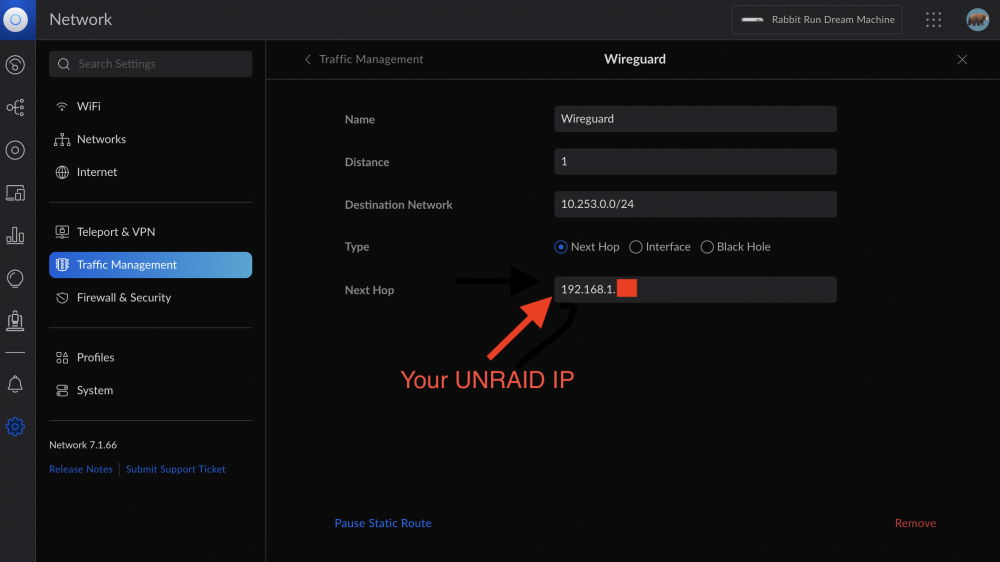
Nevermind. I figured it out. I don't know why but I had to create the static route I never had to use in the past. Left here for anyone else looking for a solution.\
-
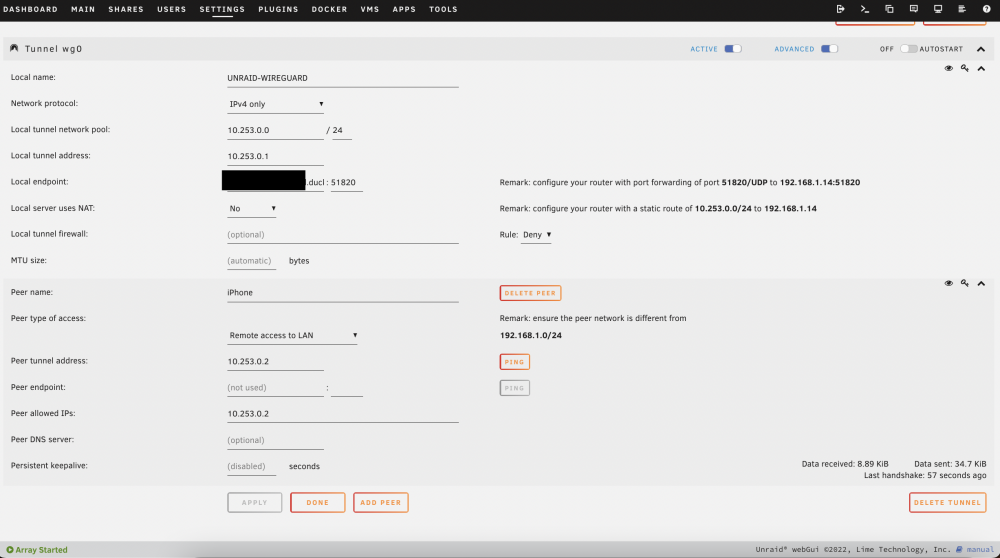
I've encountered several other people on Discord having the same issue, and it's possible it's a bug with 6.10, but I wanted to ensure it's not just me doing something wrong first. I've used "Remote Access to LAN" via Wireguard since the feature was introduced, and I've never had a problem, it's been a magic pushbutton feature for me. I use the feature only occasionally, so there had been a couple changes to my server that could have broken it. The most obvious is that I upgraded to 6.10 (.1, .2, and now .3), but I also got rid of a lot of drives and consolidated to some larger drives and upgraded the server motherboard. I wouldn't think the hardware changes would matter but I thought I'd mention it. I'm running Unifi networking through a UDM Pro. I have a simple network setup with no VLANs, all devices are on 192.168.1.X, including the server. I've used the same Unifi network for a while and Remote Access to LAN worked before. I've had to set up the static routing for NAT or whatever before to make it work, so I don't know why that would have changed now. Here's what I've tried: Checked the Wireguard setup for errors and deleted and re-created the Wireguard tunnel and peers several times. I test it using Wireguard on my iPhone with the wifi off to access from outside the network, set up via QR code. Ensured the DuckDNS is working Ensured that 51280 is forwarded in Unifi Asked around on Discord for similar problems (2 other people have encountered similar problems recently) I don't know what logs I'd need to post for you for this, but if there are any I'd be happy to do so. Ive attached the Wireguard config screenshot here.