alee0904
Members
-
Joined
-
Last visited
-
It ended up being the processor. Good ole eBay will get you every time on used parts. Thanks!
-
Agreed, I tried replacing RAM same issue, I was hoping something would point to it being the MB or CPU directly. Thank you! I will see what I can do about ordering replacements.
-
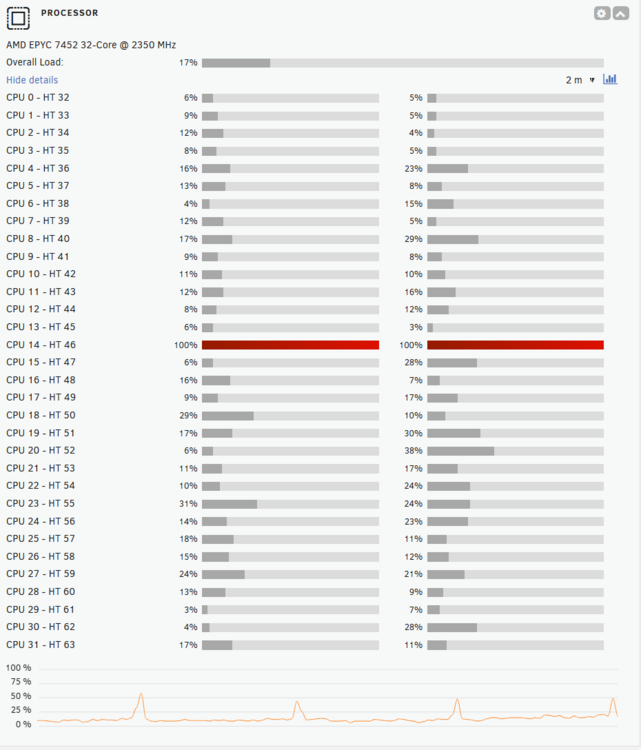
Good Evening All, I just swapped to a new MB, Memory, and CPU. I am looking for some help if anyone can determine the cause of my lockups. It seems like if I do not start the array it will idle fine and once I start the array and then allow it to do parity check it seems to go fine. The problem comes when I turn on docker and start some tasks that have memory/cpu loads. After a bit, it locks up. I originally thought it might have been transcoding issues with Plex but I stopped my Plex, tdarr, and channels dockers, still stalled. I also stopped the parity check then flipped docker on without Plex, tdarr, and channels and it still stalls after a bit. I ran 1 pass on the memory via memtest86 and it passed, I am going to let it run throughout tonight and tomorrow and see what else it shows. The diagnostics file is attached and the image attached of CPU utilization right when it stalled. I found it interesting that core 14 was maxed when it stalled as a few crashes back a syslog message popped up mentioning core 14. "segfault at 14a889cd001c ip 000014a7d238343e sp 000014a7c4e67fd0 error 4 in libavcodec.so.60[14a7d2082000+ca6000] likely on CPU 14 (core 14, socket 0)" unraid OS - 7.0.0 Thanks! rhealated2.0-diagnostics-20250217-2212.zip