





Yonder
Members
-
Joined
-
Last visited
-
Hmm... okay. I'll order some new cables and replace these before I start the rebuild. In the meantime, I'm trying to learn to read these diagnostics reports better myself. Looking at the Disk report files under the "smart" folder in the diagnostics, I'm seeing them mention the interface CRC errors that you're talking about, but are those recent errors since the last boot or are they lifetime errors on the drive. I guess what I'm asking is whether there are new errors since I already replaced the data cables and powered it back on after being shut down... or whether these issues could exclusively be detected from back before I shut down the machine and replaced some cables. How are you telling what the specific error state is since my last power on?
-
Sorry for the slow reply... checked connections and powered back on. The drive is visible and self-testing fine. I haven't started any rebuild yet. Here is my updated diag: tdvault-diagnostics-20260203-2129.zip
-
Is it one of those hiccups possibly caused by a failing SATA cable? I'm not seeing real SMART errors on any of the disks but maybe the diagnostics show more. See attached. tdvault-diagnostics-20260129-0426.zip I can follow the instructions to rebuild that disk 1 back on top of itself if that's wise, but I could also replace the disk, if needed. Thanks.
-
Thanks for the advice, JorgeB. I've replaced both of those cables, to be on the safe side. The rebuild process on both drives is now underway. ~13 hrs to go, so fingers-crossed that all the other drives hold up while this operation completes. Cheers!
-
You think that replacing the cables is likely needed even after they've served for a couple of years with previous problems? I did take them out, hit them with compressed air and re-seated them, but the behavior was the same. I think I have some new spares around that I could swap to. Also, assuming that the extended SMART tests check out and the contents look fine in the emulated disks, then if I go to rebuild on top... any specific problem with doing that for both disks at once, or is it wiser to do them one at a time?
-
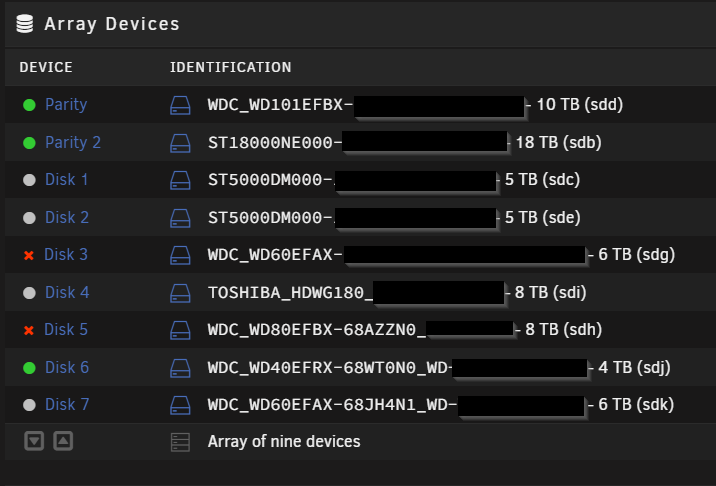
So I had purchased a new large drive with my intention of upgrading my second parity drive to 18TB so that I can start slowly swapping out aging array drives with much larger ones over time. Before I had the chance to install the new drive to get it precleared and do a parity swap, one of my drives (Disk 3) flipped to a red X and is listed as "Device is disabled, contents emulated" seemingly without any inciting event causing that. Whether or not that disk had actually failed, I powered down to install my intended new parity disk into my server on an available SATA connection, and start the long preclear process. When I powered back on I still had the red X on that same drive, as expected. I figured that while the preclear was running I'd also do a short and maybe also an extended SMART self-test on the drive to see if it was actually failed... or whether it might have just gone weird and now needed to be rebuilt upon itself. I had stopped my docker containers, and checked a few other things and then spotted spontaneously that a second drive (this time Disk 5) had also flipped to a red X, with the same apparent error. Now I'm starting to get concerned. With two disk parity, I should still be okay, but now I can't suffer another disk failure without losing data. Both drives passed the short SMART tests, and I've got them both running extended SMART tests now... they'll be a few more hours yet. And the preclear operation for the new parity drive will probably take at least a few days given its size. Is there a way to be confident that the two drives would be okay if I try to rebuild onto both of them? Or do I need I need to see the results of the extended SMART tests? If they seem to test okay, should I rebuild both at the same time or do them one at a time? I've attached my diagnostics data. I'm looking at the instructions here: https://wiki.unraid.net/Manual/Storage_Management#Replacing_failed.2Fdisabled_disk.28s.29 in the section "Rebuilding a drive onto itself". Thanks. tacounraid-diagnostics-20230403-0231.zip
-
Actually, talking to my friend for whom I built this server, he has decided that he'd feel better just starting over once again with newer drives, and a clean setup. Rather than trying to recover this, we're just going to wipe everything and start over. Thanks again for the help.
-
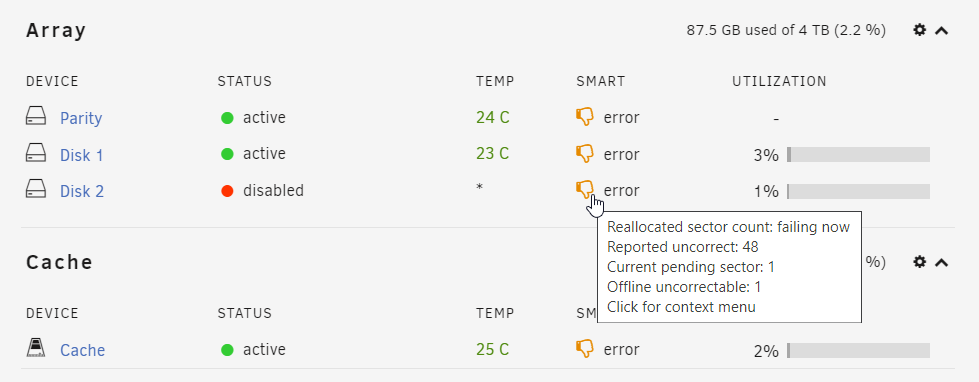
Sorry for the slow reply. I had to dig up the screenshots I took before getting started with this maintenance. No, the drive was not showing as Unmountable before the rebuild. I was looking like it had failed and was being emulated, but everything seemed fine at first. Here's what it looked like before I tried to rebuild to a different drive: I was also a bit worried about the Parity drive, but I figured that I'd start with trying to rebuild to a replacement to Disk 2 in order to get that drive intact again... and then perhaps replace the Parity drive as well. This was what the disks looked like: However, after I ran the rebuild for 5 hours which seemed to have been successful, this was what I'm left with: I don't really understand why it would've come out the far side of a parity rebuild without a working filesystem presented to me. It seems like the drives are all a bit unhappy, so I'm prepared to slowly go through them all and get replacing them. They were old drives when I began, and they're now throwing SMART warnings fairly often. If I lose a couple of files here or there to unrecoverable errors, that's not the end of the world. But I didn't want to have to rebuild the whole server from scratch. Thanks for the help.


-
I had built an Unraid server for a friend and after several months of running apparently fine, but not being closely monitored, two issues arose. One disk seems to have failed, and also the USB (Flash) drive seems to have failed and was running in read-only mode. Worried about the significant potential repercussions of a failed OS Flash drive, I created a replacement one from a flash backup, and had my licenses transferred over and rebooted to the new flash drive. So far so good. Then to address the failing disk (which had been displayed as being emulated since it had failed), I stopped the array, assigned an unallocated warm spare that was running but unused in the system to the array, then restarted the array telling it to rebuild to the replacement drive. Five hours later the rebuild seems to have completed with no errors reported, but now that one drive has an error: "Unmountable: Wrong or no file system". What do I need to do now to get the disk mounted properly as part of the array. I've never seen this happen before. I know that I'm not supposed to try to format this un-mounted drive. Attached are diagnostics. What should I do next? Thanks, Frank goldblum-diagnostics-20230217-0211.zip
-
The parity check completed and Unraid seems to have repaired Disk 3 to a point that the file system now mounts properly. I ran a diagnostics to post here anyway, just to close the loop, but I think that my array is now running normally and the problems are gone. diagnostics-20220204-0919.zip
-
Will do. I'm just letting it complete a parity check. I'll post additional diags as soon as that's complete.
-
Sure... here it is: root@servername:~# xfs_repair -v /dev/md3 Phase 1 - find and verify superblock... - block cache size set to 1490008 entries Phase 2 - using internal log - zero log... zero_log: head block 0 tail block 0 - scan filesystem freespace and inode maps... - found root inode chunk Phase 3 - for each AG... - scan and clear agi unlinked lists... - process known inodes and perform inode discovery... - agno = 0 - agno = 1 - agno = 2 - agno = 3 - agno = 4 - agno = 5 - process newly discovered inodes... Phase 4 - check for duplicate blocks... - setting up duplicate extent list... - check for inodes claiming duplicate blocks... - agno = 0 - agno = 2 - agno = 1 - agno = 3 - agno = 5 - agno = 4 Phase 5 - rebuild AG headers and trees... - agno = 0 - agno = 1 - agno = 2 - agno = 3 - agno = 4 - agno = 5 - reset superblock... Phase 6 - check inode connectivity... - resetting contents of realtime bitmap and summary inodes - traversing filesystem ... - agno = 0 - agno = 1 - agno = 2 - agno = 3 - agno = 4 - agno = 5 - traversal finished ... - moving disconnected inodes to lost+found ... Phase 7 - verify and correct link counts... XFS_REPAIR Summary Thu Feb 3 01:37:11 2022 Phase Start End Duration Phase 1: 02/03 01:36:55 02/03 01:36:55 Phase 2: 02/03 01:36:55 02/03 01:36:57 2 seconds Phase 3: 02/03 01:36:57 02/03 01:37:02 5 seconds Phase 4: 02/03 01:37:02 02/03 01:37:02 Phase 5: 02/03 01:37:02 02/03 01:37:06 4 seconds Phase 6: 02/03 01:37:06 02/03 01:37:10 4 seconds Phase 7: 02/03 01:37:10 02/03 01:37:10 Total run time: 15 seconds done
-
I'm running a 9-disk Unraid array with dual disk parity configured. Earlier this evening, I was noticing some slow network file access, and when I went to check the status of the array I see that it had been running it's monthly parity check for a full day and a half now, but had only reached 3% complete. Something was obviously wrong, so I manually stopped the parity check where it was (as I said, it had made minimal progress but had recorded no errors), and then I rebooted the server. Everything was proceeding fine, except that the array didn't come back online as expected. Instead it was stopped with one of the seven data disks listed as "Unmountable: not mounted". There were no SMART errors detected on that drive, but obviously the file system wasn't happy. I started the array in maintenance mode and ran the "Check Filesystem Status" operation. It seemed to detect a few inode issues, and so I re-ran it telling it to fix the errors, but even after completion I still can't get that disk to mount properly when I try to start the array. I also did a "SMART short self-test" on that disk with no errors detected. Any recommendations as to what I can do next? I've had disks fail outright, refuse to spin up, and replaced them with new disks to have my array back up and running quite rapidly. Because the disk isn't mountable, UNRAID is giving me the option to Format the disk, but then of course gives me the following warning: A format is NEVER part of a data recovery or disk rebuild process and if done in such circumstances will normally lead to loss of all data on the disks being formatted. This isn't a new disk but one with existing data on it, so it wouldn't seem that a format is an acceptable operation in this case, as I can't be sue that I would have the ability to rebuild that missing filesystem from parity data afterward. It is giving me the option to try to re-run the Parity Check so I'm doing that right now while still started in Maintenance mode. I can't tell if it will make it further than 3% where it seemed to be stuck last night but we'll see. In the meantime, I'd love any useful suggestions. I've attached my diagnostics file if that's helpful. Thanks. diagnostics-20220203-0021.zip

