





kbrutlag
Members
-
Joined
-
Last visited
Everything posted by kbrutlag
-
Only one I have is a month old.
-
Hello - So unraid has not been too friendly to me in the past year... failed OS update caused me to rebuild a lot of plugins/dockers, etc. to get it back, afraid for other updates, but they worked, so waited for 7.3.1 to try again... failed. Restored from backup, but system was running slow - not as responsive, then today (about 2 weeks later) I noticed the shares were not available and no GUI access. Rebooted and it took a long time before I could ping it, but that was all I got. Connected a monitor, etc. and tried booting to local GUI - unreachable, tried local safe mode with GUI, same thing. Guess I can try to restore backup again, but looking for other ideas. IF I can recover from this, I may start looking for a more stable alternative - unraid was good to me for years, but this past year has really dropped my confidence level. Thank you.
-
Thank you, I'll need to find a time and test safe mode. I assume this will boot without any plugins, etc. active.
-
I tried updating to 7.3.0 and it left the system in an unusable state, no shares and no web or local GUI access. Reverted back to 7.2.5 and system is now slow to respond in GUI and network streams. Any ideas are appreciated, I've attached a diagnostic file. Thank you. unraid-1-diagnostics-20260614-1547.zip
-
THANKS FOR ALL YOUR HELP!! Was lost without your experience!
-
Oh - odd, I didn't realize that the setting were used even if the interface was down. So eth1 has no connection now, but it was the only active interface when I reconnected the 10Gb back up. I had to make it interface 0 through the Interface Rules. I've set interface 1 to use DHCP now and that seems to have taken care of it.
-
Sure thing! All Docker versions report 'not available' when I check for updates, but I'm assuming that may be due to having no Community Applications. unraid-1-diagnostics-20251104-1219.zip
-
Thank you again. After some network re-configuring, I was able to get all the Dockers up and running. So far I've been unable to load any plugins. I tried Community Applications and looks like it's installing, but never shows up as actually installed.
-
Great work! You're correct, they all came back. Hopefully there will not be any more changes, but I am interested in a permanent fix. I'm also curious as to how I get all the dockers and plugins working again..... If I can get more of your advice?
-
Thank you, output attached. Output.txt
-
Latest diag file. unraid-1-diagnostics-20251103-1237.zip
-
Well, it came up, but shows 6 of my drives as unmountable unsupported or no file system.
-
Thank you, I'll give that a shot and update.
-
Thank you - yeah, I have the system on a bench for troubleshooting and no available network for it. New diagnostics attached. unraid-1-safemode-diagnostics-20251103-0912.zip
-
Thank you - diagnostics attached. unraid-1-diagnostics-20251103-0750.zip
-
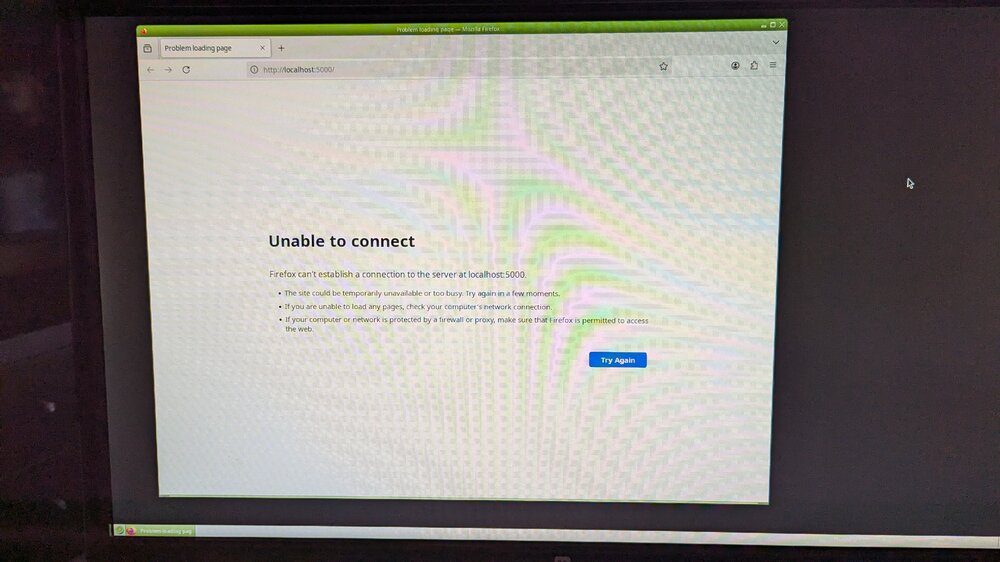
Attached is what I see when booting in GUI mode. Thank you for responding and assistance.
-
Nothing at all, no shared drives or login prompt. When I connect a keyboard and monitor to the UnRAID server and boot with GUI, the firefox browser opens but nothing is displayed, like the web interface is missing.
-
Hello - Just updated from last 7.14 to 7.2 and the system is completely down - no access at all. Moved the system to workbench, attached monitor/keyboard - system boots, but no UnRAID - tried GUI boot and browser opens, but nothing. Also tried safe mode GUI and nothing there either. Thought I had a backup, but nope wasn't being done (I know idiot for not verifying), so where to I stand on getting this thing back up? Been using UnRAID for years and have a TON of data on it.... this is the 1st time ever having this type of issue and I must say, the panic is real! Thanks for any assistance......
-
I appreciate the assistance, but I needed to get things going again so attached a 8TB 3.5" eSATA drive.
-
No, all are 2.5" internal SATA drives. I just did a drive listing (dmesg | grep blocks) and all are reporting the same size (4.00 TB/3.64 TiB).
-
I have reset the configuration and am still unable to assign any new 4TB drive I have (6 others all same MFG and type as array) as a new parity drive, Unraid still reports them all as 'Parity slot not biggest'. I've attached each drive to a different computer and deleted the 1 partition they each had and I'm still getting the same message. Is there a way to find out why? Thanks for all your assistance.
-
Guess I didn't retain the important part, I appreciate you pointing that section out. I'll have a go at it and let you know. Thanks again.
-
That looks a little scary - like it'll remove all the existing data is what it sounds like, especially the 'you have been warned' part. Seriously though, the only way to tell the system to remove a bad/missing drive is to start a new config? Like most, I have a TON of data I don't want to loose, granted the VERY important stuff is backed up but the other TBs of data is still important.
-
UNRAID masterminds.... So I had my single 8TB parity drive fail and all I had to replace it quickly is a 4TB drive. No problem I thought since all the data drives are 4TB - oh, but wait, UNRAID won't let me because it says the 8TB drive is missing and the 4TB drive is not the largest in the system because of it. How do I go about telling UNRAID to forget about the 8TB drive so I can get the 4TB as the parity drive? Thanks

