





linnkan
Members
-
Joined
-
Last visited
-
Here is the Docker settings for Duplicati. Is it wrong to have /tmp mapped to an Unassigned Device? And thank you all for your help!
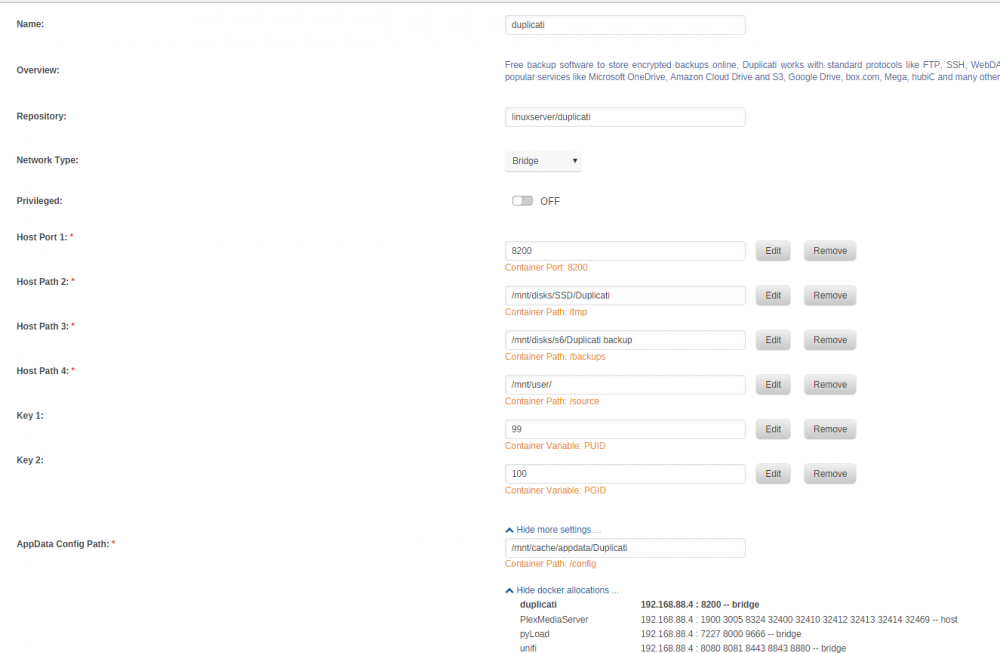
-
I see, should i run a balance or should i reformat the Cache drive to XFS you think? Thanks for the tip I´ve also noticed that SATA cable, i´m just a bit afraid of changing things before i´ve sorted this out.
-
Yes, Jul 7 around 9pm, it crashed multiple times, so i enabled troubleshooting mode and waited for the crash. Ok, i See. Should i change to XFS? I guess it´s made by following the guide to change cache drive, but only reformat it? Yes I saw that, I will install the SSD Trim Plugin
-
Hello. I´m leaving Crashplan Home in favor of Duplicati. I´ve successfully run one backup from a user share to Microsoft Onedrive. But after that, my server started to crash. Web interface crash, no answer on ping. It appears to be when Duplicati is indexing files on another backup sourse (from another user share) I´ve run CA common problems, and the application said there was a problem with duplicati mapped to unassigned devices without the slave option. (duplicati TMP mapped to a unassigned device, and also a backup location on a unassigned device) I changed it to R/W Slave, but no difference. I´m attaching the logs from common problems runned in troubleshooting mode. Please let me know if anyone else has encountered the same problems, or if someone can tell anything strange from the logs. FCPsyslog_tail.txt datahall-diagnostics-20180707-2129 (1).zip
