




Skip to content
View in the app

A better way to browse. Learn more.

Unraid

A full-screen app on your home screen with push notifications, badges and more.

To install this app on iOS and iPadOS
  1. Tap the Share icon in Safari
  2. Scroll the menu and tap Add to Home Screen.
  3. Tap Add in the top-right corner.
To install this app on Android
  1. Tap the 3-dot menu (⋮) in the top-right corner of the browser.
  2. Tap Add to Home screen or Install app.
  3. Confirm by tapping Install.

ykmail05

Members
  • Joined

  • Last visited

  1. It does not work. Got 502 bad gateaway with the quotes
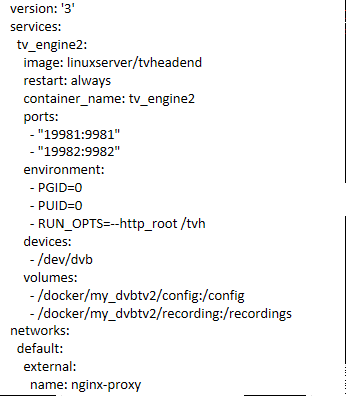
  2. Did the --http_root config, it seems to work (got the logo on the browser tab) but nothing on the page (blank).
  3. Hi, i'm trying to setup linuxserver/tvheadend container behind a reverse proxy. The docker image let us define an environment parameter to specify webroot for reverse proxy "-e RUN_OPTS". The question is what is the syntax to define the RUN_OPTS like "--http_root /tvheadend" in /etc/service.d/tvheadend/run . What i'm tryin to set up is to acces the web interface at https://<DOMAIN>/tvheadend
Account

Navigation

Search

Search

Configure browser push notifications

Chrome (Android)
  1. Tap the lock icon next to the address bar.
  2. Tap Permissions → Notifications.
  3. Adjust your preference.
Chrome (Desktop)
  1. Click the padlock icon in the address bar.
  2. Select Site settings.
  3. Find Notifications and adjust your preference.