



Skip to content
View in the app

A better way to browse. Learn more.

Unraid

A full-screen app on your home screen with push notifications, badges and more.

To install this app on iOS and iPadOS
  1. Tap the Share icon in Safari
  2. Scroll the menu and tap Add to Home Screen.
  3. Tap Add in the top-right corner.
To install this app on Android
  1. Tap the 3-dot menu (⋮) in the top-right corner of the browser.
  2. Tap Add to Home screen or Install app.
  3. Confirm by tapping Install.

Jammie999

Members
  • Joined

  • Last visited

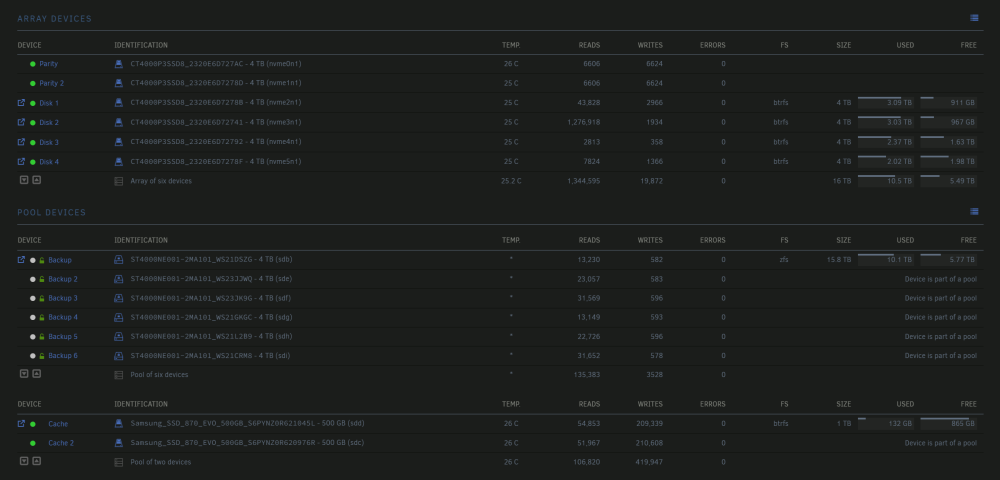
  1. I have a Pool of encrypted drives that acts as a backup to the main array, what I would like to happen is when the system boots its starts the main array without needing the backup pool to be decrypted and mounted, is that possible? My data dosnt change that much and i manually run a backup to the encrypted array every so often but id like that array to be offline/unmounted most of the time its not in use. mostly just want to boot the server and the main array to start without me having to type a password in. Version: 6.12.4 Array: 6x 4TB NVMe drives (2 parity BTRFS formatted) Pool Backup: 6x 4TB Ironwolf Pro's (Raid 6 ZFS Encrypted) Pool Cache: 2x 500GB Samsung 870 Evo (Raid 0)
Account

Navigation

Search

Search

Configure browser push notifications

Chrome (Android)
  1. Tap the lock icon next to the address bar.
  2. Tap Permissions → Notifications.
  3. Adjust your preference.
Chrome (Desktop)
  1. Click the padlock icon in the address bar.
  2. Select Site settings.
  3. Find Notifications and adjust your preference.