planetsiah905
Members
-
Joined
-
Last visited
Everything posted by planetsiah905
-
root@Ares:~# zpool import pool_appdata cannot import 'pool_appdata': I/O error Destroy and re-create the pool from a backup source. Dang, I think I may be cooked. I also saw your advice in another thread about importing read only so I tried that, but got the same output.
-
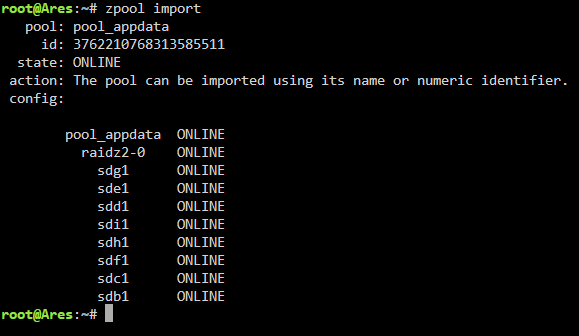
Had a very brief power outage today and now my zpool will not mount. Keep getting "Unmountable: missing or no file system" error when I start the array. Running zpool import shows the pool online, but I cannot mount it or access the files. Hoping there is a way to save my data as it's newly migrated to a zpool and hadn't gotten to setting up the backups yet. Thanks for the help in advance! I have attached the diagnostic zip file. ares-diagnostics-20250224-1957.zip

-
So I ended up figuring this out and wanted to update in case some stranger from the future runs into a similar issue. After restoring one of my appdata backups, I realized it was not the most recent backup and was a month old(2024-4-3 was March 4, not April 3). I decided to clear the drive and reformat before restoring the most recent backup. After moving the other functioning shares to the array in preparation, I proceeded to delete the appdata folder I had just created from the old backup. Once deleted, the original appdata was still there(!). What it seems happened is there was a folder and a dataset in the same place with the same name (appdata). As they were both located in /mnt/cache/appdata unraid was only able to see one(dataset). After deleting it, the folder was able to be accessed at /mnt/cache/appdata. TL:DR. Folder and Dataset in same location with same name. Basically on top of each other is how I conceptualize it. So when I deleted the dataset, I was able to find the folder underneath.
-
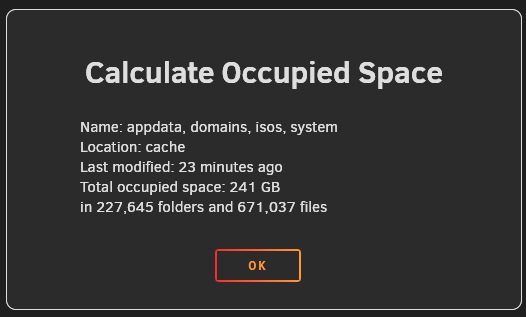
Hello, hoping to get some help with finding my missing files or explaining why the GUI shows they are there, but the folders not showing them. I implemented this ZFS pool for my app data a few weeks ago and it has been running great. Unfortunately I haven't taken the time to set up snapshots yet. Today, I stopped my array to add a couple more disks to my server and create another zpool for network writes and when I started the array again, my appdata folder was missing. The UI still shows the correct usage (~400GB) of where the files should be, but using file browser, I cannot find them and my docker containers are creating new folders upon startup. Currently in the process of restoring from my last appdata backup, but hoping to figure out how to either find my old files or clear them to free the space for the future. Thank you in advance.