





172pilot
Members
-
Joined
-
Last visited
-
Thank you - You're right.. Duh.. Somehow I missed this detail, and just focused on "I can't mount individual drives".. I think I'm fine.. Thanks!
-
Sorry for bringing back this old thread, but it actually popped up for me from an Unraid weekly "You might be interested in..." email, and yes, as someone who had a house fire, and relied a lot on mounting individual disks on a laptop when the server was physically destroyed, having the most flexibility is important to me! I see that all of my disks currently show "SSZ" and "BSZ" as 512, which I think is what the issue is here? (sorry - not an expert in low level formatting on modern disks!).. I have spare disks. If I understand the potential solution, I should be able to add a disk to the array, then before any files go onto it, I should be able to format it with: mkfs.xfs -m crc=1,finobt=1 -s size=4096 -f /dev/md# and that should make the disk readable easily in a generic linux install if I ever need to do so? If so, I could then move all the files from another disk to this empty one, in order to free the space on a second disk, and slowly rotate through all my disks to correct the issue without ever losing parity, right? Thanks! Steve
-
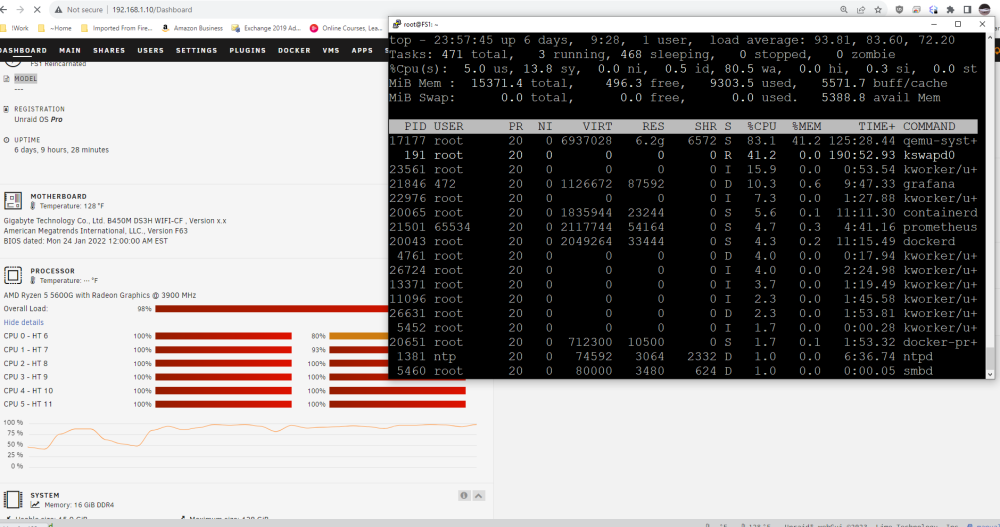
Thanks for your reply, and sorry, somehow I didn't get notified of this post 'till now. RAM doesn't seem to affect it. I had made it higher and lower with no noticeable difference. I can't say I specifically selected 4gb so I just set it to that, and started the VM. The VM's purpose is to back up data from various workstations around my house so I can use Backblaze on the VM to back up to the cloud, so I started the backup batch file (uses robocopy) It's been running 10 minutes or so. So far it's still responsive and the one core assigned to the VM has been pegged the whole time, but the other cores are inching up slowly and I'd expect it to be unresponsive on the "UnRaid side of things" soon. I'll keep an eye on it and report results. Watching top, of course the qemu thread is using most, but it looks like "agent", "notify", and "shfs" threads are the other heavy hitters. I am kind of assuming that while the VM is running, since the underlying VM disks are spread on several separate physical drives, it is slowing the server down as it tries to keep up with parity calculations, but I'm not sure why that should keep the gui from being responsive. I had previously intentionally spread the virtual disk files across disks so as to try to minimize contention on one disk, but I think I'll try to try to consolidate the disk files onto a smaller number (maybe 1!) of disks and see if perhaps it will help the overall server perhaps at the risk of a hit to the performance of the VM itself, which is fine with me. I dont care if a backup cycle takes a whole week to run, but I dont want it to impact my use of the rest of the UnRaid while it happens! Thanks!
-
After posting this 2 hours ago, I brought the VM up, and now although the VM is running fine, Unraid is completely unusable.. No screen updates, took 10 minutes for "top" to come up on an ssh session which was already established.. Here's what I see.. Why would the qemu process be taking so much CPU if the VM is only configured for 4 threads (2 cores)? And, it doesn't instantly do this.. it built up over the 2 hours.. So strange! :
-
One thing I forgot to mention.. Although my secondary drives are on spinning drives, the C Drive for the OS is on an SSD backed cache pool of 2 drives in a mirror..
-
I've got an Unraid server I've been using for years.. I have 6 or so docker containers that run with no problem, but I now have one VM that I'd like to run, but every time I start it, the whole unraid performance begins to degrade over the next couple hours to the point that even the webpage wont render. I can still RDP into the Windows VM typically, and if I shut it down, the Unraid server will slowly become responsive again, although it takes an hour or so.. My server has a Ryzen 5 5600G CPU and 16gb RAM. The CPU has 6 cores with 12 threads. It doesn't matter if I only assign the VM one thread - It still has the same problem. The only odd thing is that I do have 8 total virtual hard drives, each a 3tb file on a spinning drive which is a member of the array, but it doesn't matter if I am using the VM or not, and the problem doesn't start immediately, so I dont think this is related. I'm not sure where to start troubleshooting with this. Is there some CPU parameter on the VM that could be doing this? Has anyone else experienced this? I can't find anything similar searching the forum or just generically googling the problem on the Internet at large. Thanks in advance for any help!
-
OK.. I'm going to give that a shot in the next couple days.. I have a new motherboard I want to install anyway, so thats a good opportunity. I will report back to this thread if it worked, just in case someone else has the problem. Thanks!
-
Thanks, Yeah, I'll have to look to see what the differences in the machine types are.. I'm still mostly curious why my system isn't working for new VMs.. ie: I shouldn't have to edit the XML, right? Me not understanding that I had to use virsh command to edit the XML explains to me why I wasn't able to manually add it initially, but I'd think I should be able to create a VM with a NIC w/o editing the XML file after creation, right? Thanks for all the help..
-
So, looking at the config as it is working, it is showing i440fx-7.1 and the NIC is working. In the XML I verify that, and the working NIC is configured: <interface type='bridge'> <mac address='52:54:00:18:64:6b'/> <source bridge='br0'/> <model type='virtio-net'/> <address type='pci' domain='0x0000' bus='0x00' slot='0x03' function='0x0'/> </interface> The machine type is something I generally dont mess with, although I am pretty sure I've flipped it back and forth randomly to see if it made any difference in this NIC problem. I dont know the pros and cons of each and assumed that the template type chosen at build time probably set that to whatever is best for each OS.
-
So.. Made some progress.. I still dont know what the root cause, but after removing a bunch of the drives I didn't need anymore on the VM, I decided to try again to edit the XML file. I had edited it manually previously, but this time when I edited it, I noticed it says it should be edited with "virsh edit Backup" (the machine name). Trying that, and pasting the xml into the file, it returned "error: XML error: Invalid PCI address 0000:01:00.0. slot must be >=1" and asked me if I wanted to try again, so I did, and edited the XML to include: <interface type='bridge'> <mac address='52:54:00:18:64:6b'/> <source bridge='br0'/> <model type='virtio-net'/> <address type='pci' domain='0x0000' bus='0x01' slot='0x01' function='0x0'/> </interface> with the slot =0x01 and now I have a NIC. I am still a bit confused, because in my ipconfig, where it would usually show "Ethernet adapter Ethernet" before listing the parameters, it is showing "Ethernet Adapter Ethernet Instance 0" which I have never seen before, but it's working.. I'd love to know why the creation isn't working by default (repeatable and demonstrable) but for the moment the one VM I need on this machine is working, so I guess I'm considering it done.. Thanks for all who helped!! -Steve
-
Is there possibly something in my unraid config or hardware that potentially could do this? I am actually just about to upgrade the motherboard, which means it's going to be a different integrated NIC, but I've never had to worry about that before. I assume if Unraid supports a NIC, the VM engine should support it?
-
As I am creating it, the NIC settings are shown, but as soon as I save it (even without running it) and go back into the edit screen to see what was saved, there's no NIC shown..
-
To do some further testing to see if the number of drives are involved with the problem, I created a new VM. During the initial creation screen, I see the NIC in the config. I left every default, scrolled down and simply unchecked the "Start VM After creation" checkbox and clicked to create the VM. Going directly back into the VM config (edit) the NIC is gone, so somehow something is preventing it from including it in the XML file. I'm not sure what this means, or what could be causing it. Hopefully there will be something in the diagnostic pack I uploaded above. Is there a way to, and reason to somehow rebuild the network config for the whole server? Networking is working fine for the fundamental UnRaid functions, as well as the docker or two that I have, but I'm not sure what else to do. I dont know what differences the different OS templates mean, but I have done the above with Win11, Win10, Server2012, and Ubuntu, and they all do the same thing. Thanks!!
-
Sorry.. Just saw this.. Yes, diagnostics attached. Before seeing this, I thought to try to add the interface to the XML manually too, so I copied basically what you have above from a different UnRaid server with a working VM, and put it into the XML of the broken one. I changed a digit on the MAC address just to be different. I did this with the VM engine turned off so there would be no conflicts with open files, and then when I went to turn on the VMs again I got "Libvirt Service failed to start".. Continued to get the Libvert error even after removing NIC from XML. In a desperate attempt to solve w/o figuring out what went wrong, I deleted the Libvert image through the GUI, and then it recreated the image and properly started. When I went back to recreate the VM, the NIC was listed in the initial configuration screen, but once I got done adding the disks and started the VM, the VM showed no NIC again, and looking at the XML now while the VM is running, there's no NIC entry. The only thing odd I can say is that this VM has an unreasonable number of disks defined.. I think 18 of them. all but 4 are on the local filesystem, and 4 of them are mounted via a non-array SMB share to the other UnRaid server, so I'm wondering if there's an XML parsing problem, or a limit to how many disks you can have before the NIC is missing? I have not been able to find a documented limit in either UnRaid or generic KVM documentation. Does that make any sense? Thanks for the help!! fs1-diagnostics-20230217-2220.zip
-
OK.. After shutting down VM and docker subsystem, I have the configs set as shown, and even shut down there's no option to configure a NIC on the VM screen. One thing I dont understand is the difference on the VM environment config where the default network source is br0 or virtbr0. I have tried both with identical unsuccessful results, but am leaving it on br0 because that's what I see the nic belongs to at the bottom of the network configuration. 3 Config screens attached below -Steve NetworkSettings.pdf VMNetworkConfig.pdf VMConfigShutDown.pdf

