





k0d3g3ar
Members
-
Joined
-
Last visited
-
Thank you. No VMs on this build (very basic backup server) and all the HDD are on a LSI card that will just unplug from the old Mobo and plug into the new one. Sounds pretty straightforward a swap then.
-
I'm about to embark on a server rebuild due to a failing MOBO and I wanted to check if I have to do anything special to just do the MOBO swap, but boot off USB on my original thumbdrive that has been working with the old MOBO for years? Is this just a simple "boot off the old USB thumbdrive and it will work fine" kinda thing, or is there anything special I need to do for this to transfer?
-
Something like that could work. I was hoping to repurpose as much off the original build as I can, particularly with memory prices the way they are. I found this: Supermicro A1SRM-2558F-O Micro ATX Intel Atom which appears to allow me to move the 32gb of memory from my old board to this. It is older, but it should work. I have a PCI-e 10GB/s dual network adapter, so I only need 2x PCI-e slots. What do you think?
-
Hi guys, I'm looking to upgrade a 10 yr old Mobo + i7 setup that I built which has been running fine for a long time, but recently I am starting to see issues on restart with memory errors that appear to be potential cracks in the Mobo following it being transported from one location to another. I've had really good results with Supermicro M11SDV-8C-LN4F boards that have an inbuilt EPYC processor in them with Proxmox, but they are old now and buying them is over a $700 price point. They are super low energy consumption, but I can live with a higher power consumption cost here (we are solar powered) if I can get something at a lower price point. I don't use VMs at all - this is a dedicated backup server I'm trying to build, and I have a LSI PCI-e card in there for my 8 drive array, so I don't need onboard SATA (other than one for the cache drive). I probably won't have more than 32GB of memory in this either, so I don't need a board that can handle high memory. It is going into a larger desktop tower box that can hold the drives, so I can do Mini ATX, etc. I'm totally cool with AMD processors on this if that helps. Any thoughts or suggestions?
-
You guys are all freakin' amazing. Yep, that was it. When I put the 14TB on a Molex adapter, the damn thing showed up. I'm back online. Thank you all!
-
So I'm running Unraid 7 on a computer that has been working fine. It is an Intel Mobo with a LSI card in there, with 8 drives on it. It has been working fine for a very long time. The HDD configuration are all 12TB SATA drives - mainly WDD, but some Seagate, with a 14TB WDD Parity drive. Recently we had an issue with the parity drive failing, so I got a replacement 14TB WDD drive. The replacement drive is almost identical to the original one - both are Ultrastar drives. When I put the new drive in, nothing. No sign of life on it at all. I can't feel anything in there even giving a hint that it is getting power and spinning up. But if I put the original drive back in there without any changes, it spins up and is recognized. Out of interest, I put a 12TB drive that I had spare on there to see if I could use that for parity. Again, no sign of power or life on that drive either. Either I have a really strange coincidence that 2 drives are DOA here and won't power up, or there is something that suggests an incompatibility in there? Has anyone seen this before? Any thoughts? I changed out the PSU on the box from an 850 watt to a 1000 watt supply, thinking that maybe the thing was being overloaded, but no difference at all. Is there some subtle difference in drives that work in this config vs. those that don't? The 14tb drive I put in as a replacement shows as being the same, but built 6 months prior. I would have thought that it would at least be an option, but I guess not. What do you guys do when it comes to replacement drives in this situation? Has anyone experienced this before, and if so what was your solution? Thanks in advance for your thoughts.
-
I wanted to follow up on this, because I solved it. The issue was that the Unraid server exhibiting the problems was an upgraded server from a long time back (probably v5 or so) and the disks in there were formatted with ReiserFS (now deprecated). Well 75% of them were - two were XFS and 6 were ReiserFS. On one of the disks when I ran diagnostics on it, it came back with a small file integrity issue during the ReiserFS check run, and was fixable. When I then ran the auto fix on it, it corrected it and then all of a sudden I could rsync to the server without any file permission errors anymore. Of course that has meant that about 15TB of content is being replaced now from our production server, but that's ok - at least we have the backup running correctly now. Thank you for anyone who has helped (in particular @JorgeB) who helped me get to the point where I could identify the issue and fix it.
-
Well I thought I was solved, but no so fast.... I removed the disk from the array under maintenance mode, then started the array. It comes up in degraded state which is to be expected. But since the parity disk contained the content from before with /mnt/disk3 it still shows up and attempts to remove the content from that disk continues to fail as "Read-only file system". Is it that the parity disk copied the corrupted file system from disk3? If so, is there any chance of recovery now?
-
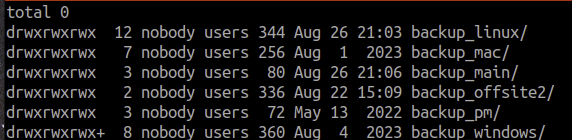
I think I might have stumbled on the issue. One of the folders has no content in it (backup_offsite2). I tried to delete it with the share, and got this: root@Tower:/mnt/user# rm -Rf /mnt/user/backup_offsite2 rm: cannot remove '/mnt/user/backup_offsite2': Read-only file system This was the problem occurring repetitively. However if I go into one of the disks and try and delete it, it worked: root@Tower:/mnt/user# rm -Rf /mnt/disk1/backup_offsite2 root@Tower:/mnt/user# So I went through each of the 7 disks in the array, and everything let me delete the folder, except disk 3: root@Tower:/mnt/user# rm -Rf /mnt/disk3/backup_offsite2 rm: cannot remove '/mnt/disk3/backup_offsite2': Read-only file system Although there are no errors reported in the array for disk3, clearly this is the issue. I'm stopping the array and putting the system into maintenance mode, so I can disable disk3 and then rebuild from parity. I'm away from the location where the server is, so I'm trying to do this remotely but I think at least I have the issue isolated. If it is just a matter of a disk replacement, and the entire array can be used again, I'll be a very happy camper. Thanks for your help in helping me dig deeper on this. Not sure I'm totally solved yet, but I think I'm on the right track now.
-
Here you go.
-
Unfortunately that didn't work. Ran for about 9 hours and no difference. Seems to be just staying on drive1 in the list and going over and over on it. Then I stopped it to do the shares and it did the same thing. Any ideas? The content appears to be fine and readable. Just the permissions are messed up.
-
Thank you. I was not aware that this had been addressed. I found the tool and have started to run it on the raw disks first. Any idea how long this takes on 80TB of storage, over 8 drives?
-
I have an Unraid server running the latest software version, with about 80TB of storage. I have had this for a very long time, but recently started to notice issues with permissions. It seems that if I log into the server with SSH and look at the file & directory permissions in /mnt/user/* and /mnt/disk?/* they show as owned by "nobody" with the group "users". All content has been copied to this server via NFS over the years. The perms are showing routinely as -rw-rw-r-- but this is not consistent. Some directories are 777 as well. I've tried to chmod 777 on disks and it works on some, but on others (even though I'm logged in as root) give me permission errors when I attempt to change this. The same is true of changing ownerships. Is there a "best practice" way to set perms up so that I can delete content I no longer need? I tried to do this via the very same NFS mounts that created the content and I'm getting the same errors there as well. Thanks in advance for any suggestions.
-
For some reason, I can't upgrade my UnRaid install. The option to do it is there on the Tools page, but when I click to Upgrade the OS, I see only the same release as I have as an option, and with the "next" choice, nothing happens. Also when I try and paste the plugin script to do the upgrade, I just get "Network Failure" on it. Is there a way I can upgrade my thumbdrive to the latest version, but retain all my content and shares, etc.?
-
Anyone know the max SATA drive size per drive unit attached to this or the 9400 8I here? 18TB OK?

