ste_fairy
Members
-
Joined
-
Last visited
Everything posted by ste_fairy
-
Boom worked! I take it .img files need to be kept on top of over time then? Thanks for your help, been doing my head in haha. Steve
-
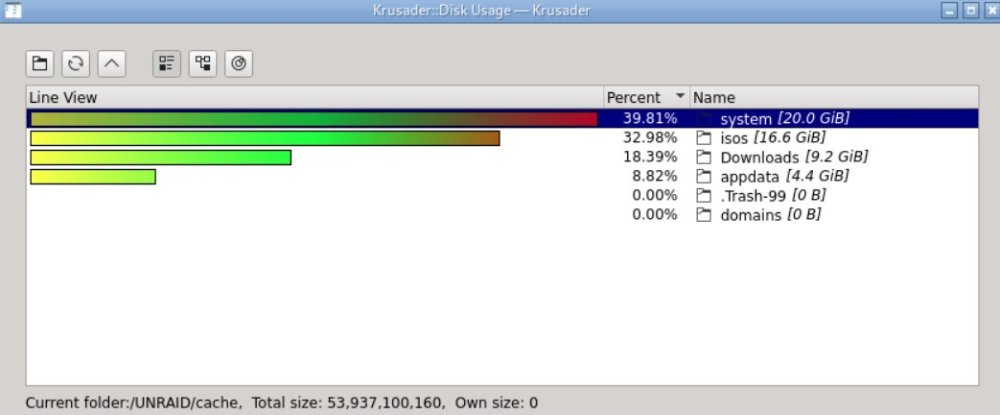
Hi JorgeB, I've moved the system folder (one that contains docker.img) over to the array using mover and it looks like this is the culprit as you suspected. Would the following now work (please let me know if there is an easier way): 1) Move the system folder back to cache so that I can run docker again. 2) Enable docker using the old img then use Krusader to make a copy of the old docker.img onto the array. 3) Disable docker and delete old docker image. 4) Copy over new docker.img (using cp --sparse=always docker.img docker.img) from the array back onto cache. 5) Enable docker. Am I going around the houses with this method. I'm sure there are more efficient terminal commands to do this, if so could you run me through it? Cheers Steve
-
Hi, I've searched the forums for an answer to this issue, but all similar problems/answers seem to stem from having a dual cache drive setup, which I don't have (only a single cache drive). Basically, Unraid is showing the wrong free space on my single btrfs cache drive. If you look at the screenshots you can see the used space calculated by Krusader doesn't match up with what should be free. The Unraid GUI matches these screenshots so it's not a Krusader problem. I'm lost, can anyone suggest anything?