maxstevens2
Members
-
Joined
-
Last visited
Everything posted by maxstevens2
-
correction, Unraid now says 62% of docker space used. still a bit high, but at least not in warning state! Thanks for the help @Energen
-
Allrighty; i did 'docker image prune -a' and it said a bunch of things and then this: But still the docker.img is 16Gigabytes. Any clue on what to do next?
-
Ran the command, doesn't seem like its a big deal. About the docker image history, how do use it? Like what command should i run for it? 'docker image history [OPTIONS] IMAGE' Just is for the installed dockers history and doesn't seem that insane on my docker images.
-
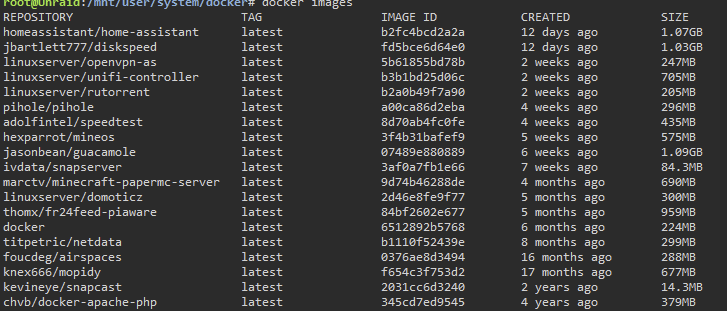
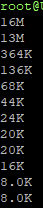
On my unraid server, that i have for around 1,5 years right now, i am getting messages that my docker image is getting above 75%. I thought this issue was because I had too many docker installs, but I found out it actually ain't. The docker file as of now has a file size of arond 16 Gigabytes and the total worth of docker images (docker images command in unraid terminal) ends up in a total of around 9.4 Gigabytes worth of installed Dockers. While i can just easily increase the size of the docker, i prefer to find out where the other ~6 Gigabytes is located at or used for. I tried to use 'docker builder prune' which didnt remove anything, then i tried 'docker container prune' which just removed 1 inactive container. Here's a list of my currently installed docker images: ~ 9586 MB And here a sceenshot of the total file size: Is there any way to see, or to clean up the access storage used by docker.img?