





nookie
Members
-
Joined
-
Last visited
-
Hello Unraid Team, I would love to see Unraid include a built-in cloud synchronization feature similar to Synology’s “Cloud Sync.” Such an addition would make the system significantly more user-friendly for many of us. Justification / Use Case: Streamlined Backup Workflow: For backups and archive data, it is extremely convenient to sync files to one or more cloud platforms with just a click. Centralized Management: Instead of relying on external scripts or third-party Docker containers, users could manage everything directly in Unraid via a clear, unified interface. Flexibility Across Providers: Many users rely on different services—whether it’s AWS S3, Backblaze B2, OneDrive, Google Drive, or Dropbox. Having a single UI where these providers can be added and managed would save time and reduce potential errors. Proposed Features: Provider Selection & Configuration: Ability to choose from common providers (e.g., S3/AWS, Backblaze B2, OneDrive, Google Drive, Dropbox) Securely store credentials or API keys within Unraid Sync Profiles: Create multiple profiles (e.g., “Daily Backup,” “Weekly Archive Sync”) Configure source/target paths with include/exclude filters (select specific files or folders to sync) Options for one-way upload, two-way sync, or simple archiving Scheduling & Automation: Run syncs on a set interval or at specified times (e.g., daily at 2:00 AM) Manual trigger button within the GUI for on-demand syncs Status Overview & Logging: Display last sync time, amount of data transferred, and any error messages Access detailed logs directly from the Unraid web interface Error Handling & Notifications: Automatic retry attempts if there are temporary connectivity issues Option to receive email or push notifications if a sync fails Benefits for the Community: Reduced Complexity: Currently, many Unraid users rely on custom shell scripts, cron jobs, or external Docker containers to handle cloud backups. A native integration would eliminate these workarounds. Time Savings: Setting up and maintaining backups would be much easier since Unraid could handle API communications behind the scenes and manage common error cases. Thank you for your excellent work on Unraid. I hope this suggestion resonates with the community and can be implemented in a future release. Best regards
-
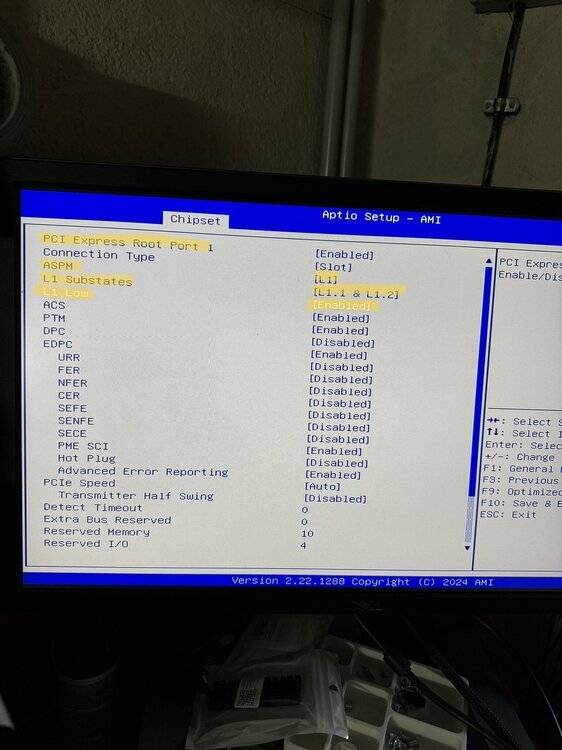
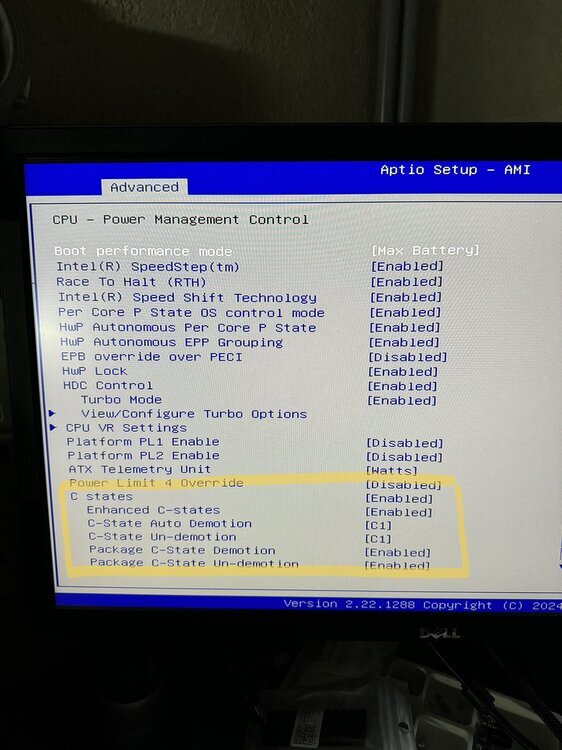
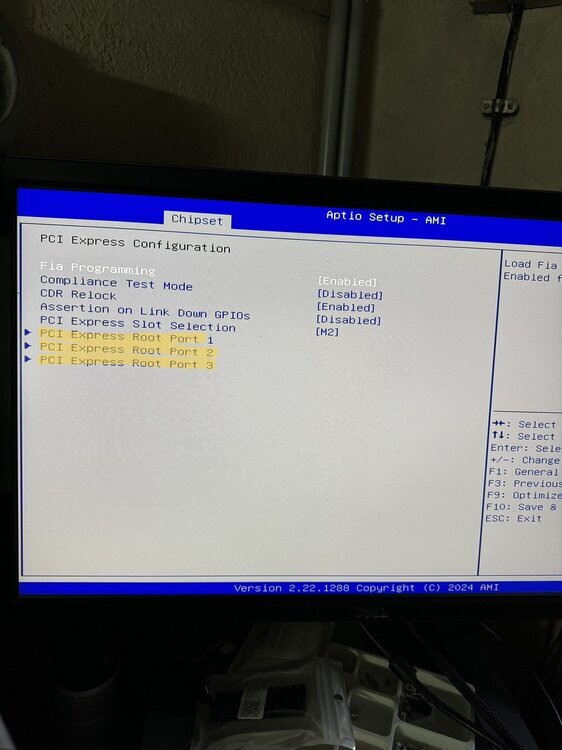
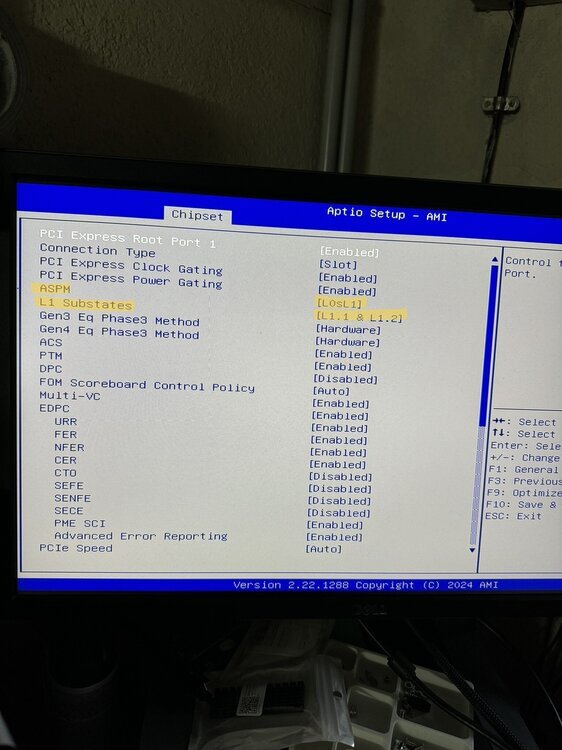
sorry for my late reply, the following settings should be the most important ones: Advanced -> Nativ ASPM = enabled CPU Settings -> Advanced -> C states = enabled CPU Settings -> Advanced -> Package C State Limi = C10 Chipset -> PCI Express Configuration -> ALL PCI Express Root Port 1/2/3 etc. = ASPM L1 + L1 Substates = L1.1 & L1.2 I will also attach some pictures:
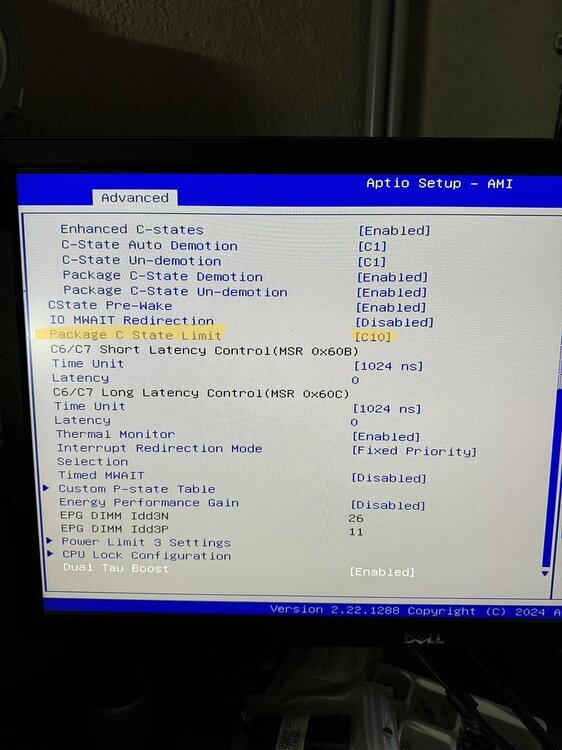
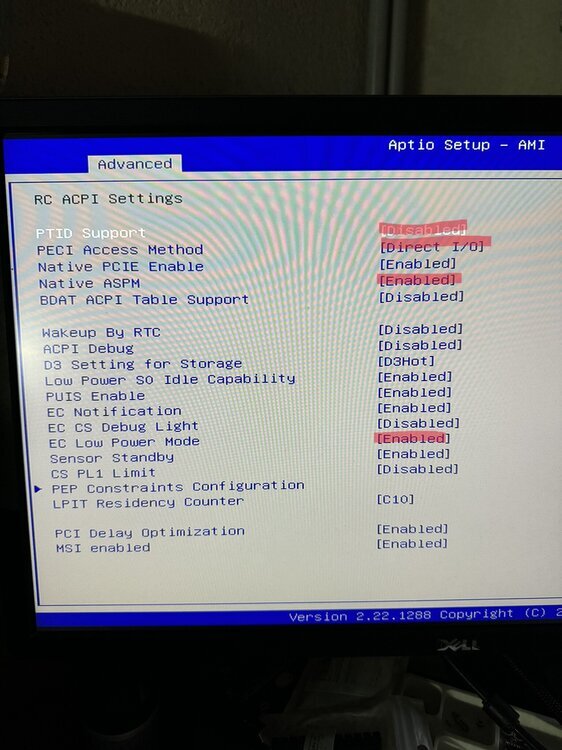
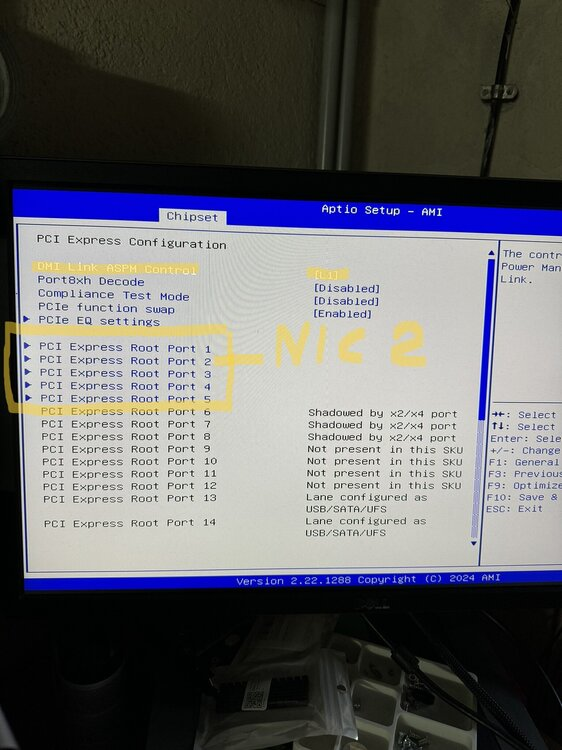
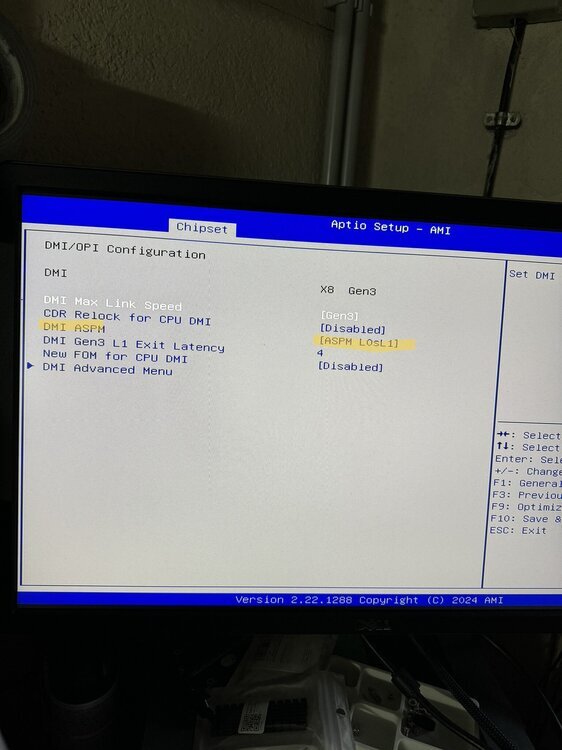
-
aktuell läuft das H670 Board mit Unraid 7.0.0-beta.2 auf C8 was ~17-18 Watt Verbrauch im Idle ergibt (i3 12100, 16GB DDR5, 8 HDDs im Spindown, 2 NVMe, 2.5GbE, 3 Fans, BeQuiet 450W SFX Netzteil und 5 Docker Container für Plex etc.). Die beiden HDD Fans im Jonsbo N3 verbrauchen ca. 3 Watt, ohne diese liegt das System bei ca. 14-15 Watt, was denke ich schon sehr ordentlich ist.
-
sorry mein Fehler... ich habe das ganze bisher nur mit einer aktuellen Ubuntu Live sowie Proxmox getestet, dabei hatte ich das erwähnte Problem. Ich habe das ganze nun mal mit meinem bestehenden Unraid Stick getestet und dort werden die C States korrekt bis C 10 ausgegeben, somit scheint das ganze einfach nur ein Software Thema zu sein.
-
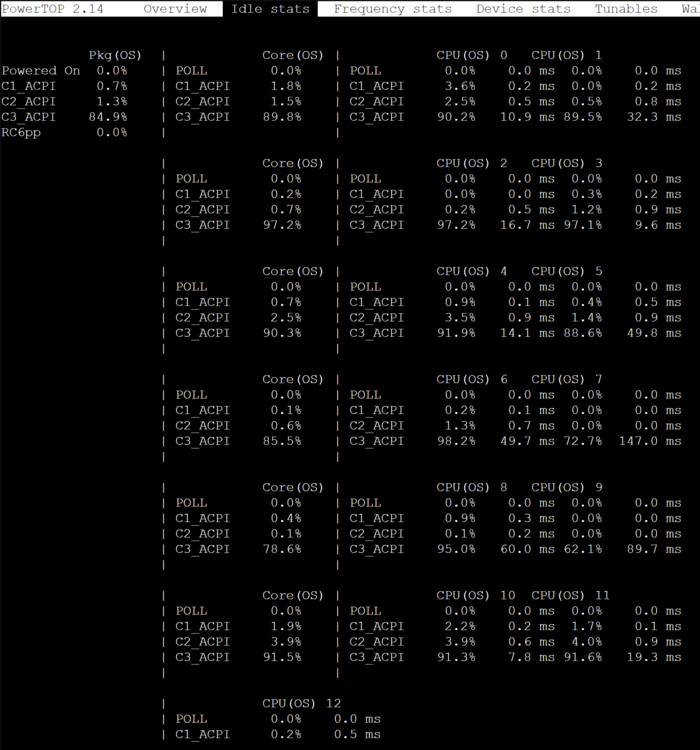
kleines Update: Ich habe nun mal das aktuelle Bios vom 10.07.2024 ausprobiert. Das NIC Problem besteht weiterhin, ich konnte aber auch allgemein keine Änderungen feststellen (einen Changelog gibt es leider nicht..). Nebenbei läuft nun auch mein zweites Setup mit dem Q670 Board, welches derzeit für leichte Kopfschmerzen sorgt.. Aus irgendeinem nicht nachvollziehbaren Grund, zeigt mir Powertop keine "regulären" C States, sondern nur C1-C3_ACPI an. Egal was ich im Bios einstelle, es bringt keine Verbesserung und der Stromverbrauch liegt bei 20 Watt.. (i5 13400, 32GB DDR5, 1x NVMe) - selbst ohne SSD.. (minimal Setup via Ubuntu Live). Falls hierzu jemand einen Tipp hat, wäre ich sehr dankbar.
-
CWWK bietet aus einem mir unbekannten Grund irgendwie zwei verschiedene Download Möglichkeiten an. Der von dir geteilte Google Drive Link sollte aus der Produktübersicht -> Bios and Driver sein. Zusätzlich gibt es aber noch auf deren Seite über den Reiter "Service & support" ein allgemeines Download Portal, welches scheinbar aktuell gehalten wird -> https://pan.x86pi.cn/BIOS更新/3.NAS存储类产品系列BIOS/9.第12-13-14代-AlderLake-RaptorLake-Desktop-双网H670-Q670-NAS Ich schaue mal dass ich endlich ein zweites Netzteil organisiere und teste dann weiter
-
leider war das zweite H670 nach meiner Bestellung nicht mehr lieferbar (dafür hat CWWK ein kostenloses Upgrade auf das Q670 gegönnt). Dadurch kam es zu Verzögerungen und aktuell hatte ich noch keine Zeit, das zweite Board richtig zu testen. Aktuell fehlt mir auch noch ein zweites Netzteil... TDP kann man im Bios einstellen. CWWK hat vor etwa 10 Tagen auch ein neues Bios veröffentlich, leider konnte ich das aber auch noch nicht testen. Auf Reddit scheint es ein paar User zu geben, welche das Board mit einem i7 13700T/14700 nutzen:
-
die 8 SATA Ports laufen nativ über den Intel Q670 Chipsatz, das passt auch zum lspci output: -> 00:17.0 SATA controller: Intel Corporation Alder Lake-S PCH SATA Controller [AHCI Mode] (rev 11). Ich nutze derzeit alle 8 SATA Ports (im Spindown), 2 NVME, 32GB DDR5 mit einem i3 12100 und komme bei 6 aktiven Docker Containern und Unraid 7 auf ~18 Watt (C8). Das mit der CPU ist halt echt so eine Sache, CWWK empfiehlt eine TDP von 65W und maximal 125 Watt Verbrauch. Größere sollten sicher auch laufen, ist nur die Frage ob auch stabil. Ich habe mir nun ein zweites Board bestellt, um es mit einem i5 13400 laufen zu lassen. Bin mal gespannt ob der i5 aufgrund des maximalen Verbrauchs von 148 Watt Probleme macht. Btw: Ein Handbuch zum Board o.ä lag nicht dabei, deshalb kann ich mich leider auch nur auf das Datasheet auf cwwk.net beziehen
-
das ganze hat mir jetzt doch keine Ruhe gelassen 😅 Testweise die zweite NIC deaktiviert = -0,5w Anschließend nur noch Port 1 aktiv gelassen und die folgenden Settings übernommen: Connection Type: Built-in (kp was das wirklich für einen unterschied macht) L1 Substates = L1.1 & L1.2 L1 Low = Disabled Gemessen wurden nun 10.3w am Shelly (Board, i3 12100 + Kühler, 2x NVMe, 1x 16GB DDR5, BeQuiet L11-400W). ASPM an der NIC scheint somit wohl nicht viel auszumachen. Ich muss nun noch testen, ob der Connection Type oder grundsätzlich die aktive zweite NIC die Ursache des Problems ist/war.
-
also ich konnte eben kurz etwas testen. Scheinbar hängen die beiden NICs nicht an der PCI Express Root Ports 3 & 4 sondern an 1 & 2 (der lspci Output von Unraid und einer Ubuntu Live scheinen sich da zu unterscheiden). Ich habe nun den Root Port 2 komplett deaktiviert, dadurch ist der zweite Port laut LSPCI nicht mehr sichtbar. 00:00.0 Host bridge: Intel Corporation Device 4630 (rev 05) 00:02.0 VGA compatible controller: Intel Corporation Alder Lake-S GT1 [UHD Graphics 730] (rev 0c) 00:06.0 PCI bridge: Intel Corporation 12th Gen Core Processor PCI Express x4 Controller #0 (rev 05) 00:08.0 System peripheral: Intel Corporation 12th Gen Core Processor Gaussian & Neural Accelerator (rev 05) 00:0a.0 Signal processing controller: Intel Corporation Platform Monitoring Technology (rev 01) 00:14.0 USB controller: Intel Corporation Alder Lake-S PCH USB 3.2 Gen 2x2 XHCI Controller (rev 11) 00:14.2 RAM memory: Intel Corporation Alder Lake-S PCH Shared SRAM (rev 11) 00:17.0 SATA controller: Intel Corporation Alder Lake-S PCH SATA Controller [AHCI Mode] (rev 11) 00:1c.0 PCI bridge: Intel Corporation Alder Lake-S PCH PCI Express Root Port #1 (rev 11) 00:1c.4 PCI bridge: Intel Corporation Alder Lake-S PCH PCI Express Root Port #5 (rev 11) 00:1f.0 ISA bridge: Intel Corporation Alder Lake-S PCH PCI Express Root Port #????? (rev 11) 00:1f.4 SMBus: Intel Corporation Alder Lake-S PCH SMBus Controller (rev 11) 00:1f.5 Serial bus controller: Intel Corporation Alder Lake-S PCH SPI Controller (rev 11) 01:00.0 Non-Volatile memory controller: Samsung Electronics Co Ltd NVMe SSD Controller 980 (DRAM-less) 02:00.0 Ethernet controller: Intel Corporation Ethernet Controller I226-V (rev 04) 03:00.0 Non-Volatile memory controller: Sandisk Corp SanDisk Ultra 3D / WD Blue SN570 NVMe SSD (DRAM-less) Zusätzlich habe ich noch die folgenden Einstellungen für Port 1 gesetzt: Connection Type: Built-in ASPM = Auto L1 Substates = Disabled L1 Low = Disabled Damit läuft powertop --auto-tune jetzt scheinbar durch und friert nicht mehr ein lspci -vvvnnPPDq 00:06.0 PCI bridge: Intel Corporation 12th Gen Core Processor PCI Express x4 Controller #0 (rev 05) (prog-if 00 [Normal decode]) Capabilities: Port #5, Speed 16GT/s, Width x4, ASPM L0s L1, Exit Latency L0s <4us, L1 <16us Settings: ASPM L1 Enabled; RCB 64 bytes, Disabled- CommClk+ Status: Speed 8GT/s, Width x4 Flags: PMEClk- DSI- D1- D2- AuxCurrent=0mA PME(D0+,D1-,D2-,D3hot+,D3cold+) Status: D0 NoSoftRst- PME-Enable- DSel=0 DScale=0 PME- ASPM Capabilities: PCI-PM_L1.2+ PCI-PM_L1.1+ ASPM_L1.2+ ASPM_L1.1+ L1_PM_Substates+ ASPM Settings: PCI-PM_L1.2+ PCI-PM_L1.1+ ASPM_L1.2+ ASPM_L1.1+ 00:14.0 USB controller: Intel Corporation Alder Lake-S PCH USB 3.2 Gen 2x2 XHCI Controller (rev 11) (prog-if 30 [XHCI]) Flags: PMEClk- DSI- D1- D2- AuxCurrent=375mA PME(D0-,D1-,D2-,D3hot+,D3cold+) Status: D0 NoSoftRst+ PME-Enable- DSel=0 DScale=0 PME- 00:17.0 SATA controller: Intel Corporation Alder Lake-S PCH SATA Controller [AHCI Mode] (rev 11) (prog-if 01 [AHCI 1.0]) Flags: PMEClk- DSI- D1- D2- AuxCurrent=0mA PME(D0-,D1-,D2-,D3hot+,D3cold-) Status: D0 NoSoftRst+ PME-Enable- DSel=0 DScale=0 PME- 00:1c.0 PCI bridge: Intel Corporation Alder Lake-S PCH PCI Express Root Port #1 (rev 11) (prog-if 00 [Normal decode]) Capabilities: Port #1, Speed 8GT/s, Width x1, ASPM L1, Exit Latency L1 <64us Settings: ASPM L1 Enabled; RCB 64 bytes, Disabled- CommClk+ Status: Speed 5GT/s, Width x1 Flags: PMEClk- DSI- D1- D2- AuxCurrent=0mA PME(D0+,D1-,D2-,D3hot+,D3cold+) Status: D0 NoSoftRst- PME-Enable- DSel=0 DScale=0 PME- 00:1c.4 PCI bridge: Intel Corporation Alder Lake-S PCH PCI Express Root Port #5 (rev 11) (prog-if 00 [Normal decode]) Capabilities: Port #5, Speed 8GT/s, Width x4, ASPM L1, Exit Latency L1 <64us Settings: ASPM L1 Enabled; RCB 64 bytes, Disabled- CommClk+ Status: Speed 8GT/s, Width x4 Flags: PMEClk- DSI- D1- D2- AuxCurrent=0mA PME(D0+,D1-,D2-,D3hot+,D3cold+) Status: D0 NoSoftRst- PME-Enable- DSel=0 DScale=0 PME- ASPM Capabilities: PCI-PM_L1.2+ PCI-PM_L1.1+ ASPM_L1.2+ ASPM_L1.1+ L1_PM_Substates+ ASPM Settings: PCI-PM_L1.2+ PCI-PM_L1.1- ASPM_L1.2+ ASPM_L1.1- 01:00.0 Non-Volatile memory controller: Samsung Electronics Co Ltd NVMe SSD Controller 980 (DRAM-less) (prog-if 02 [NVM Express]) Flags: PMEClk- DSI- D1- D2- AuxCurrent=0mA PME(D0-,D1-,D2-,D3hot-,D3cold-) Status: D0 NoSoftRst+ PME-Enable- DSel=0 DScale=0 PME- Capabilities: Port #0, Speed 8GT/s, Width x4, ASPM L1, Exit Latency L1 <64us Settings: ASPM L1 Enabled; RCB 64 bytes, Disabled- CommClk+ Status: Speed 8GT/s, Width x4 ASPM Capabilities: PCI-PM_L1.2+ PCI-PM_L1.1+ ASPM_L1.2+ ASPM_L1.1+ L1_PM_Substates+ ASPM Settings: PCI-PM_L1.2+ PCI-PM_L1.1+ ASPM_L1.2+ ASPM_L1.1+ 02:00.0 Ethernet controller: Intel Corporation Ethernet Controller I226-V (rev 04) Flags: PMEClk- DSI+ D1- D2- AuxCurrent=0mA PME(D0+,D1-,D2-,D3hot+,D3cold+) Status: D0 NoSoftRst+ PME-Enable- DSel=0 DScale=1 PME- Capabilities: Port #0, Speed 5GT/s, Width x1, ASPM L1, Exit Latency L1 <4us Settings: ASPM L1 Enabled; RCB 64 bytes, Disabled- CommClk+ Status: Speed 5GT/s, Width x1 ASPM Capabilities: PCI-PM_L1.2+ PCI-PM_L1.1+ ASPM_L1.2+ ASPM_L1.1+ L1_PM_Substates+ ASPM Settings: PCI-PM_L1.2- PCI-PM_L1.1- ASPM_L1.2- ASPM_L1.1- 03:00.0 Non-Volatile memory controller: Sandisk Corp SanDisk Ultra 3D / WD Blue SN570 NVMe SSD (DRAM-less) (prog-if 02 [NVM Express]) Flags: PMEClk- DSI- D1- D2- AuxCurrent=0mA PME(D0-,D1-,D2-,D3hot-,D3cold-) Status: D0 NoSoftRst+ PME-Enable- DSel=0 DScale=0 PME- Capabilities: Port #0, Speed 8GT/s, Width x4, ASPM L1, Exit Latency L1 <8us Settings: ASPM L1 Enabled; RCB 64 bytes, Disabled- CommClk+ Status: Speed 8GT/s, Width x4 ASPM Capabilities: PCI-PM_L1.2+ PCI-PM_L1.1- ASPM_L1.2+ ASPM_L1.1- L1_PM_Substates+ ASPM Settings: PCI-PM_L1.2+ PCI-PM_L1.1- ASPM_L1.2+ ASPM_L1.1- Ich versuche heute Abend mal etwas weiter zu testen (auch bzgl. des Stromverbrauchs)
-
guter Einwand, ich muss zugeben dass ich daran gar nicht gedacht habe, obwohl ich die betroffenen PCI Ports die ganze Zeit durch die Ausgabe von LSPCI vor Augen hatte. Habe bisher nur den "einfachen" Weg versucht, ich schaue da gleich nochmal rein
-
genau die gleichen Bios Optionen (PCI Express Root Ports etc.) habe ich auch, auf dem Screenshot sieht man nur den letzten Abschnitt ganz unten bezugnehmend zum Thema Netzwerkkarte deaktivieren. ASPM etc. ist/war für alle Ports aktiv.
-
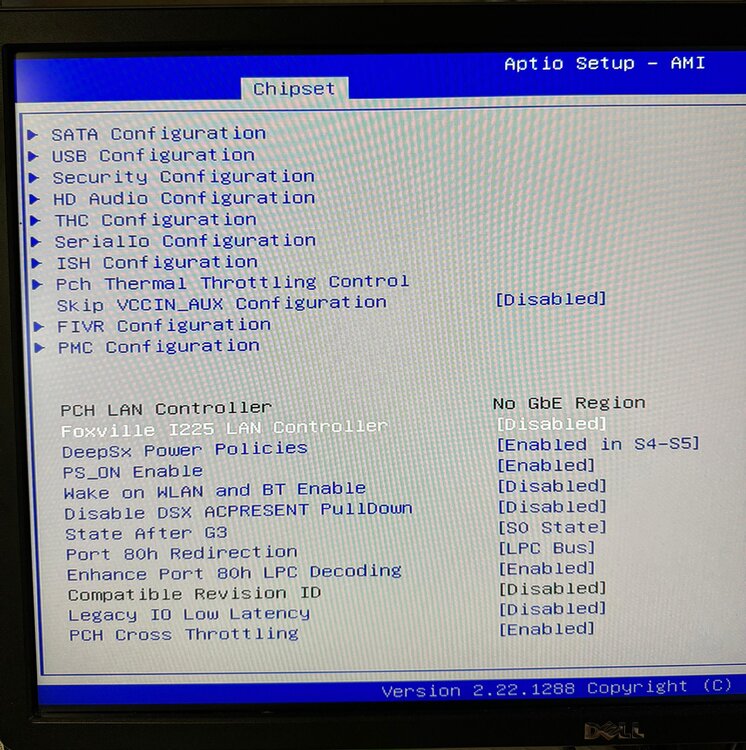
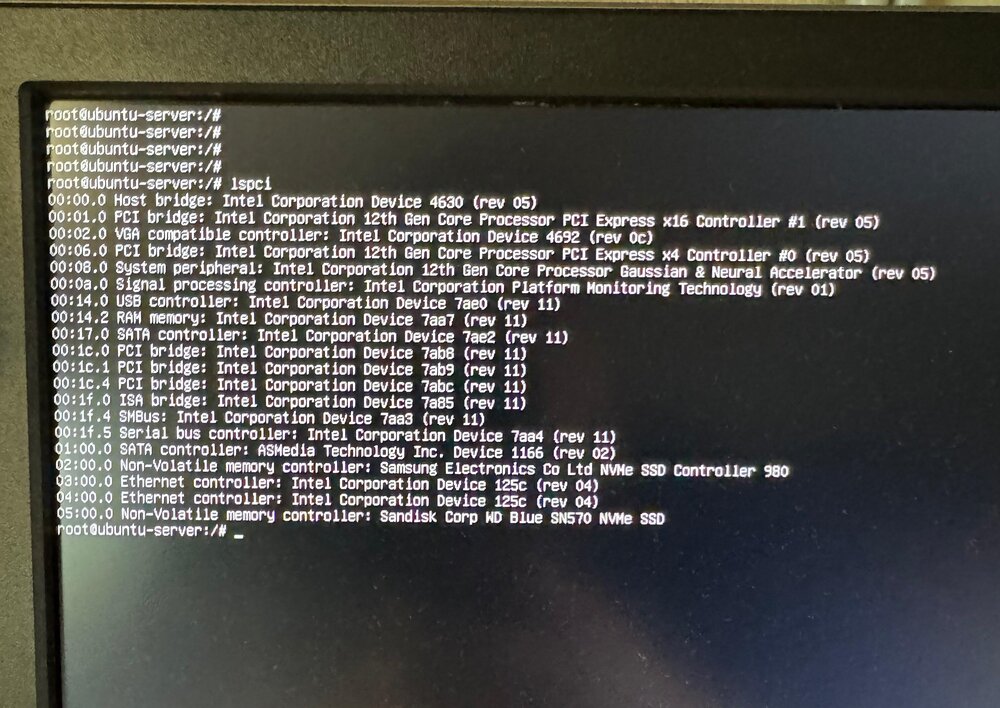
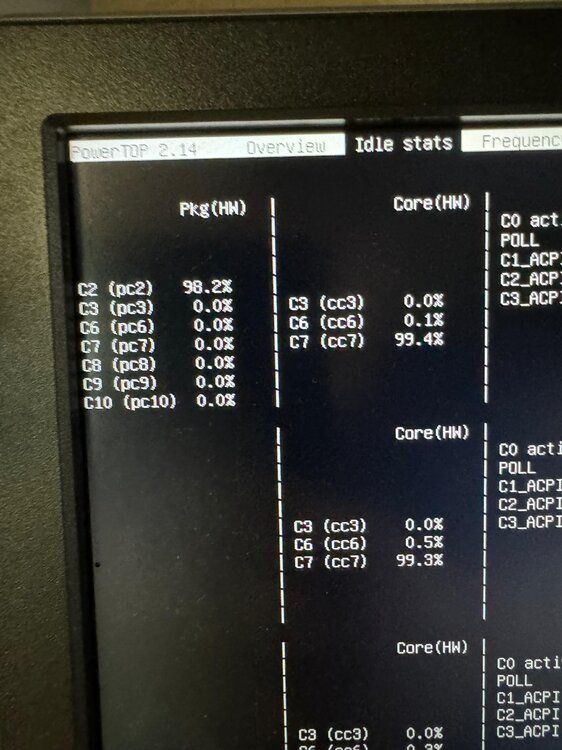
Ich kam heute dazu noch etwas zu testen. Das Bios bietet zwar die Option die NICs zu deaktivieren (unabhängig davon, dass die Beschreibung falsch ist I225/I226), jedoch funktioniert es nicht wie gewünscht. Beide NICs sind laut LSPCI weiterhin voll aktiv... Ich habe auch testweise den m.2 ASP1166 SATA Controller via PCI Adapter verbaut. Dabei war laut Powertop nach ein paar Minuten nur noch C2 möglich. Beim Test waren zusätzlich nur die beide NVMe SSDs verbaut (keine HDDs, keine zusätzlichen Gehäuselüfter, Monitor & Maus später abgesteckt etc.), der Stromverbrauch lag bei ~20 Watt.
-
Habe das ganze nur kurz unter Ubuntu geprüft, dort waren nach wenigen Minuten 50% auf C10. Ich denke das hier noch etwas mehr gehen würde, wenn die beiden NICs auch ordentlich "runtergefahren" werden könnten. Ich habe noch einen ASM1166 6 Port SATA Controller (mit FW Patch zwecks ASPM) rumliegen, den könnte ich auf einen PCI Adapter schmeißen und mal dazu stecken. Evtl. komme ich dieses Wochenende dazu das mal zu testen, kann aber leider nichts versprechen da ich dann auch meine 8 HDDs zum testen abklemmen müsste etc. Dann kann ich das ganze auch mal kurz ohne NICs testen.
-
jup, leider besteht das Problem mit beiden Bios Versionen





