





GTvert90
Members
-
Joined
-
Last visited
Everything posted by GTvert90
-
Yeah, I can back up disk 7 if needed. I actually already removed it as I tried to replace it. Can I perform a parity swap to resolve this? (Whatever that involves or Would I need to reinstall disk 7 for that? Whichever is the path of least resistance. That's weird it is formatted like that. It's only ever been in an unRAID server. I can't imagine I formatted it anywhere else. Sent from my Pixel 6 Pro using Tapatalk
-
Disk /dev/sdb: 12.73 TiB, 14000519643136 bytes, 27344764928 sectors Disk model: ST14000NM001G-2K Units: sectors of 1 * 512 = 512 bytes Sector size (logical/physical): 512 bytes / 4096 bytes I/O size (minimum/optimal): 4096 bytes / 4096 bytes Disklabel type: gpt Disk identifier: F81D82F2-BC67-4F1C-BA61-03CDE1B1ED89 Device Start End Sectors Size Type /dev/sdb1 2048 27344764894 27344762847 12.7T Linux filesystem Disk /dev/sdm: 12.73 TiB, 14000519643136 bytes, 27344764928 sectors Disk model: ST14000NM001G-2K Units: sectors of 1 * 512 = 512 bytes Sector size (logical/physical): 512 bytes / 4096 bytes I/O size (minimum/optimal): 4096 bytes / 4096 bytes Disklabel type: gpt Disk identifier: 9A21185A-CEEA-4740-B6D8-B8F79ADEB5BB Device Start End Sectors Size Type /dev/sdm1 64 27344764894 27344764831 12.7T Linux filesystem I ran the new disk for good measure too.
-
no, Both are x16 Exos 14TB drives vulcan-diagnostics-20220106-0738.zip I don't mind parity swapping if that is what is needed. I just thought this was strange. Thank you for all your help. I couldn't really find the right keywords to find any posts on this issue.
-
So the GUI is telling me that the new drive (14tb replacing a 4tb) is larger than the parity drive(Also 14TB).. Its equal but not bigger. Do I have to parity swap or am I missing something?
-
True. It's not often I'm performing a full backup/restore and a 50MBps speed hit when spinning up a 40mbps movie wouldn't even be noticed. I don't think it would impact my usage but man all that red and orange bothers me haha. I might move one stuff around, I just don't want to cause more harm than good so maybe I won't. Sent from my Pixel 6 Pro using Tapatalk
-
Thank you sir. Every thread I've read says not to worry about "balancing" drives after something like this. Using high water any new data is going to be written to this new drive for quite a while so maybe it isn't as big of a deal but doesn't drive performance degrade as the drive fills? Wouldn't all the drives being 70% filled give better r/w speeds than them being 92% filled?
-
I'm also going to run a parity check before doing all of this. My last one is only a month old or so but you can't be too safe.
-
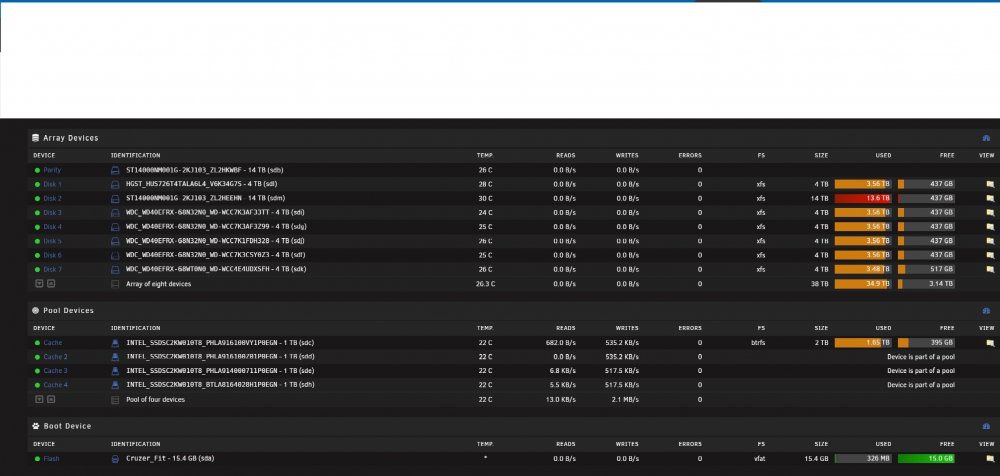
Parity drive is 14TB new data drive will be 14TB. Final result would be remove disk 6 (4tb) and 7(4TB), have new 14TB drive as drive 6. Depending how storage look maybe pull disk 5 as well. If you need any more info please let me know! vulcan-diagnostics-20220105-0546.zip
-
I think this is my first post here! The conversion to unRAID has been smooth. This is such a great community and so much documentation. I did see threads.on this I just wanted to make sure my plan was solid. I currently have an 8 disk array with 7D+1P. I am going to pull out at least 2 maybe 3 smaller disks and replace with 1 larger drive, so I'll have 5 or 6 data disks and 1 parity. All of my internal SATA ports are full. I was thinking I can pull out one of the data drives to be replaced. Preclear the new drive, let it rebuild from parity. Then shut down dockers and mover then use unbalance to move data from the other drive I will remove. And then remove that drive from the array and run a parity check/write/rebuild... Profit? I understand unbalance is pretty much just a gui for rsync but I've successfully used it in the past and I don't have to learn more command line lol Sent from my Pixel 6 Pro using Tapatalk
