MRACHINI
Members
-
Joined
-
Last visited
-
UnRAID: 2.4 ZFS Cache: 1.12 Free: 27.7 this is when frigate is off basically frigate takes all the ram, but why it was able to work with 16G only on V6 and it cant restrict itself to 16G on V7 !
-
it seems that UnRAID V7 needs more RAM than latest V6, with 32GB of RAM V7 can easily reach 22.5G or 72% on the other hand V6 can still work with 16G of ram and if I install 32G it reaches a max of 65% only have docker running and only frigate container. so anyway I added more memory, now it is 32G instead of 16G, and it is stable. thank you for your help
-
it hangs even without having frigate running, will upgrade again and disable docker and share syslog again, but maybe there is some memory leak somewhere since frigate is also running on V6.12.15
-
was stable for 2 days, updated and it hang after minutes, so I downgraded again. syslog-10.10.17.221.log
-
26 hours later still stable on V6.12.15
-
Hello, updated to V7 couple of days ago and since then I'm having to force reset UnRAID many times during the day, I have this log but don't know what the issue is and how to solve it, zero dockers started on it, VM is turned off, I can see the eth renamed back and forth but don't know if this is normal, i have a 2xPort 10G fiber NIC connected and set as active backup with the onboard 1G NIC, and I use the 10g NIC only (no idea if it is the same 2xPort 10G NIC i used before, I had to relocate everything during the war, and now reassembled it after 4 month and this one is all I found) i forced the reset "Feb 5 14:03:29" in syslog file thank you for the help syslog-10.10.17.221.log
-
ok disabled bridging, I initially enabled it since it says "Bridging is a feature which creates a virtual bridge and allows VMs and Docker containers to communicate directly with the physical Ethernet port. Both bonding and bridging can be combined to let VMs or containers communicate over a bonded interface." but everything works normally after disabling it, so what functionality do I loose from this, compared to switching from macvlan to ipvlan, what do you guys recommend: to disable bridging or to use ipvlan ?
-
syslog-192.168.0.221.log crash happened before 02:11:02 is this enough ? thank you
-
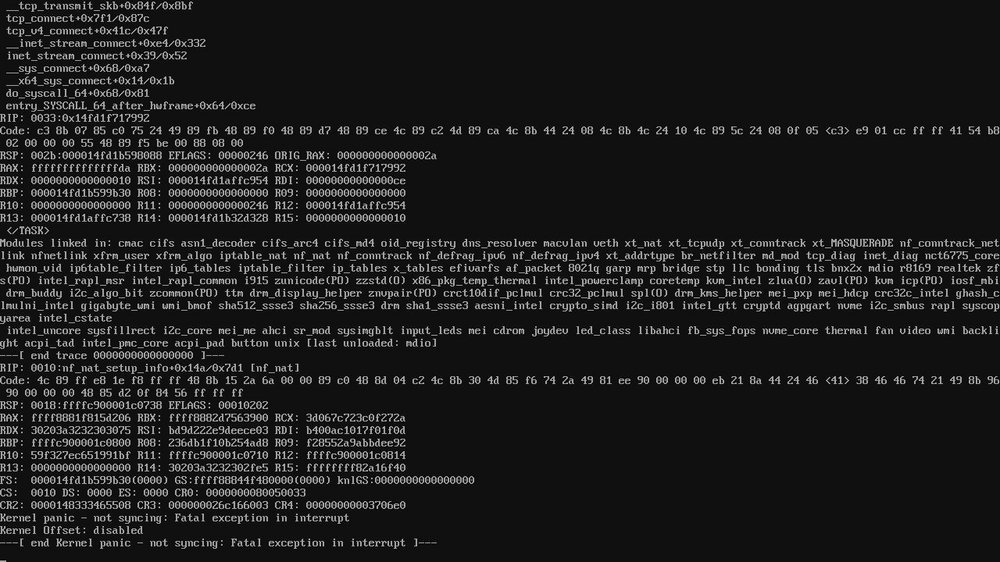
one of my UnRAID servers is crashing everyday sometimes twice or more, and I usually don't get any errors so this time I was able to connect it to a pikvm and save this screenshot, I already tried replacing the main storage nvme, and also just replaced the Motherboard+CPU+CPU Fan+NVME+PSU, the only hardware that was not replaced is the Boot USB and memory, but I did test memory from the UnRAID boot menu and got a PASS. EDIT: the previous hardware is working fine with another UnRAID USB Stick. the next step is to replace the boot USB stick but I was wondering if someone can tell anything from this screenshot before replace USB since replacing is once per year