pipingfiend
Members
-
Joined
-
Last visited
-
Hi all, Not my first build but decided to replace my two unraid servers and consolidate into one. I'm stumped as to what i can do other than give up. Post making a USB key. I might get one successful boot. try again and it will either kernel panic/VFS errors, failed to read blocks: 0x7, simply wont boot and kicks me back to the bios. So far i have tried. - Updated BIOS - Cleared CMOS and start from scratch on the recommended settings. - Used the Windows USB creator app and manually created USB Key - Tried disabling things like IPMI, C-States, Fast Boot, Ignore F1 errors - Ensured the key is the primary boot. - Tried UEFI and Non UEFI keys. - If i enable CSM board pushes display out to an onboard VGA header even though there is a discrete graphics card so with out a VGA monitor no idea what happens but looking at my router it has not successfully booted. - On my tenth USB key though have tried a mixture of Sandisk, Samsung in either USB 2.0/3.0/3.1 - Took the key one of my servers that works and it booted once. second boot same issues. - Installed windows via USB and was able to run cinebench for 24 hours straight. Hardware: Threadripper Pro 3975X Asus Sage WRX80-SE-WIFI 64GB DDR 4 RAM
-
Tried the manual way with script no dice. Both methods work on 10.14
-
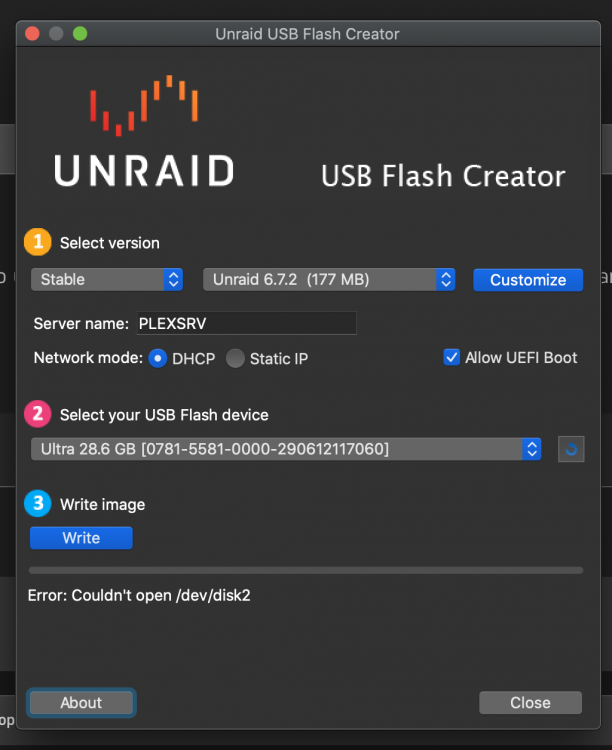
Hi all, Used the creator tool before but on my macbook pro using 10.15 Catalinab beta ive had no dice getting a usb key written and i have tried four now. They get to a point where the follow error is generated