chron
Members
-
Joined
-
Last visited
Everything posted by chron
-
I thought i needed to choose the node the ram is connected to. Here is my cpu layout. numactl --hardware available: 4 nodes (0-3) node 0 cpus: 0 1 2 3 4 5 24 25 26 27 28 29 node 0 size: 32123 MB node 0 free: 1897 MB node 1 cpus: 12 13 14 15 16 17 36 37 38 39 40 41 node 1 size: 0 MB node 1 free: 0 MB node 2 cpus: 6 7 8 9 10 11 30 31 32 33 34 35 node 2 size: 32227 MB node 2 free: 406 MB node 3 cpus: 18 19 20 21 22 23 42 43 44 45 46 47 node 3 size: 0 MB node 3 free: 0 MB node distances: node 0 1 2 3 0: 10 16 16 16 1: 16 10 16 16 2: 16 16 10 16 3: 16 16 16 10 I couldn't use node 0 or 2 for VM because the PCI-E slot my GPU is on isnt connected to those I assume because the VM wouldny see the card if I had any other cores selected.
-
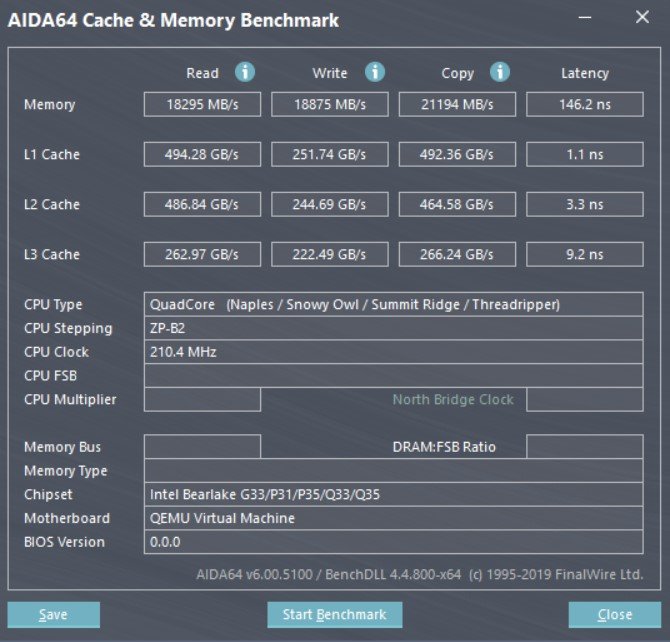
i have been tweaking my VM settings and got CPU and memory speed decent along with low latency for L1-L3 but their speed is very low. Any suggestions? <?xml version='1.0' encoding='UTF-8'?> <domain type='kvm'> <name>Windows 10 test</name> <uuid>924dacca-7dd4-bc22-0bb7-9280368c9603</uuid> <metadata> <vmtemplate xmlns="unraid" name="Windows 10" icon="windows.png" os="windows10"/> </metadata> <memory unit='KiB'>6291456</memory> <currentMemory unit='KiB'>6291456</currentMemory> <memoryBacking> <nosharepages/> </memoryBacking> <vcpu placement='static'>8</vcpu> <cputune> <vcpupin vcpu='0' cpuset='18'/> <vcpupin vcpu='1' cpuset='42'/> <vcpupin vcpu='2' cpuset='19'/> <vcpupin vcpu='3' cpuset='43'/> <vcpupin vcpu='4' cpuset='20'/> <vcpupin vcpu='5' cpuset='44'/> <vcpupin vcpu='6' cpuset='21'/> <vcpupin vcpu='7' cpuset='45'/> <emulatorpin cpuset='18-21'/> </cputune> <numatune> <memory mode='strict' nodeset='0'/> </numatune> <resource> <partition>/machine</partition> </resource> <os> <type arch='x86_64' machine='pc-q35-3.1'>hvm</type> <loader readonly='yes' type='pflash'>/usr/share/qemu/ovmf-x64/OVMF_CODE-pure-efi.fd</loader> <nvram>/etc/libvirt/qemu/nvram/924dacca-7dd4-bc22-0bb7-9280368c9603_VARS-pure-efi.fd</nvram> </os> <features> <acpi/> <apic/> <hyperv> <relaxed state='on'/> <vapic state='on'/> <spinlocks state='on' retries='8191'/> <vendor_id state='on' value='none'/> </hyperv> </features> <cpu mode='custom' match='exact' check='partial'> <model fallback='allow'>EPYC-IBPB</model> <topology sockets='1' cores='4' threads='2'/> <feature policy='require' name='topoext'/> </cpu> <clock offset='localtime'> <timer name='hypervclock' present='yes'/> <timer name='hpet' present='no'/> </clock> <on_poweroff>destroy</on_poweroff> <on_reboot>restart</on_reboot> <on_crash>restart</on_crash> <devices> <emulator>/usr/local/sbin/qemu</emulator> <disk type='file' device='disk'> <driver name='qemu' type='raw' cache='writeback'/> <source file='/mnt/disks/Samsung_SSD_840_PRO_Series_S12PNEAD275552V/VM/Windows 10 test/vdisk1.img'/> <target dev='hdc' bus='virtio'/> <boot order='1'/> <address type='pci' domain='0x0000' bus='0x03' slot='0x00' function='0x0'/> </disk> <memballoon model='virtio'> <address type='pci' domain='0x0000' bus='0x04' slot='0x00' function='0x0'/> </memballoon> </devices> </domain>