





wesman
Members
-
Joined
-
Last visited
-
does there need to be a reason?
-
That's a really helpful clarification on how Unraid defines user shares, and it makes sense. If the underlying folder doesn't exist, the share doesn't exist from Unraid's perspective regardless of what's in config/shares. To be clear about my specific scenario though, this was not a filesystem issue. There was no failed disk, no corrupted folder, no unexpected disappearance. I created a user share via the web UI, then later deleted it via the web UI. The filesystem is correct. The folder is gone. The share is gone as far as Unraid is concerned. But the .cfg file remained in /boot/config/shares/, and Windows Explorer was still showing the share as visible on the network after the deletion. The syslog confirms this is a Samba issue, not a filesystem issue. The errors are canonicalize_connect_path failures inside smbd, Samba trying and failing to resolve a path it was told to serve. The filesystem itself was fine throughout. I resolved it by manually deleting the .cfg file for that specific share, after which the share disappeared from Windows Explorer and the syslog errors stopped. Whether the .cfg file being present was the direct cause of Samba's behavior or a contributing factor, that seems worth looking into, particularly given that the errors persisted long enough to eventually destabilize Samba and take nginx down with it. Happy to provide any additional diagnostics that would help narrow it down.
-
Thanks for the feedback — a few clarifications though: Regarding User Scripts as the place for startup code: Available scheduling options, "At Startup of Array" exists, there's no true "at boot" option, only "At First Array Start Only" or array-dependent triggers. My use case requires remote mounts to be available before the array starts, not after. The go file remains the only reliable mechanism for that timing (that i know of). As for the remote mount setup, it's not just about mounting shares. Remote mounts serves as centralized config storage for multiple Unraid servers. Managing that per-server via Unassigned Devices would be significantly more painful and is not a substitute for what the go file is doing here. On the Samba connection: the syslog shows the system had been running for over a month before the crash. The go file runs once at boot and doesn't touch Samba share configs at any point after that. The errors are clearly tied to the Citadel share name in /boot/config/shares/ — a path that only gets written when a User Share is created or deleted via the UI. I don't see a credible path from the go file to that orphaned .cfg.
-
Version: Unraid 7.2.4 Description: When deleting a User Share via the Unraid web UI, the share is removed from the UI share list but the corresponding .cfg file is not removed from /boot/config/shares/. Samba continues to read this orphaned config on reload and attempts to serve the share, even though the underlying path no longer exists. Steps to reproduce: Create a User Share Delete it via Settings → Shares in the web UI Check /boot/config/shares/ — the .cfg file remains Samba begins spamming syslog with canonicalize_connect_path failed for service <sharename> errors Windows clients that previously had the share mapped continue attempting to reconnect in the background, feeding the spam loop After extended time (in my case ~2 weeks of continuous spam), Samba became unstable and crashed, taking nginx/emhttp down with it — requiring a manual nginx command to recover the web UI How it manifested: The issue went completely unnoticed until the Unraid web UI crashed overnight. There were no alerts, no visible warnings in the UI — the only indication was syslog spam that most users would never see in normal operation. Reviewing the logs afterward showed the canonicalize_connect_path errors had been occurring intermittently for over two weeks before Samba finally became unstable enough to crash and take nginx/emhttp down with it. The web UI required a manual nginx command from an SSH session to recover. Fix: bash rm /boot/config/shares/<sharename>.cfg /etc/rc.d/rc.samba restartNote that a reboot does not resolve the issue — Samba re-reads the orphaned config file on every start, so the spam and instability will return. After removing the orphaned config and restarting Samba, the share no longer appears in Windows Network, which should eliminate the background reconnection attempts that were feeding the spam loop in the first place. A reboot does not resolve the issue — Samba re-reads the orphaned config file on every start, so the spam and instability will return without manually removing the .cfg. Question for the devs: Should deleting a share via the UI automatically remove the corresponding .cfg from /boot/config/shares/ and trigger a Samba reload? It seems like the UI delete operation is incomplete if the share config persists on the boot drive. kingslanding-diagnostics-20260408-0853.zip
-
seems solved, been running for a few hours now. MEMTEST86 Identified a bad ram stick. removed and we are now moving along wit zero errors
-
Right, thanks.. Update for the thread — we've had two more crashes since the original post and have done a lot more digging. New diagnostics are attached from the third crash this morning. Mirror to Flash was enabled so we have the pre-crash syslog. We also have mcelog output now which gives us something more specific to work with: CPU 5, Bank 0, Internal parity error, Uncorrected error, Processor context corrupt. STATUS b200000000030005. Interwebs say Bank 0 is the CPU's internal logic rather than a DIMM directly. Ruled out a few things. Swapped the PSU to a Dark Power Pro 12 1200W and it crashed again. Temps are completely clean — CPU cores were sitting at 31-34°C under full transfer load with no thermal warnings anywhere in the logs. XMP is disabled and we confirmed via dmidecode that all four DIMMs are running at stock 2133 MT/s. What's interesting is the crashes are escalating. First crash was 5-6 hours in. Second was about 2 hours in. Third was only 28 minutes in. The system is completely stable at idle — this only happens under sustained heavy load. Running memtest86+ now and will report back with results. Main question is: whether a Bank 0 internal parity error on the CPU points toward a failing RAM stick stressing the memory controller, or whether it's more likely the CPU itself degrading. Any guidance there would be appreciated. kingslanding-diagnostics-20260224-1042.zip
-
Why would it "reboot by itself" ? I mean, why would it ever do such a thing?
-
Captured the crash again, and this time had "Mirror to Flash" setm diagnostics attachedkingslanding-diagnostics-20260224-0723.zip
-
Hi all, hoping to get some help diagnosing an unexpected reboot on my server. System: - Unraid 7.2.3, kernel 6.12.54 - ASUS ROG MAXIMUS XI HERO (Z390) - Intel i9-9900K - Three ZFS pools: fleabottom (8x14TB RAIDZ1), greensight (10x12TB RAIDZ2), maester (2x2TB NVMe mirror) What I was doing: Running a large data transfer (~58TB total) from a NAS Pro 8 over 10GbE using parallel rsync workers in screen sessions. The transfer was writing directly to the fleabottom ZFS pool, bypassing shfs. Transfer was running well at sustained 600-700 MB/s for several hours. What happened: Approximately 5-6 hours into the transfer, the server rebooted unexpectedly. No manual intervention. After reboot all three ZFS pools came back ONLINE with no errors. The rsync workers were lost and the transfer had to be restarted, but rsync resumed from where it left off. What I've checked: - All pools show ONLINE with zero READ/WRITE/CKSUM errors after reboot - No kernel panic message visible in syslog (log cuts off before the crash as expected) - System is stable after reboot Questions: 1. What's the best way to capture pre-crash data on Unraid 7 if it happens again? 2. Has anyone seen unexpected reboots during sustained heavy ZFS writes on 7.2.3? 3. Any recommended diagnostic steps for tracking down the root cause? Diagnostics attached. Thanks in advance. kingslanding-diagnostics-20260223-2148.zip
-
Did you recently update to 6.12.x? When I did, I kept crashing every 2 to 3 days
-
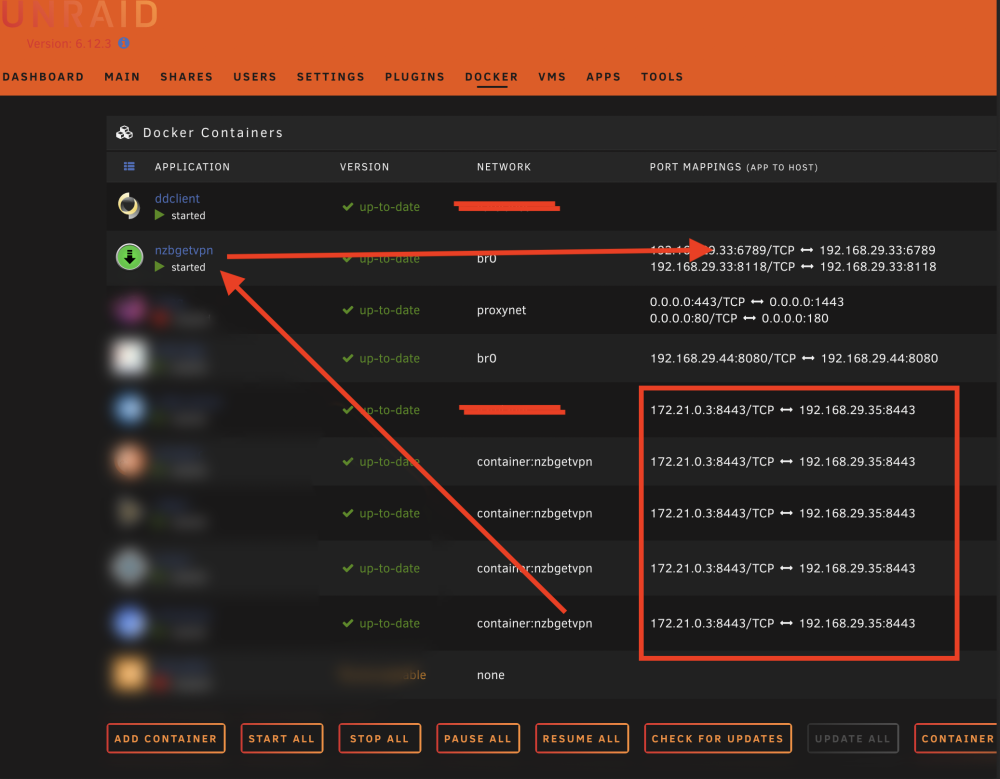
Let me start out by saying. Its actually work correctly, just the display is totally jacked. I have nzbgetvpn running, on br0 so that it gets its own IP. All the containers that use that for networking work correctly too. they all have ports (not the ones show below, that is all kinds of wrong). And selecting the container, and opening the WebUI opens properly. No Issues, and the URL in the browser is correct too. The top one in the red box is correct, that is the correct IP and Port for it (and it works) every other one in the box are exactly the sae, and incorrect for both IP and Port. (but still open to the correct IP/Port when the WebUI is selected. Any thoughts on why that might be?
-
Ah, apparently the image-name is the repository. Thanks everyone!
-
Thanks for the assist. @Kilrah I was looking at that, but I haven't figured out how to specify an internal docker image. The Repository and Registry URL lines don't seem able to allow and internal "docker run" command. All the other path variables are easy enough. I am just not sure how to add the RUN part of the command. It might be as easy as clicking the Icon and selecting Start. but I still don't know how to tell it which image to start
-
In the end, I created my own docker image, using ubuntu, install ffmpeg and exiftool to do my processing. Now I just need direction on how I can get it to stay on the docker page when its not running. Currently I have to 'docker run' it every time. would be nice to have it in the docker page, that I can just press start. are there directions on that somewhere?
-
I would LOVE a Docker that contains FFMPG. I would be forever thankful! If there is anything I can do to help. Even if its ordering PIZZA!


