cdproject
Members
-
Joined
-
Last visited
-
With it only being a 2 bay drive this isn't an option, sadly.
-
Would it be possible to do this after the event?
-
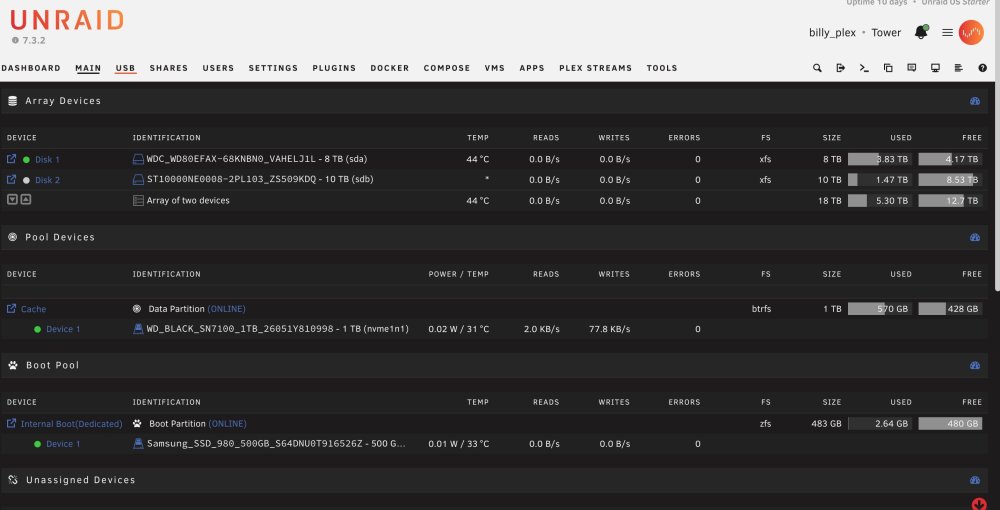
Would it not be easier to copy all data from Disk 1 to Disk 2 , as there is space available. Then remove Disk 1 and replace with the new 10TB drive and then New Config?
-
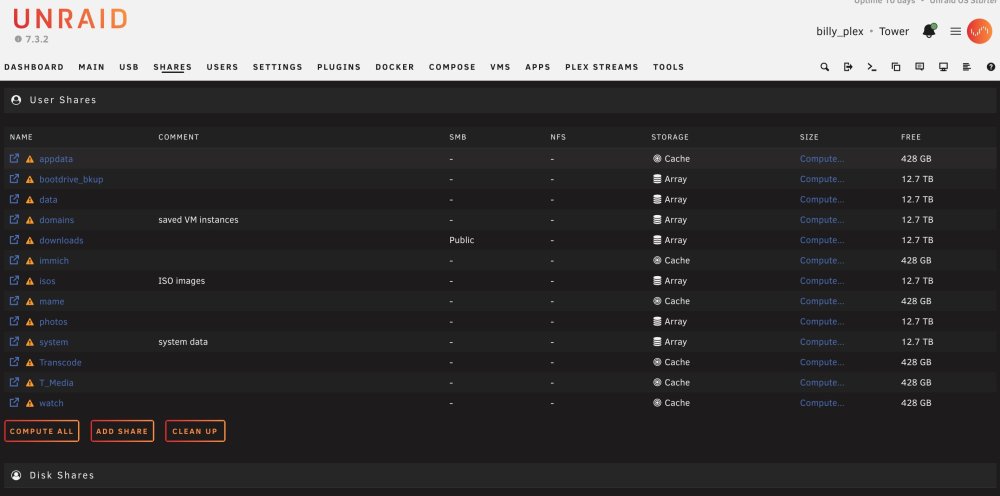
I realise Unraid IS NOT RAID, I just didn't want people to suggest installing as a RAID array. Thanks for mentioning about my appdata, my mistake it is on the cache drive and not the array. So going from what you say I can unassign the old drive, remove the current 10TB drive and install the new one. Then copy from the unassiagned device to the replacement . Then remove the unassiagned and install the original 10TB drive, then make a New Config? All this disk juggling, is confusing lol
-
I have an UGreen DXP2800 NAS drive running Unraid. I have the OS and cache set up on an 2xNVME drives. All my media is on 2xHDD. One is an 8GB WD Red HDD and the second drive is a 10TB Seagate Ironwolf. The WD drive is getting on and I have bought another Irongate to replace it. The majority of my data is held on the WD. My question is how can replace the drive and move the data. Do I simply move it all across to the current 10TB drive, or do I remove the current 10TB and then replace it with the new 10TB drive before moving data across and replacing the 8TB WD with my original 10TB drive? I don't want to have a RAID Array....I like to live dangerously 🤣 I have attached a screenshot of how I have things currently set up. I hope this makes sense? I'm fairly new to Unraid and never had to do this before, so please try to be sympathetic to this 61yr old PC tinkerer.