




Skip to content
View in the app

A better way to browse. Learn more.

Unraid

A full-screen app on your home screen with push notifications, badges and more.

To install this app on iOS and iPadOS
  1. Tap the Share icon in Safari
  2. Scroll the menu and tap Add to Home Screen.
  3. Tap Add in the top-right corner.
To install this app on Android
  1. Tap the 3-dot menu (⋮) in the top-right corner of the browser.
  2. Tap Add to Home screen or Install app.
  3. Confirm by tapping Install.

BopTheGuru

Members
  • Joined

  • Last visited

Everything posted by BopTheGuru

  1. Sure will do. I will do it when I get home from work tonight.
  2. Sorry for late reply. See attached. Thanks for you help. skynet-diagnostics-20230118-1851.zip Command output 1.txt Command output 2.txt
  3. Thanks for the suggestion. But that is not it. Not only is it to yes, https://forums.unraid.net/my-servers/ is also all green. Ever since the update, when I click to test the connection I just keep getting this error.
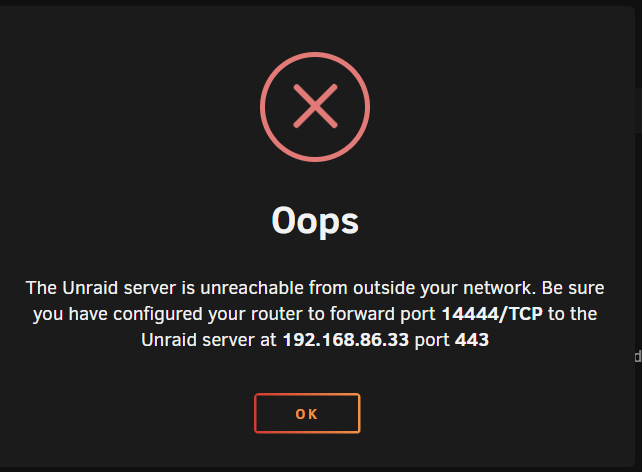
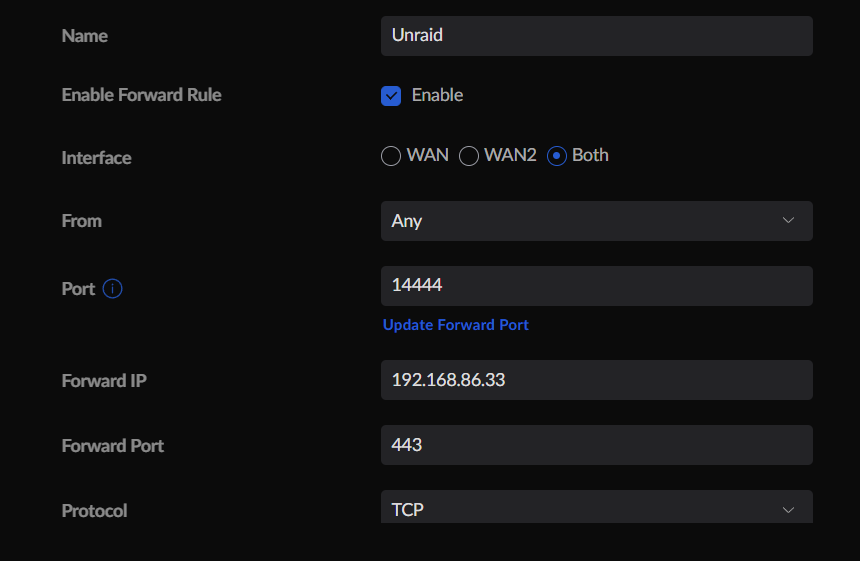
  4. Hi, I run Unifi and after the SSL update I can no longer access unraid remotely via myservers plugin. This is my port forward that was working up until now.
Account

Navigation

Search

Search

Configure browser push notifications

Chrome (Android)
  1. Tap the lock icon next to the address bar.
  2. Tap Permissions → Notifications.
  3. Adjust your preference.
Chrome (Desktop)
  1. Click the padlock icon in the address bar.
  2. Select Site settings.
  3. Find Notifications and adjust your preference.