




Skip to content
View in the app

A better way to browse. Learn more.

Unraid

A full-screen app on your home screen with push notifications, badges and more.

To install this app on iOS and iPadOS
  1. Tap the Share icon in Safari
  2. Scroll the menu and tap Add to Home Screen.
  3. Tap Add in the top-right corner.
To install this app on Android
  1. Tap the 3-dot menu (⋮) in the top-right corner of the browser.
  2. Tap Add to Home screen or Install app.
  3. Confirm by tapping Install.

Matthews

Members
  • Joined

  • Last visited

Everything posted by Matthews

  1. I had to reboot the server when adding new disks, maybe that is why?
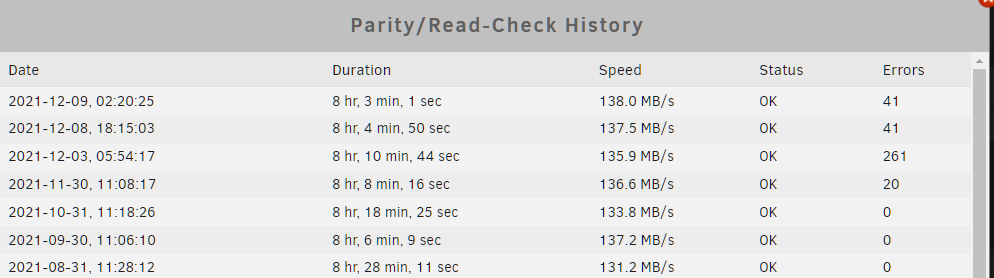
  2. Hi yall I have ran parity 3-4 times now, ran smart reports on drives if any are bad. Nothing. The only thing that is left is memory, bad sata cable. I have ran mem test before, nothing came up (didnt do it atm yet no time). Checked sata/power connections all good. Running parity, which states there are 41 errors, to fix those problems. Yet after running parity and yes i checked the "write corrections to parity" option, but after it finishes it states 41 sync errors. Im lost. I am about to do a parity swap & a data drive swap and I am waiting only bcs of these errors floating around! Anyone knows what the issue is for sync errors not getting corrected? h30-diagnostics-20211216-1046.zip
Account

Navigation

Search

Search

Configure browser push notifications

Chrome (Android)
  1. Tap the lock icon next to the address bar.
  2. Tap Permissions → Notifications.
  3. Adjust your preference.
Chrome (Desktop)
  1. Click the padlock icon in the address bar.
  2. Select Site settings.
  3. Find Notifications and adjust your preference.