- Solved
- Minor
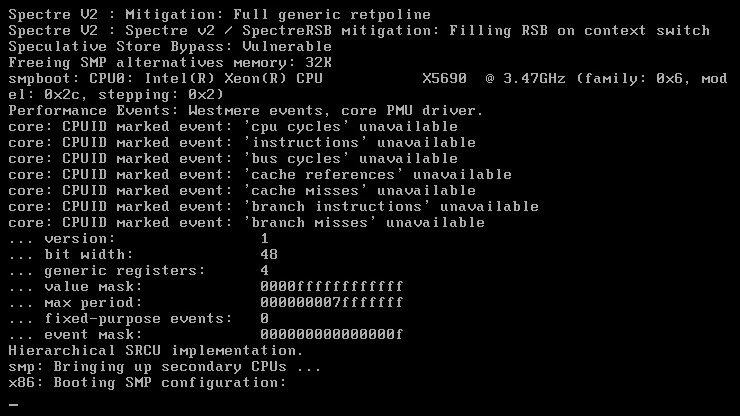
I have my unRaid setup running under ESXi 6 with 8 virtual cores and 16 GB ram. This worked fine with all prior versions, including 6.5.3, but with 6.6.0 the boot gets stuck on "x86: Booting SMP configuration:"
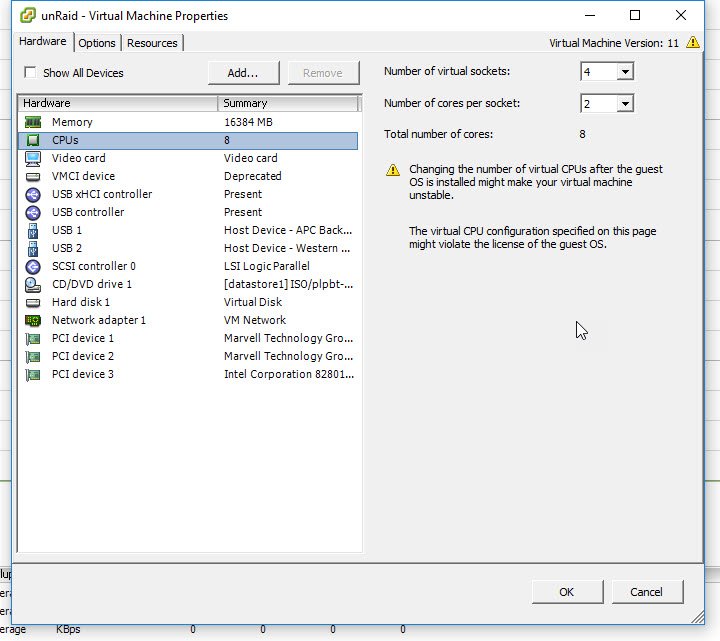
When this happened, I first moved back to 6.5.3 and unRaid booted as expected. Then I re-downloaded the 6.6.0 update and tried booting again. It failed at the same spot. Lastly, I tried changing the number of cores in ESXi from 8 (4 virtual sockets with 2 cores per socket) to only 1 core (1 virtual socket with 1 core per socket). unRaid 6.6.0 booted up just fine after that. Currently, this is how I am running unRaid.
My system includes a Supermicro X8DTH-i motherboard, 2 x 5690 Xeon CPU (provides 12 physical cores + 12 hyperthreaded cores) and 96 GB ECC DDR3 RAR (48 GB per CPU). This is running ESXi-6.0.0-20160302001 -standard version.
Honestly, I'm not 100% sure this is a bug or a result of running under ESXi, but I would sure like to run unRaid 6.6.0 and I have to continue running it under ESXi.
Thanks for your help!
Scott