






black296tuuk
Members
-
Joined
-
Last visited
Everything posted by black296tuuk
-
On the Plex issue. I was also running a Windows VM that was used for Blue Iris and an ebook private tracker because I couldn't figure out how to incorporate it into a docker with the sharing rules. When that was running the CPU was pretty much maxed out the entire time. I have since deleted it. Additionally, when I took the trip to pick up the computer I witnessed the plex use of 3 of my users I I was not happy with the performance they were getting. They are all very close with me and they never complain but they were turning everything way down to 480 just to get a smooth stream. In looking at their use right now it is mostly transcode and the most common devices are roku and apple tv. I know I probably need to look more closely at my plex setup but I wanted to start with hardware if I could.
-
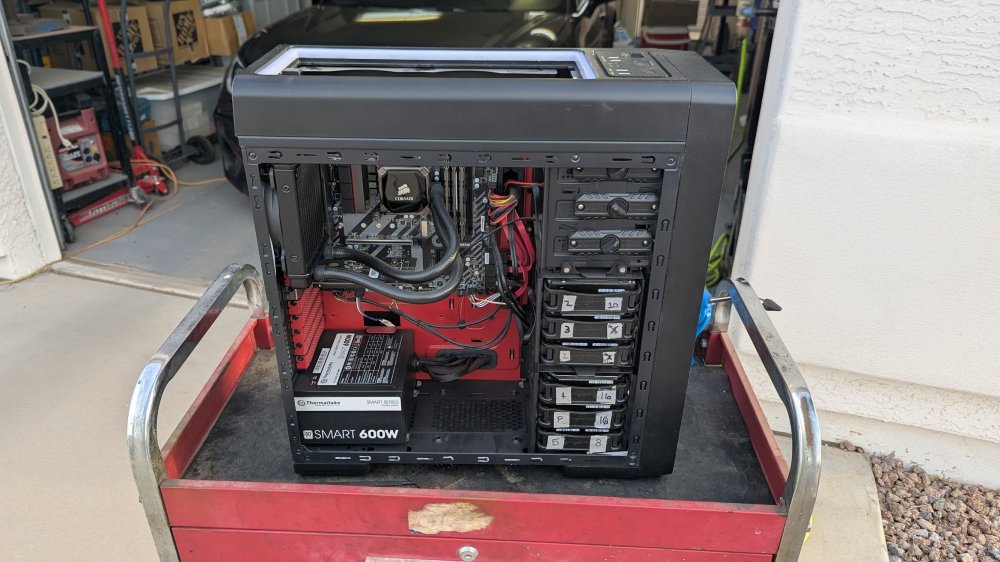
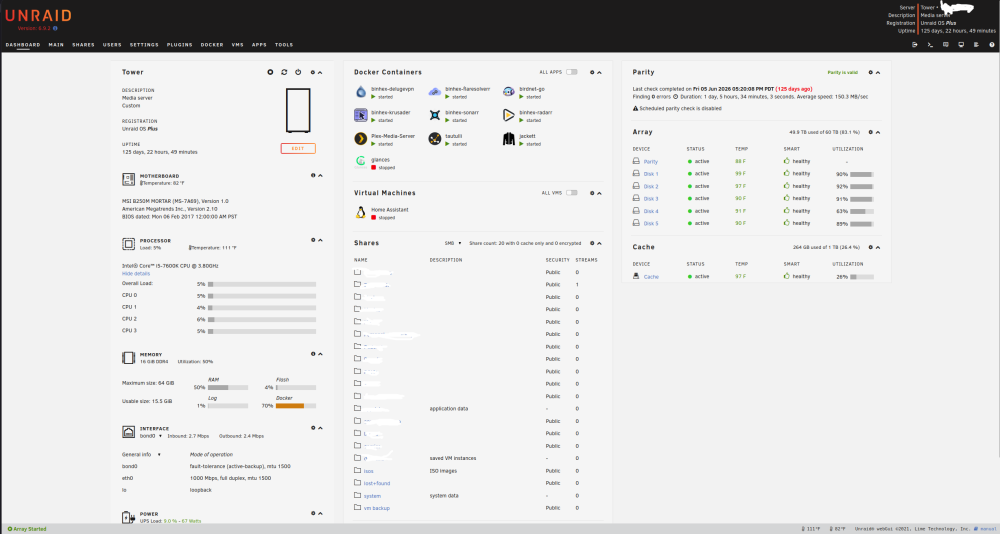
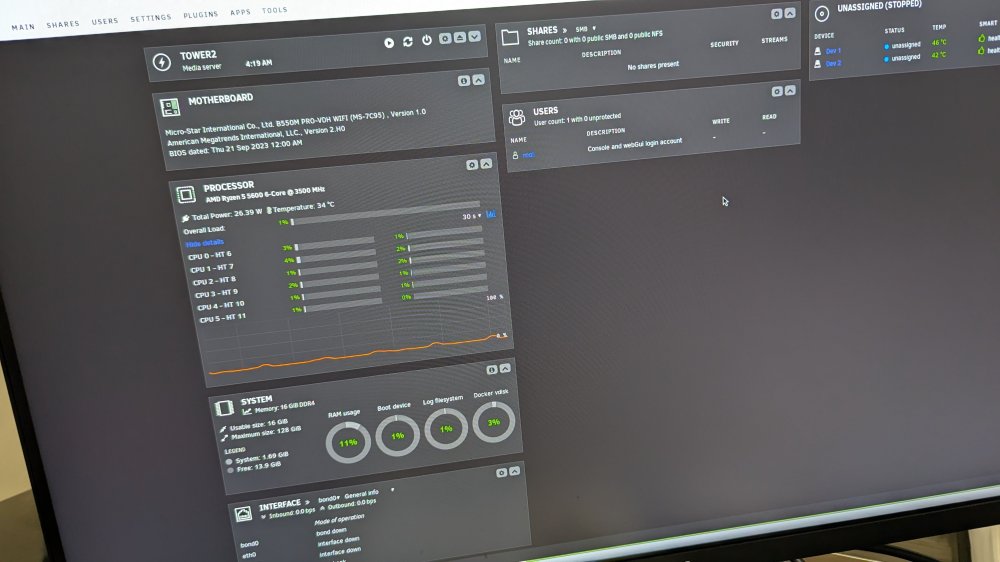
I built my original unraid rig back in 2017ish. I have planned for about 2 years to update the hardware but various life events have prevented me from doing it. The reason for upgrade would be to add more users to plex, right now I feel like I am maxed out at about 5 concurrent streams with all the other stuff running. Last October my best bud of 30 years died suddenly of a rare, aggressive cancer. His wife asked me to take his computer that he built a few years ago and use whatever I could for unraid, I just picked it up last week. I got out of tech in 2020 and after that I have kind of ignored my system, only changing hard drives when I was out of space and doing nothing else. With all the crazy prices right now I am at a loss of what I should do. I have about $750.00 saved but I would also like to use what I can from his setup. I am attaching a photo of my current specs and his specs. He also has a Radeon RX 6650 XT Mech 2X 8G that is not listed. I would also like to add a second parity but that would mean a new case so that will probably have to wait. Any feedback would be appreciated. Thank you.
-
Greetings users- I am getting a connection error when I try and log into the Deluge UI. This is a long time running system. Usually I just need to update the PIA config file to fix the issue but from looking at the logs I am not seeing anything that shows a rejection. Log attached. Log for_ binhex-delugevpn.txt I changed the port forwarding to no just to get a clean log. Any help would be appreciated. Thanks.
-
I had issues with an upgrade and the problem was solved here. https://forums.unraid.net/topic/198248-very-slow-rebuild-after-swapping-in-new-drive/ I put in a new power supply and this fixed the issue. I started the sync a few nights ago and walked away from it until right now. The sync was completed but now the new drive and another drive shows as unmountable. I don't know what I need to do to try and fix this without data loss. The array appears to be running normally still. I have attached smart reports and diagnostics. Thank you. tower-diagnostics-20260415-0412.zip tower-smart-20260415-0415.zip tower-smart-20260415-0418.zip
-
I haven't done this yet, I am manually backing up some data because I feel like I have lost control of the repair and I want to make sure I have the family stuff in a second place. I have determined that it is not the drive, sata cable, or power. I tried doing a rebuild with a powered USB enclosure and the drive did the same thing. I tried a sata port not on the motherboard. I also tried with a different untested 16tb drive. It does the same thing. The drive ran a full pre-scan without making a sound, but as soon as I start the rebuild I can hear a different drive in the case start clicking like it is bad and the transfer goes from 250mb down to below 1mb. I have the array up now everything runs fine? Does anything else in the diagnostics fit with what I am describing? tower-diagnostics-20260412-1917.zip
-
I have tried several different SATA cables and power sources and had about 10 minutes of full speed transfer and then it started doing the same thing again. After the last reboot unraid can no longer find the device. I tried just returning to the old 8tb device but I am getting an error. Stopped. Replacement disk is too small. How can I return to the old drive until I figure out the new drives actual issue?
-
I removed an old 8TB Red today and put in a new 16TB Red. On first reboot I had two additional drives show up as missing. Powered back down and re-seated all sata cables and had a successful boot. I started the re-sync and am only getting 300kbps. I am attaching a before and after diagnostics. I paused the rebuild and ran a smart report on the new drive as well. Drive was fine with normal pre-clear so I am not sure what the problem is. Any help would be appreciated as a 500 day rebuild is not going to work. tower-diagnostics-20260412-0908.zip tower-smart-20260412-0859.zip tower-diagnostics-20260412-0609.zip
-
My VM did not crash last night so it looks like that corrected my issued. Thank you for the help.
-
Great, thanks. I only have 16gb but I am going to try it at 4GB too and see what happens.
-
How much memory do you have and what limit did you set?
-
Start at 2 and end at 5. Everything on that page is checked except for "Update all Libraries During Maintenance"
-
Thank you. I tried lowering just Jacket to 1gb and it still crashed last night. I will continue to test different settings until I can get it to stay on. Is the simple answer to this to buy more memory? I have used this setup for years without the problem, so I figured it was an update or a changed setting that was causing the issue.
-
I am receiving an out of memory error from fix common problems and I believe that this is related to my VM shutting down/crashing every night. Restart does not help and it has been happening for a while now. I am including the diag file as requested in the instructions. Thank you. tower-diagnostics-20220626-0753.zip
-
I was able to fix the greyed out "extend partition" in Windows 10 by downloading a free third party partition tool for windows. Odd that Windows disk manager cant address the issue but a free tool can.



