





Peter Holmes
Members
-
Joined
-
Last visited
-
Thanks Trurl, thats all it needed. Thanks also to the other mods for your contributions.
-
Not sure whether the diagnostics show this but these are my disks. Does this give any indication of where each should be asigned? I was wondering about the (sdb,c,d,e etc.) suffix.
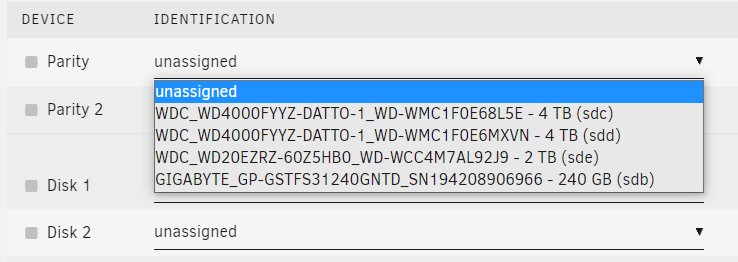
-
Hi Trurl Thanks for looking at the diagnostics. I think that pretty much sums up my approach. I dont have the knowledge or skills to set this up so its pretty much default. I previously had a Drobo and, in truth, thats my level and i should probably have just replaced that with a newer version. I could really do with a step by step 'idiots' guides for non-techies on how to optimise UNRAID but everything I've seen assumes understanding or prior knowledge that I just don't have. TBH, I wasnt even aware that i had two drives allocated as parity, which seems like overkill for me as i currently only have four disks, and one of them is cache. I guess I can deal with all this later but, for now, just need to know how to asign these disks without overwriting my data. There are files I need to access urgently. As for updating my OS, all i did was run the USB creator and point it at the latest stable version. So that has just overwritten the original OS on the USB stick. Do you recommend I wipe the new OS and replace it with the backup from my previous version? Thanks again for helping
-
Thanks for replying Trurl. Diagnostics attached, tower-diagnostics-20211013-1811.zip
-
Hi No, I just updated the OS on the flash drive. Not been inside the case at all.
-
I did an update, but i have a backup of the previous version
-
Hi I just updated my OS but, when i rebooted, all the disks are now unassigned and I have no idea which one is the parity drive. I know i should have labelled the drives in the case but hoping someone can advise me on how i can establish this after the fact? Thanks in advance
