clubbyr8
Members
-
Joined
-
Last visited
-
clubbyr8 changed their profile photo
-
Thanks I've ordered a couple and if successful , I'll order the other two. Thanks for the help.
-
Yes I did, but I have a couple of Corsair PSU's and used a longer cable from a different PSU, The result? Four fried drives, they won't spin up so I guess I've blown the surge protection diodes on each drive. Bloody expensive mistake to make....
-
Yeah I forgot to mention that, went from a tiny HP PS to a Corsair RM750x..
-
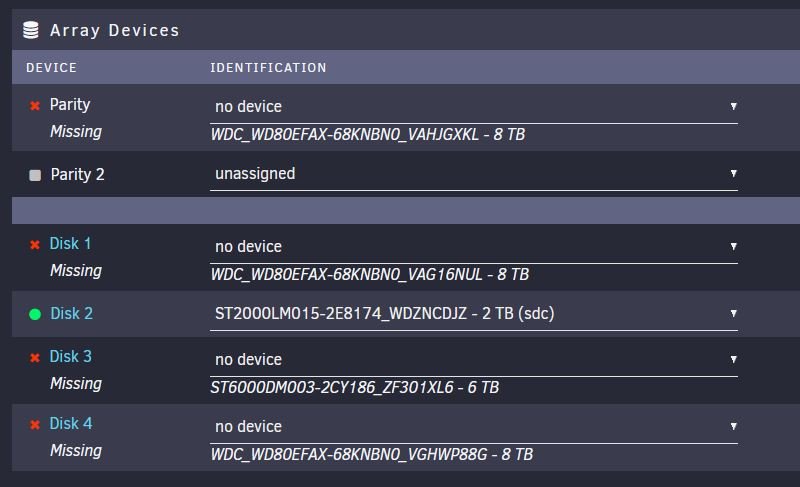
I updated some hardware in my server and now I'm missing 4 x drives (1 x parity and 3 x data), 2 x drives are working (1 x data and 1 x cache) The new hardware consists of: MSI MAG B550M Mortar MB with latest bios AMD Ryzen 7 3700X cpu 32Gb DDR4 3200 ram Migrated across to the build was: Dell H310 HBA card Nvidia Quadro K2200 When I started the server I get a message saying "Array Stopped Stale Configuration" and the 4 x drives mentioned above are missing and the drop down says no device against each missing drive. I have swapped ports and cables on the H310 and the drives still don't show. I removed the H310 card and plugged the drives into the MB sata controller and they still don't appear. I've checked the bios and two working drives are the only ones to show. Is there anyway to fix this or have I lost 4 x drives and 16Tb of data? All the missing drives are 6Tb or more. tower-diagnostics-20211012-1425.zip