





Vithy
Members
-
Joined
-
Last visited
-
Hi All, Wondering if i can get some guidance in upgrading my primary cache pool. Currently it's setup with 2x1.95TB SAS SSD drives with ZFS mirror, over the last 5 years it's been running well. I got some 3.85TB SAS SSD drives, would like to upgrade the pool with them. Increase the storage space and decommissioning aging 1.95TB drives. Would I be able to just swap them out one at a time and let them rebuild ? Any guidance would be appreciated. Thanks
-
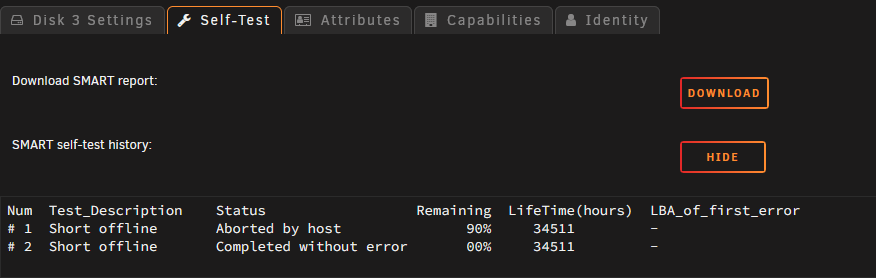
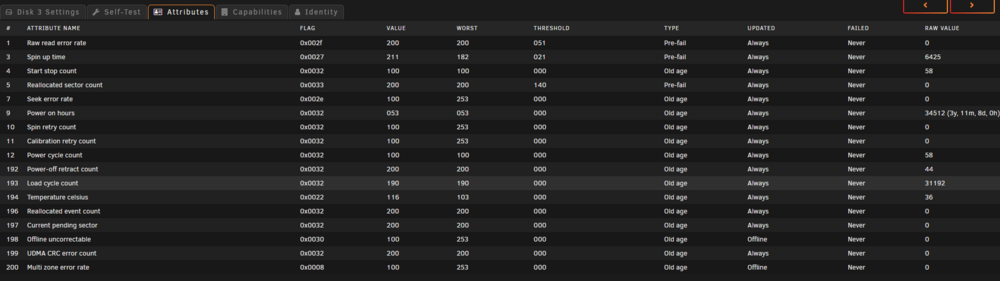
Hi All, Experiencing this with one of my array drives after a reboot. System reported not a clean reboot and my Drive 3 went into "Unmountable: Unsupported or no file system" state. I have already tried setting the system into maintenance mode and running xfs_repair via both gui and terminal. (including -L flag) i keep getting the following error. Phase 7 - verify and correct link counts... SB summary counter sanity check failed Metadata corruption detected at 0x47c2cb, xfs_sb block 0x0/0x200 libxfs_bwrite: write verifier failed on xfs_sb bno 0x0/0x1 SB summary counter sanity check failed Metadata corruption detected at 0x47c2cb, xfs_sb block 0x0/0x200 libxfs_bwrite: write verifier failed on xfs_sb bno 0x0/0x1 xfs_repair: Releasing dirty buffer to free list! xfs_repair: Refusing to write a corrupt buffer to the data device! xfs_repair: Lost a write to the data device! fatal error -- File system metadata writeout failed, err=117. Re-run xfs_repair. Any advice on how i could recover this? I have included additional information regarding the drive in question (smarts etc. ) I do have a spare drive on hand if i need to rebuild the drive. traid-diagnostics-20250101-0622.zip


-
I tried the command under maintenance mode then restarted the array. But i'm still getting the filesystem errors. [1/7] checking root items [2/7] checking extents data extent[1237294485504, 8192] referencer count mismatch (root 5 owner 260 offset 1042198528) wanted 0 have 1 data extent[1237294485504, 8192] bytenr mimsmatch, extent item bytenr 1237294485504 file item bytenr 0 data extent[1237294485504, 8192] referencer count mismatch (root 11529215046068469765 owner 72057080813343117 offset 1042198528) wanted 1 have 0 backpointer mismatch on [1237294485504 8192] ref mismatch on [1583247851520 16384] extent item 65535, found 1 tree extent[1583247917056, 16384] root 7 has no backref item in extent tree tree extent[1583247917056, 16384] root 9837529117959913479 has no tree block found incorrect global backref count on 1583247917056 found 2 wanted 1 backpointer mismatch on [1583247917056 16384] ERROR: errors found in extent allocation tree or chunk allocation [3/7] checking free space tree [4/7] checking fs roots warning line 3917 [5/7] checking only csums items (without verifying data) [6/7] checking root refs [7/7] checking quota groups skipped (not enabled on this FS) Opening filesystem to check... Checking filesystem on /dev/sdi1 UUID: 145b0bd2-bcab-40f6-b250-f4c725ada4e9 found 491507535872 bytes used, error(s) found total csum bytes: 203607832 total tree bytes: 1631535104 total fs tree bytes: 1235763200 total extent tree bytes: 127582208 btree space waste bytes: 236806362 file data blocks allocated: 1757058953216 referenced 451653742592
-
Thank you for your response. I'm assuming I do this in Maintenance Mode?
-
Hi All, I upgraded from 6.11.5 to 6.12.1. As soon as it came back online, i had most of my dockers failed, so I upgraded to 6.12.2, had the same symptoms. So i downgraded back to 6.11.5 (Restore from Backup zip). That didn't help. So now I'm back to 6.12.1 with my Cache drives Unmountable. Help please. I have uploaded both diagnostics (Array Start Mode and Maintenance Mode) btrfs check status: [1/7] checking root items [2/7] checking extents data extent[1237294485504, 8192] referencer count mismatch (root 5 owner 260 offset 1042198528) wanted 0 have 1 data extent[1237294485504, 8192] bytenr mimsmatch, extent item bytenr 1237294485504 file item bytenr 0 data extent[1237294485504, 8192] referencer count mismatch (root 11529215046068469765 owner 72057080813343117 offset 1042198528) wanted 1 have 0 backpointer mismatch on [1237294485504 8192] ref mismatch on [1583247851520 16384] extent item 65535, found 1 tree extent[1583247917056, 16384] root 7 has no backref item in extent tree tree extent[1583247917056, 16384] root 9837529117959913479 has no tree block found incorrect global backref count on 1583247917056 found 2 wanted 1 backpointer mismatch on [1583247917056 16384] ERROR: errors found in extent allocation tree or chunk allocation [3/7] checking free space tree [4/7] checking fs roots warning line 3917 [5/7] checking only csums items (without verifying data) [6/7] checking root refs [7/7] checking quota groups skipped (not enabled on this FS) Opening filesystem to check... Checking filesystem on /dev/sdi1 UUID: 145b0bd2-bcab-40f6-b250-f4c725ada4e9 found 491436212224 bytes used, error(s) found total csum bytes: 203538312 total tree bytes: 1631404032 total fs tree bytes: 1235730432 total extent tree bytes: 127582208 btree space waste bytes: 236747903 file data blocks allocated: 1756970487808 referenced 451582554112 Thanks Vithy traid-diagnostics-20230713-1145-Array Start.zip traid-diagnostics-20230713-1154-Maintenance Mode.zip
-
Did your TV library get deleted too. Mine got deleted twice, even after restore from backup. It seem to be happing every night since upgrade to v3. I can't figure out why.


