





MacDaddy
Members
-
Joined
-
Last visited
-
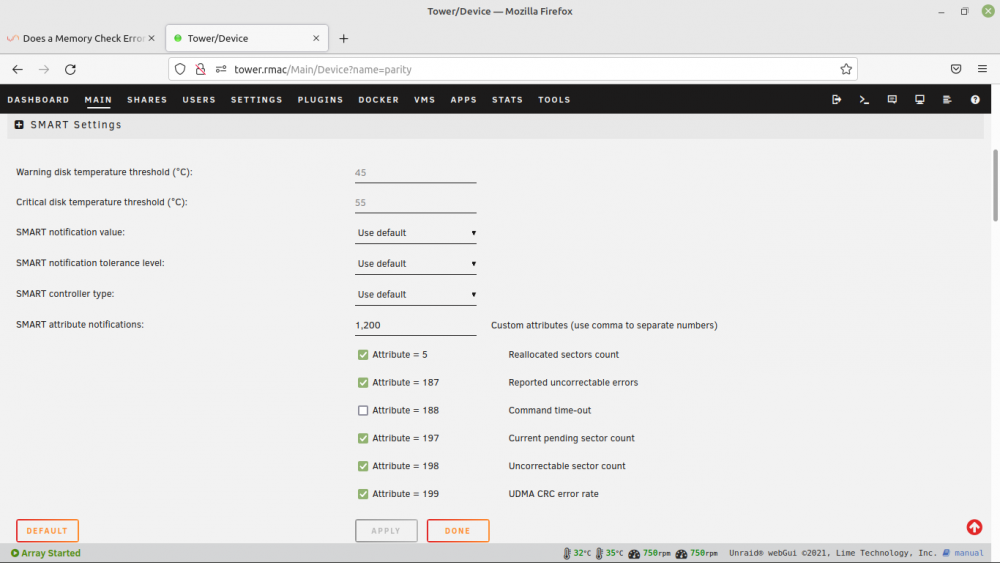
Is this the appropriate place to initiate monitoring 1 and 200 attributes?
-
Thanks for the suggestion. I will add attributes 1 and 200 to be monitored as you suggest. The parity completed with no errors. The main screen shows there are 56 errors on the parity disk alone. All other disks are 0. I'm assuming these are all the correctable read errors. I believe I will use this opportunity to replace the parity with an 8TB option. This will give me the latitude to begin incrementing the data drives to 8TB as the storage is consumed. Unless I'm just being hyper paranoid, I'll not add the former parity drive back to the disk pool. If the risk is is low to the point of non-existent then I'll be willing to add it back in.
-
I have had a MCE occuring since mid December. I've ordered some replacement memory that has been delivered and plan to install it tomorrow. While awaiting the replacement memory, the parity drive alerted for read errors. Before I reboot following the new memory installation I wanted to add the current diagnostic information. It appears that the HDD read errors were corrected, but I wanted to ask for help in determining if the HDD read error might possibly be a false positive influenced by the memory errors. If it is truly failing, I have no problem replacing the drive. In this case would adding the old parity drive back to the data pool be an unreasonable risk. Thanks in advance for your advice. tower-diagnostics-20220110-1653.zip tower-smart-20220110-1648.zip tower-syslog-20220110-2300.zip
-
Fix Common Problems alerted me to a previous MCE. I'm seeing repeating entries for about 5 secs of: Oct 18 22:34:33 Tower kernel: mce: [Hardware Error]: Machine check events logged Oct 18 22:34:33 Tower kernel: EDAC sbridge MC1: HANDLING MCE MEMORY ERROR Oct 18 22:34:33 Tower kernel: EDAC MC1: 1 CE memory read error on CPU_SrcID#1_Ha#0_Chan#3_DIMM#0 (channel:3 slot:0 page:0x5ff304 offset:0xec0 grain:32 syndrome:0x0 - area:DRAM err_code:0001:0091 socket:1 ha:0 channel_mask:8 rank:0) It corrected and I have not seen a repeat event. Is this a one-time event that bears attention if it should happen again, or do I need to start looking for some new memory? Thanks in advance for any advice you can offer. tower-diagnostics-20211024-1411.zip
-
Any possibility to add sshpass? In conjunction with user.scripts I'm hoping to implement something like : #!/bin/bash #argumentDescription=Enter password and box name (mypass pihole) sshpass -p $1 ssh pi@$2.rmac "sudo dd bs=4M if=/dev/mmcblk0 status=progress | gzip -1 - " | dd of=/mnt/user/Backups/$2/$(date +%Y%m%d\_%H%M%S)\_$box.gz I run 4 different Raspberry Pi boxes. They run for a good long time, but I've just had the third SD card fail. I would like to keep an image where I can recover quickly with minimal pain.
-
That's probably it. My 57 year old eyes need a little extra size in fonts these days:-) I'll experiment with another size. Sent from my iPhone using Tapatalk
-
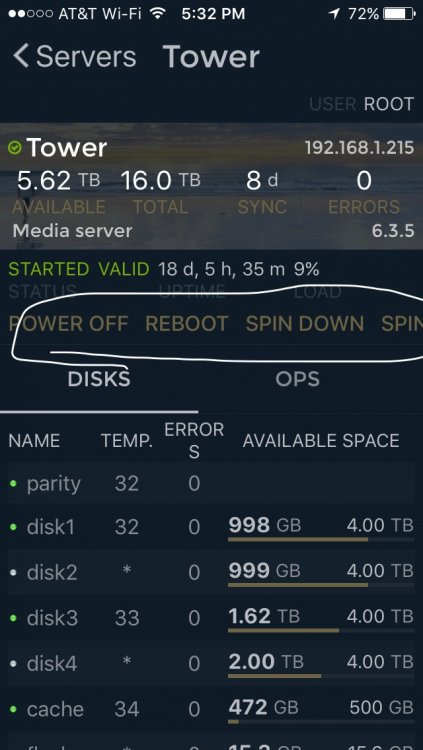
I just updated the app. I think I remember the "operations" selection being scrollable. Here's a screenshot capture with the items circled.
-
Logs are back. Many thanks. Sent from my iPhone using Tapatalk
-
Heads up. I just updated the app on iPhone. Major features work as expected and alignment of tab scrolling is much improved. However it seems that the logs no longer display. I did a quick check for a plugin update on the server side. It appears I'm on the latest. Is there any diagnostic info I can send that would be helpful? Sent from my iPhone using Tapatalk
-
Thanks so much for all the work on this. I wanted to send some beer money. On the Apps tab, there are links for Statistics and Credits in the upper right. Selecting them brings up the expected response with the familiar PayPal donate button. It took four attempts to get the donation sent - it terminated many times with a cryptic "fatal error" message. I think donations are an essential function:-). Thanks for keeping the unRaid apps world safe.
-
Good point. This is the first drive on the SAS card and the first time the slot in this particular cage has been used. I'm not sure if it's really impacting the preclear right at the moment. I'm getting about 98.3 MB/s and 21% through the first step at 8:13 hours in. I think I should let it finish and then try to address the cable/card/backplane items when it completes.
-
I've used this script for reclaiming two of my older 1TB disks from other equipment in to my unRaid server. It was great to still be able to use the existing array with all of my normal shares still in a protected state while the new drives were clearing. I am now in the process of preclearing a 2TB WD EARS drive and got some interesting syslog entries. I'm a Linus newb, so would appreciate any insight on this. By the way, this is on one of the Limetech MD1510 machines and this particular disk is the first (and only) on the second SAS. Right after the login at 23:21:36 I kicked off the preclear and went to bed. The hard resetting of the link worries me. I'll attach the full syslog if there is any further information that might help in explaining. thanks for your help. syslog-2011-06-09.txt

