





FreakyUnraid
Members
-
Joined
Everything posted by FreakyUnraid
-
Is that a 'thing', that LSI cards don't like sleep? Didn't realize that, but after reading your comment I googled some and there a quite some topics where people mention about LSI cards "server parts are not meant for sleep mode" etc. Hadn't even thought about this for a second... dumbdumbdumb. So to sum things up and see if I understand you correctly: reboot start array - in maintenance mode i presume? check everything download diagnostics Correct?
-
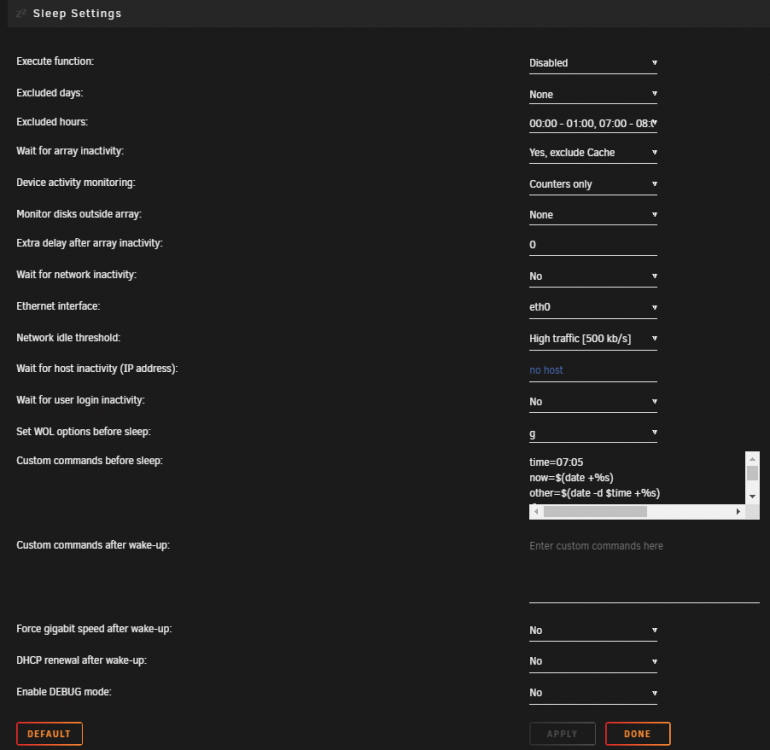
Server has been running 24/7 for a long time now. Without any (real) issues. I replaced my motherboard, cpu and cache drive last week. No issues. Yesterday I thought, why not save a few bucks on power and put the server to sleep at night. Used my old settings in the sleep plugin (used it before, without any problems) and enabled the plugin. Today I'm waking up to a nightmare, thinking the plugin somehow (almost) destroyed my array. Thankfully I have 2 parity drives, but still... Server was set to wake at 07:00 hours. After ~30 minutes of that time disk 3 was disabled. After 1:40 hours disk 2 was disabled These are the messages I received: So, what I did after seeing all of this: - downloaded diagnostics, see attachment - disabled docker - disabled the array - did a short self test on disk 2 and 3 > both passed - Status as of now: Disk 1 - read error Disk 2 - disabled, emulated - sst says passed Disk 3 - disabled, emulated - sst says passed Disk 4 - read error Looking for theories what happened: - The sleep plugin is the last thing that changed. Attached a screenshot of the sleep setting I used. So either the plugin is not working correctly, I used a bad setting or just random luck. I'm almost 100% sure it's one of the latter ones. Although, I heard it "shutdown" rather 'harsh', or maybe I'm not used to the sound of all drives stopping at the same time when the server goes to sleep. - Opened the case and I can rule out a power issue. The 4 drives aren't connected to the same power cable or the end of one. - But they are all connected to the same breakout cable and the same LSI card (IBM M1015 > SFF-8087 cable). That's not suspicious at all... - It's the only cable connected to that IBM M1015 in the server (I have two of those cards, the other one is full) - So some error with the sleep plugin? Although, the server was set to wake at 07:00 and the errors started (way) later? the sleep/wakeup resulted in a faulty cable? faulty IBM M1015 card? Spare parts (that I know of) - IBM M1015 > not yet flashed - Multiple drives (same as in array) ready to go > already pre-cleared - Not sure about a spare SFF-8087 cable. I know I have at least one laying around, because I replaced that one when a disk was having read errors. Not sure if that was connected to the same IBM card we're talking about now... Maybe be safe and order a new one? Next steps: Honestly, not sure what to do now. First time dealing with such a catastrophic failure. So before I do anything I would like some advice. Buy a new cable and flash the new LSI card to replace all the hardware that could be faulty? And then follow https://wiki.unraid.net/Manual/Storage_Management#Checking_a_File_System for disks 2 and 3? What would you guys recommend I do and in which order? Edit: changed title from "Sleep plugin almost destroyed my array? 4 disks with read errors, of which 2 are disabled. How to proceed??" to "4 disks with read errors, of which 2 are disabled. How to proceed??" because it's probably not the plugin's fault and in hindsight it reads a little bit sensational. server-ur-diagnostics-20220119-0906.zip
-
Situation: Backup & restore app on phone. Connected to Nextcloud with a webdav connection Restore process get's stuck every time. error.log file gets filled with the same error over and over again: ERROR upstream prematurely closed FastCGI request while reading upstream, client: [ipaddress], server: _, request: "GET [filename] HTTP/1.1", upstream: "fastcgi://127.0.0.1:9000", host: "[hostname]" Any ideas? EDIT: Seems the above error was just a symptom. Apparently you need to "tweak" Nextcloud as soon as you have more users or upload/download more data? This is what I found and did: Error in /mnt/user/appdata/swag/log/nginx/error.log ERROR: upstream prematurely closed connection while reading upstream, client Error in /mnt/user/appdata/nextcloud/log/php/error.log WARNING: [pool www] server reached pm.max_children setting (5), consider raising it Added the following to /mnt/user/appdata/nextcloud/php/www2.conf pm = dynamic pm.max_children = 120 This resulted in the next(cloud) error. Error in /mnt/user/appdata/nextcloud/log/php/error.log WARNING: [pool www] seems busy (you may need to increase pm.start_servers, or pm.min/max_spare_servers), spawning 8 children, there are 0 idle, and 6 total children Added the following to /mnt/user/appdata/nextcloud/php/www2.conf pm = dynamic pm.max_children = 120 pm.start_servers = 12 pm.min_spare_servers = 8 pm.max_spare_servers = 16 pm.max_requests = 500 This seems to have solved the issues I had with uploading/download large amounts of data. Of course, waiting to see if an error spawned again I noticed this: Error in /mnt/user/appdata/swag/log/nginx/error.log ERROR: FastCGI sent in stderr: "Primary script unknown" while reading response header from upstream, client: [ipaddress], server: _, request: "GET /admin//config.php Thought it was a related error, but I got another one from a different IP with "GET /wp-login.php". Strange, because thats wordpress? Found this post claiming it's probably a bot, so unrelated.
-
Thanks, but the steps mentioned there are too "expert" for me. How do I do those steps within Unraid? ELI5 please EDIT: I fixed it another way. All seems to be working again. - Unpacked the latest appdata backup .tar.gz - Opened the .tar file - Extracted Vaultwarden folder - Opened Krusader and deleted the content off the Vaultwarden folder in Appdata - Copied the extraxted Vaultwarden backup - Started Vaultwarden again - All is working again. So, did I do this "the right way"? Or the it's stupid, but it works, but still stupid way?
-
I had to restore an appdata backup. The restore went fine, but now vaultwarden won't start anymore: [2021-12-18 21:16:03.674][panic][ERROR] thread 'main' panicked at 'Failed to turn on WAL: DatabaseError(__Unknown, "database disk image is malformed")': src/db/mod.rs:307 0: vaultwarden::init_logging::{{closure}} 1: std::panicking::rust_panic_with_hook at rustc/4961b107f204e15b26961eab0685df6be3ab03c6/library/std/src/panicking.rs:610:17 2: std::panicking::begin_panic_handler::{{closure}} at rustc/4961b107f204e15b26961eab0685df6be3ab03c6/library/std/src/panicking.rs:502:13 3: std::sys_common::backtrace::__rust_end_short_backtrace at rustc/4961b107f204e15b26961eab0685df6be3ab03c6/library/std/src/sys_common/backtrace.rs:139:18 4: rust_begin_unwind at rustc/4961b107f204e15b26961eab0685df6be3ab03c6/library/std/src/panicking.rs:498:5 5: core::panicking::panic_fmt at rustc/4961b107f204e15b26961eab0685df6be3ab03c6/library/core/src/panicking.rs:106:14 6: core::result::unwrap_failed at rustc/4961b107f204e15b26961eab0685df6be3ab03c6/library/core/src/result.rs:1613:5 7: vaultwarden::util::retry_db 8: vaultwarden::main 9: std::sys_common::backtrace::__rust_begin_short_backtrace 10: std::rt::lang_start::{{closure}} 11: core::ops::function::impls::<impl core::ops::function::FnOnce<A> for &F>::call_once at rustc/4961b107f204e15b26961eab0685df6be3ab03c6/library/core/src/ops/function.rs:259:13 std::panicking::try::do_call at rustc/4961b107f204e15b26961eab0685df6be3ab03c6/library/std/src/panicking.rs:406:40 std::panicking::try at rustc/4961b107f204e15b26961eab0685df6be3ab03c6/library/std/src/panicking.rs:370:19 std::panic::catch_unwind at rustc/4961b107f204e15b26961eab0685df6be3ab03c6/library/std/src/panic.rs:133:14 std::rt::lang_start_internal::{{closure}} at rustc/4961b107f204e15b26961eab0685df6be3ab03c6/library/std/src/rt.rs:128:48 std::panicking::try::do_call at rustc/4961b107f204e15b26961eab0685df6be3ab03c6/library/std/src/panicking.rs:406:40 std::panicking::try at rustc/4961b107f204e15b26961eab0685df6be3ab03c6/library/std/src/panicking.rs:370:19 std::panic::catch_unwind at rustc/4961b107f204e15b26961eab0685df6be3ab03c6/library/std/src/panic.rs:133:14 std::rt::lang_start_internal at rustc/4961b107f204e15b26961eab0685df6be3ab03c6/library/std/src/rt.rs:128:20 12: main 13: __libc_start_main 14: _start How do I resolve this? Thanks in advance!
