





PeteAsking
Members
-
Joined
-
Last visited
Everything posted by PeteAsking
-
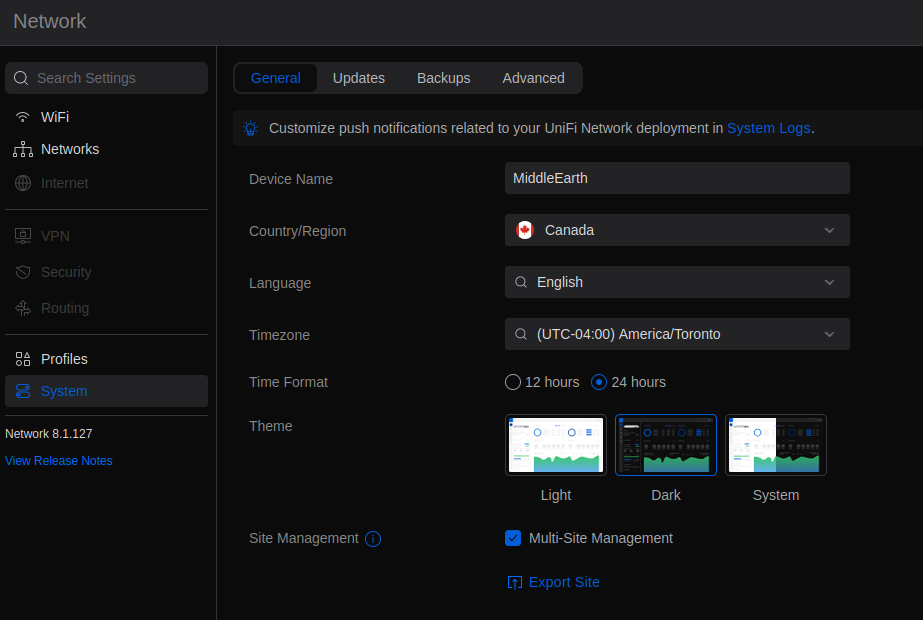
I just checked and site export exists in the latest version. I want to reiterate, this is not a unifi support forum for how to use the unifi controller. There is already a unifi forum maintained by unifi for this. If you dont know how to site export and import, then its up to you to go and ask on their forums. The support here is specific to the docker - getting it up and running and so on. The docker functions, the backup and restore process works (unfortunately) how unifi create it. The site import export works how unifi create it. I cannot actually change the way the unifi controller works as its maintained by unifi. Many users of their software have issue backing up and restoring, and their own support suggests using the site import/export. But I want to be clear, its not anything I have control over. If x feature does not work in their software, only unifi can fix it. Site export is under system-general-site management - here is a screenshot. Good luck. If the unifi software is "useless" because you cannot backup and restore, you should complain to unifi about it and tell them the software they create is useless. I dont code or create it. Telling me it is useless is not something that bothers me all that much. I know its useless. I already have to use it.
-
Just remove the docker and ssh into the server and under app data remove any reminants of the docker if there is anything. Then install again and it will be blank.
-
This seems to be a know issue on the unifi forums. Can you try the site export and site import method? https://help.cloudunifi.com/unifi/migrating-sites-with-site-export-wizard/
-
It seems this is a common issue with the Unifi controller. Here is an example here: https://community.ui.com/questions/Logins-not-working-after-restoring-backup-to-new-machine/023647bc-2953-421f-ac05-4a19072d702c under legacy interface can you go to settings and then ‘admins’ and review the list of admins there and possible create a new one. Under the modern interface the sso option that links your unifi account on their website to your local deployment is under system - advanced and allows you to remote manage it at https://unifi.ui.com you can try enabling this also and seeing what happens after a restore. let me know after doing some troubleshooting like this.
-
How did you create the backup?
-
Did you not have the ‘Sync Local Admins with SSO’ option ticked?
-
Put https:// in front of the address eg: https://IPADDRESS:8443
-
A custom network should be fine so long as you are not running into the docker macvlan issues unraid have been trying to fix. I’m personally not affected so can’t tell you much about that.
-
Test by stopping all dockers except the Unifi one. If the issues go away then you have some sort of conflict. This troubleshooting step is mandatory if you want to get to the bottom of it.
-
Ok let us know
-
It seems like unraid is killing the docker. Check you didnt run out of ram globally. Test by stopping all VM’s and All dockers and starting only this one. If it starts then you have some issue above the container you must resolve.
-
Strange, can you click on the docker and then click logs an post any output?
-
No it was luckily a very minor update so unlikely to cause a problem. Of course it is supported now due to the error our side if you have any issues.
-
I agree what appears to have happened is an inadvertent push has incorrectly updated tag 8.1.113 to version 8.1.127. I suggest moving to tag 8.1.127-unraid at this time for consistency and I will have to immediately support this tag due to the error. To track why or what happened you can use this link as I asked what happened on 11notes github (who runs the scripts that builds the images): https://github.com/11notes/docker-unifi/issues/16 Kind regards P
-
I will figure out what happened and come back to you.
-
What version are you running now? 8.1.127 is not supported at this time.
-
This basically confirms that the ip changed since the docker/unraid has a different ip to the pc it was on before. You need to set the inform ip and do what bmartino said
-
Not sure what is wrong. Can you check no other dockers are running when you start it to rule out some sort of conflict and check you have enough disk space and so on. Also check your networking is logical. Seems like an error above the container.
-
Is the inform ip in the settings set correctly still? (inform host override)
-
Not sure but there probably isnt much I can do to fix it. The software works however unifi code with all the bugs they insert into it and its a closed box.
-
Thanks. I have fixed this error now.
-
Are you using the latest tag? It was made available just a few days ago.
-
Thanks. Will just let unifi resolve it then.
-
I can check but I doubt it is important
-
+-+-+-+-+-+-+-+-+-+-+-+-+-+-+-+-+-+-+-+-+-+-+-+-+-+-+-+-+-+-+-+-+-+-+-+-+-+-+-+-+-+-+-+-+-+-+- |.|.|.|.|.|.|o|o|o|o|o|o|O|O|O|O|O|O|0|0|0|0|0|0|0|0|0|0|O|O|O|O|O|O|o|o|o|o|o|o||.|.|.|.|.|.| +-+-+-+-+-+-+-+-+-+-+-+-+-+-+-+-+-+-+-+-+-+-+-+-+-+-+-+-+-+-+-+-+-+-+-+-+-+-+-+-+-+-+-+-+-+-+- ██████╗░███████╗██████╗░░█████╗░██████╗░███╗░░██╗ ██╔══██╗██╔════╝██╔══██╗██╔══██╗██╔══██╗████╗░██║ ██████╔╝█████╗░░██████╦╝██║░░██║██████╔╝██╔██╗██║ ██╔══██╗██╔══╝░░██╔══██╗██║░░██║██╔══██╗██║╚████║ ██║░░██║███████╗██████╦╝╚█████╔╝██║░░██║██║░╚███║ ╚═╝░░╚═╝╚══════╝╚═════╝░░╚════╝░╚═╝░░╚═╝╚═╝░░╚══╝ ░█████╗░██████╗░███████╗░██╗░░░░░░░██╗ ██╔══██╗██╔══██╗██╔════╝░██║░░██╗░░██║ ██║░░╚═╝██████╔╝█████╗░░░╚██╗████╗██╔╝ ██║░░██╗██╔══██╗██╔══╝░░░░████╔═████║░ ╚█████╔╝██║░░██║███████╗░░╚██╔╝░╚██╔╝░ ░╚════╝░╚═╝░░╚═╝╚══════╝░░░╚═╝░░░╚═╝░░ +-+-+-+-+-+-+-+-+-+-+-+-+-+-+-+-+-+-+-+-+-+-+-+-+-+-+-+-+-+-+-+-+-+-+-+-+-+-+-+-+-+-+-+-+-+-+- |.|.|.|.|.|.|o|o|o|o|o|o|O|O|O|O|O|O|0|0|0|0|0|0|0|0|0|0|O|O|O|O|O|O|o|o|o|o|o|o||.|.|.|.|.|.| +-+-+-+-+-+-+-+-+-+-+-+-+-+-+-+-+-+-+-+-+-+-+-+-+-+-+-+-+-+-+-+-+-+-+-+-+-+-+-+-+-+-+-+-+-+-+- 🅟🅡🅞🅤🅓🅛🅨 🅟🅡🅔🅢🅔🅝🅣🅢 Docker tag: 8.1.113-unraid NEW: Current recommended Home User tag: 11notes/unifi:8.1.113-unraid NEW: Current Company/Corporate recommended tag: 11notes/unifi:8.1.113-unraid Current Critical Infrastructure (no downtime) tag: 11notes/unifi:7.5.187-unraid



