MichiganMatt
Members
-
Joined
-
Last visited
-
Thanks itimpi 😍, array is running and back on-line and I don't see where any files are lost or gone from the array.
-
Hello itimpi, Thank you for the quick response and pointing me in this direction to do this test, I had no idea that could be checked per disk, I had always done everything in UnRaid at the Pool/Array level. Here is the results of it with the -n and without the -n. I see two .jpeg files (cell phone pictures likely) in results below that would be lost and my backup strategy has them, but most of the data on the drive is not backed up and that's what I don't want to loose. When I run without the -n, the prompt notes that there will be data loss and wants me to run with the -L option . If I run with the -L option, can I expect the data loss to be just the Image Files identified in the -n step or is there likely/probably to be more data loss?
-
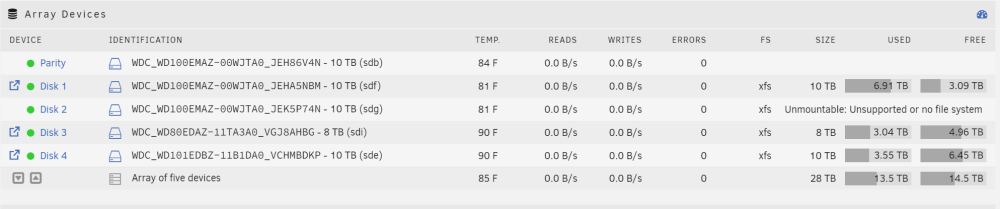
Hello Unraid Family, I need some help with my server. I've been struggling with system crashes for awhile and I upgraded my mobo/CPU/memory but kept my a Supermico Case, raid controller and thumbdrive. The migration went pretty well and after I was moved into the new hardware, I also deleted and rebuilt my CACHE and Docker Containers as I had quite a few BTRFS errors on that I could never get rid of. Post migration, CACHE rebuild and Docker file rebuild, I continued to have issues with system crashes and I noticed yesterday that a bunch of my SHARES were no longer accesible after the array was started. Disk 2 shows that It's unmountable with the error message "Unmountable: Unsupported or no file system" I looked through the logs, and I think this is what's going on with Disk 2 in the Array is that's it's corrupt but I don't what to run xfs_repair because I'm really not familiar with the command. The SMART data reported on that disk looks OK, maybe this is an issue with the repeated shutdowns. I also see in the shareDisks.txt that my 'share does not exist', but the system still has it somewhere, but it worries me that the data could be gone. I know from Spaceinvaders video, that when there is a major issue like this, it's best to stop, breath, and be very careful with steps to fix the issues as real data loss can occur if I make run commands I'm not familiar with. With that said, I would very much appreciate other looking at my logs and advising next steps. unraidserver-diagnostics-20231214-0953.zip