





Wizengamot
Members
-
Joined
-
Last visited
Everything posted by Wizengamot
-
I gave that a try but what I ended up with was another disk being unmountable (disk 11 is now gone) .. thankfully my aggressive approach to the data transfer may have been what has saved my data here. I am proceeding to shut down the NAS for the last time. I want to extend my thanks to you JorgeB for all your help on this. I think the reason for all these problems is likely some sort of hardware failure (but not likely drive failure). The failures are too widespread to be HDD based, as you indicated in one of your posts, it could be RAM failing. While I bought the hardware for this unraid PC new, I absolutely cheaped out on the parts.
-
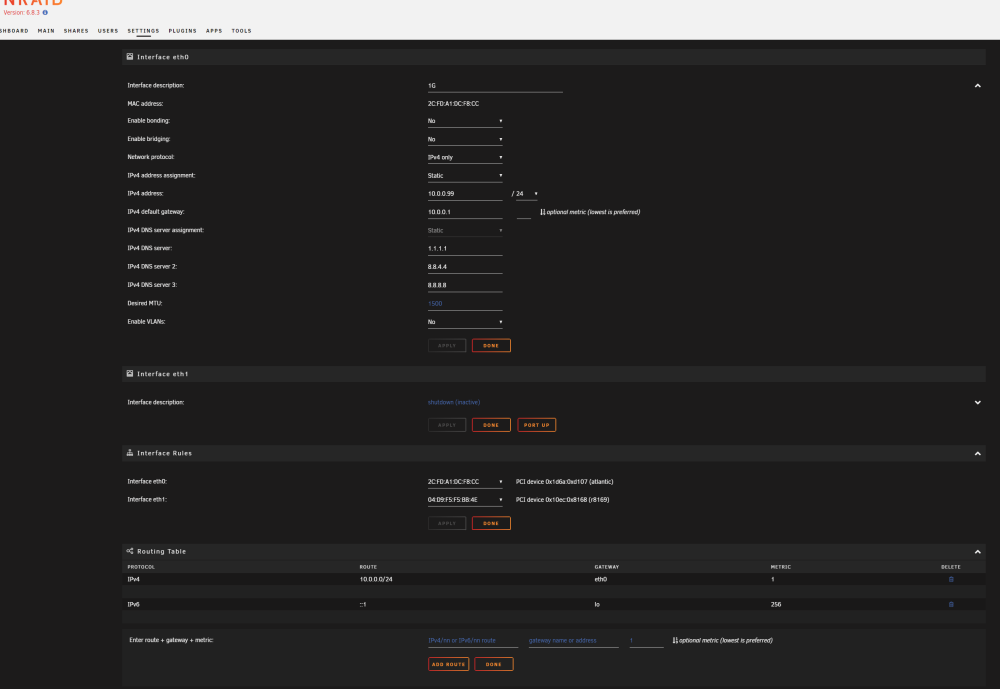
I have finally copied off all the data I care about and am trying to upgrade to 6.11.5. However, I now have a network issue. When I launch a ping from the command line (via the web interface) it says network unreachable. Yet, I can reach that device via the network. Very odd. I have attached a screenshot of the network config screen. When I attempt to use the plugin download optoin to download the latest uraid it says that it fails due to a network failure. The same with the plugin feed download. What is odd is that the only method I have to access this machine is on the network. It responds with the webui on 10.0.0.99. My primary network is 10.0.0.1 (gateway my windows pc uses) so I am lost as to why unraid doesn't use the network for one half but is able to serve on the network just fine for the webui. I don't (as yet) have a keyboard and mouse on this machine as it was not needed so I removed them. My current plan is to recover my license for easeus data recovery and recover the btrfs data from my windows box as there is only one primary drive that is not working. If someone here can give me a couple of steps to get the network operational, I will attempt them. At the end of this, I will have a license for unraid that I am not using. If the EULA says I can sell it, it is for sale, otherwise I will archive it for potential future use.
-
I will do this, and post back.. Thanks!
-
I would like to thank you for taking the time to look this over and the fast responses. This is greatly appreciated. I think I have cleaned out the filenames and attached the zip of the diagnostics. I can confirm that I did not manually disable the disk, the unmountable status showed during the parity check (overnight). When I went to bed the check was at 36% and I suspect that overnight without any data transfers going on, the parity check sped up and finally reached disk 13, which is more than 50% of the total storage, but about halfway through the list of disks. My goal here is to recover the data on disk 13 (if possible) and fix the data corruption on the files on disks 1 and disk 2. I understand that these goals may not be possible with UnRaid but it might be possible using other means. I am willing accept ideas and suggestions but my primary question will be if UnRaid has any options available to me at all in this case. If not, I will start exploring other options. I would also like to confirm that this thread applies to my situation as well and if I start taking the disks out of the UnRaid server, I should be able to mount them as independent disks on a modern flavor of linux. I would normally use ubuntu but if you know of a better option, please let me know. (I would remove these disks with the system powered down and would record what serial is on a given sata wire, so I could put them back in the exact position they came from if needed). I know that any suggestions that you might make or ideas that take me outside of the realm of UnRaid are my own risk. As long as the single file system per disk idea listed in the above linked thread applies to my situation, and I know the disk is mountable under a linux os, those are the primary confirmations I would need (assuming I have no options within UnRaid, or if you think the diagnostic shows I should not risk further operation of this hardware/dataset with UnRaid, as you referred to memory going bad being a possibility). wizengamotmedia-diagnostics-20230313-0814.zip
-
Can the data be recovered with a failed disk? Can you confirm that the only diagnostic file in the zip that contains filenames would be syslog.txt? If that is the case, the rest of the diagnostic, I would ok with sending that data on over. The private data in the filenames are dates, places, names of family that are part of the filename for organizational purposes. I don't like to leave the file as IMG_23437.jpg for example, I would name it with the vacation year, place, and who is in the photo/video. The parity check completed and it now says that parity is valid, even though I have a missing disk. Would the best solution potentially be to shutdown this unraid and recover the data by connecting the drives directly to the qnap? Not sure if qnap can natively read BTRFS though.
-
I went and grabbed the diagnostics but while I was in the system, I noticed that Disk 13 is no longer mounted. It says no filesystem. This was not this way when I made my original post. I assume that this might be where all my problems come from. In the syslog.txt I noticed the following (and it was repeated rather a lot). I recognized the files it was erroring on as files that I could not download. I can post more the filename removed errors below if what is below is not enough to determine a pattern. Mar 12 12:00:07 WizengamotMedia vsftpd[13120]: [upload] FAIL DOWNLOAD: Client "192.168.1.50", "filename removed, 0.00Kbyte/sec Mar 12 12:00:07 WizengamotMedia kernel: BTRFS warning (device md1): csum failed root 5 ino 2915 off 1040756736 csum 0xeb712c50 expected csum 0xa2a15ea7 mirror 1 The above was repeated for every single file that I had trouble downloading. Some common themes I noticed, it was always device md1 or md2 and root 5. The value after "ino" did change but the most common was 2915. The other error I have noticed is that many files/dirs are failing to delete when I command them from either the FTP or SMB access methods. The following was what I found for Disk 13 in syslog.txt Mar 12 10:21:00 WizengamotMedia emhttpd: shcmd (85): mkdir -p /mnt/disk13 Mar 12 10:21:01 WizengamotMedia emhttpd: shcmd (86): mount -t btrfs -o noatime,nodiratime /dev/md13 /mnt/disk13 Mar 12 10:21:01 WizengamotMedia kernel: BTRFS info (device md13): disk space caching is enabled Mar 12 10:21:01 WizengamotMedia kernel: BTRFS info (device md13): has skinny extents Mar 12 10:21:02 WizengamotMedia kernel: BTRFS critical (device md13): corrupt leaf: root=2 block=1510874103808 slot=34 bg_start=792451874816 bg_len=1073741824, invalid block group chunk objectid, have 35072 expect 256 ### [PREVIOUS LINE REPEATED 1 TIMES] ### Mar 12 10:21:02 WizengamotMedia kernel: BTRFS error (device md13): failed to read block groups: -5 Mar 12 10:21:02 WizengamotMedia root: mount: /mnt/disk13: wrong fs type, bad option, bad superblock on /dev/md13, missing codepage or helper program, or other error. Mar 12 10:21:02 WizengamotMedia emhttpd: shcmd (86): exit status: 32 Mar 12 10:21:02 WizengamotMedia emhttpd: /mnt/disk13 mount error: No file system Mar 12 10:21:02 WizengamotMedia emhttpd: shcmd (87): umount /mnt/disk13 Mar 12 10:21:02 WizengamotMedia kernel: BTRFS error (device md13): open_ctree failed Mar 12 10:21:02 WizengamotMedia root: umount: /mnt/disk13: not mounted. Mar 12 10:21:02 WizengamotMedia emhttpd: shcmd (87): exit status: 32 Mar 12 10:21:02 WizengamotMedia emhttpd: shcmd (88): rmdir /mnt/disk13 I can search for specifics in the diagnostics and post them here, but I noticed a large amount of personal information in the logs. Hopefully this won't prevent anyone from trying to help, me not wanting to post them. At this point, I am hoping I can recover the missing information (I have two parity drives) but it is possible the information is simply lost. I do not have another 8tb drive to replace 13, I only have my 18s going into the new NAS (QNAP) and some older 4s. I would like to recover the information (if possible) by writing the recovered information to empty space on the other drives. Is this possible? If need be, I can go get another 8tb, but I would prefer to not have to do this. I am looking in the documentation now, but am willing to accept ideas/suggestions on how to proceed. The goal is to lose as little information as possible.
-
I am running the pro edition of UnRaid 6.8.3. I know.. old.. right? I was of the mindset if it ain't broke.... It is currently doing a parity check. It is the first parity check in awhile, I simply forgot. When I try to download a file from FTP, I get an error, consistently, 426 Error Writing Network Stream. I try to download the same file using the UnRaid GUI and I get an error at about the same general location in the remote file and it fails. I try WINSCP (rather than FileZilla) and I get the same error that FileZilla gave. I switched to the onboard ethernet (rather than the fibre optic I was using).. same error. The only thing I cannot change is the network card in the unraid box (at least not easily) I think I have eliminated everything except file corruption and the parity check is still running. Will a parity check/repair solve problems associated with bitrot, assuming that is the issue I am facing? Thanks in advance for any assistance that can be provided. Thanks, Wizengamot
