nukepaste
Members
-
Joined
-
Last visited
-
Thank you. That is a good catch and not something I would have known to look for. I've made the change, fingers crossed.
-
I had it enabled and writing to a network share. It basically shows the CA-autoupdate applications running at 5AM, then the next line is it booting after the hard reset. The crash had occured at some point in the afternoon. Attached the last week (July). syslog-July.log
-
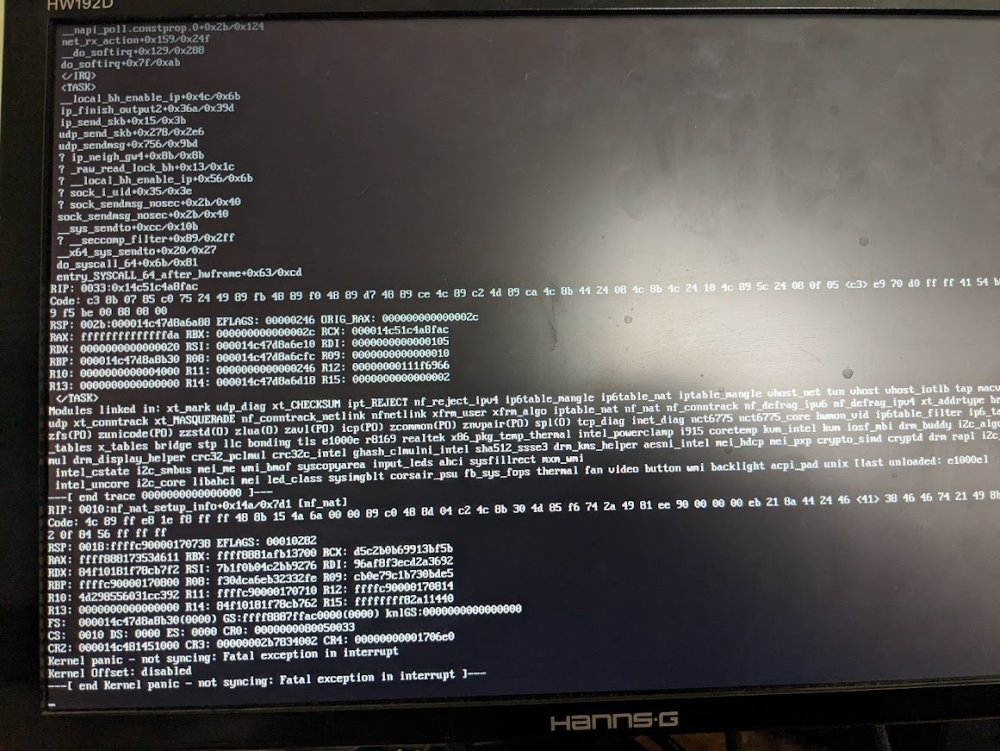
ASUSTeK COMPUTER INC. Z97-E/USB 3.1 , Version Rev X.0x American Megatrends Inc., Version 0503 BIOS dated: Wed 20 May 2015 12:00:00 AM MST Intel® Core™ i7-4790K CPU @ 4.00GHz Memory: 32 GiB DDR3 (4x8GB) WISE TIGER 2.5GBase-T PCIe Network Adapter 2x I/O CREST 2 Port SATA III PCI-e 2.0 x1 Controller Card Asmedia ASM1061 7x 14TB WD (array) 2x SANDISK 500GB SSD (cache pool) 1X 4TB WD Green (unassigned device for a VM) Crashing at random times over the last couple weeks. hard reboot and everything comes back and parity check starts. This moring was the first time the console had any data. I did some searching and I am trying software disabling c-states (from this post/solution: https://forums.unraid.net/bug-reports/stable-releases/692-kernel-panic-not-syncing-fatal-exception-in-interrupt-r1447/) . Was curious is someone else can gleam any useful info from the logs. Thanks! unraid-diagnostics-20230712-0724.zip