





Litso
Members
-
Joined
-
Last visited
-
Second StarRupture! Thank you for picking up this project!
-
Yesterday the volume finished repairing so I tried mounting via UD again. It still timed out on the SMB3 attempt, but connected on the SMB2 attempt. I'll keep an eye on it and see how it goes. Thanks again for your help!
-
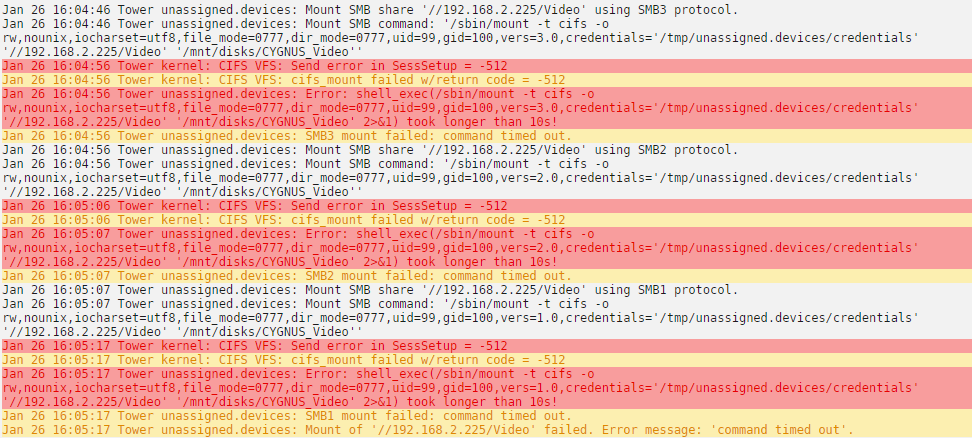
It does support SMB2 & 3. I had only enabled the force to SMB1 during the troubleshooting, I've since reverted that setting. The timeout happens across 1, 2, and 3.
-
Remote server is a Synology DS212+. I don't think it's a spin up issue. First time I noticed this behavior was last night after the power outage. After coming back online my storage pool was in a degraded state, with one of the drives being marked bad. It's still running a parity consistency check, which could be the cause of the issue, but I didn't think it would have had that much of an impact as the system is is not particularly taxed by any of the metrics I can see. I also just migrated to a new network today (Unifi system came in, yay!). I was having this issue on the old network as well, though, so I don't think it's the cause, but I do have a lot of variables in play at the moment which is not ideal. I can leave it up via the manual mount for now, and try again once it's finished all the repair processes unless you have any other ideas. Really appreciate the assistance!
-
Yea, good call. It took maybe 15-20s.
-
Unfortunately, still seeing the same error. Any other ideas?
-
Is it possible to do that from Unraid or the terminal itself, do I need to plug my flash drive into another machine? Nevermind found it!
-
Yes, I have deleted the mount from "Main" tab in the WebUI more than once. I did a reinstall of UD as well, but when I reinstalled it seems as if the configs persisted as the mount was still there. Is there a clean way to remove all UD configs and data and start fresh?
-
Hey @dlandon, recently I've been having an issue getting my SMB share to mount using UD. Had a power outage last night, and since booting everything back up the share won't mount. It's worth noting that a few days prior to the outage I updated UD for the first time in a very long time (the drive was already mounted at that point, so I'm not sure if the issue is related to the update. Here's a quick snapshot of the error I'm seeing. I have done quite a bit of googling and troubleshooting, but haven't come up with anything yet. It's worth noting that I was able to manually mount the share from the terminal by manually creating the mount point and specifying credentials. This did not persist through a reboot however. Any help would be greatly appreciated! tower-diagnostics-20200126-1346.zip

