





guythnick
Members
-
Joined
-
Last visited
-
I am getting the same disk image malformed error in my logs as well. The app seems to be working, but it isn't updating its queue and detecting when downloads are complete. If I refresh manually, it works. I confirmed in the logs that this happened after the last update on 10/30. I restored a DB backup from the day before, and the same thing happened. Something in the new release is corrupting the DB. EDIT: I was able to fix the DB corruption using the .recover option from this wiki entry: https://wiki.servarr.com/radarr/faq#i-am-getting-an-error-database-disk-image-is-malformed . Everything is now functioning normally.
-
Is there anyway to get this to display they containers on multiple lines? I just upgraded from 6.11.5 and had Docker Folders. There was an option for that. I am not seeing that here. I'd like for it to show all the containers in a folder in multiple lines rather limit to one line and but off the rest. Maybe I am overlooking that setting?
-
Also getting the same error when adding a show or when the application refreshes info. Did you ever find a fix for this? DEBG 'sonarr' stdout output: [Error] X509CertificateValidationService: Certificate validation for https://skyhook.sonarr.tv/v1/tvdb/shows/en/403294 failed. RemoteCertificateChainErrors [v3.0.4.1126] System.Net.WebException: Error: TrustFailure (Authentication failed, see inner exception.): 'https://skyhook.sonarr.tv/v1/tvdb/shows/en/403294' ---> System.Net.WebException: Error: TrustFailure (Authentication failed, see inner exception.) ---> System.Security.Authentication.AuthenticationException: Authentication failed, see inner exception. ---> Mono.Btls.MonoBtlsException: Ssl error:1000007d:SSL routines:OPENSSL_internal:CERTIFICATE_VERIFY_FAILED at /build/mono/src/mono/external/boringssl/ssl/handshake_client.c:1132 ...
-
No, it appears that the directory structure was maintained.
-
Want to put a pin on this - after the second rebuild finished the drive was still unmountable. I did some searching online and it looks like running xfs_repair was the right way to try to fix it. I started the array in maintenance mode and tried to just run 'xfs_repair -n', but it showed an error stating basically I needed to rebuild the log with the -L switch. I then re-ran with 'xfs_repair -L' , which completed in a couple minutes. Then after starting the array, I now have all the missing data! Thanks for the replies.
-
I stopped the rebuild and checked what was emulated, and it didn't emulate anything. Going to chalk this up to something incorrect I did last night. It doesn't make sense, but I don't see a way to get back the data.
-
I have replaced a drive in my array yesterday and parity was rebuilding the contents. Before the rebuild, the files were emulated and accessible. But today, about 10 hours into the rebuild, it appears all files were deleted from the array. I don't really understand what is happening.. All the modified times for the folders with missing data is around 2:15pm 12/30. So, it appears something in the rebuild process deleted the files? Not sure what to do. It is still rebuilding and at 80% complete. freenasmedia-diagnostics-20221230-1622.zip
-
EDIT: I changed the Home Assistant container to run on the same bridge (br0). Apparently when set to host mode it cannot access the br0 containers. Now it connects with websockets.
-
Can I ask then why does the 8091 show mapped in the GUI? Also, why in my other Domoticz container does it show all three that is also on br0? I understand your explanation, but that port is not working to access from other containers. Only when I set the container to bridge mode does the websockets port 3000 become connectable.
-
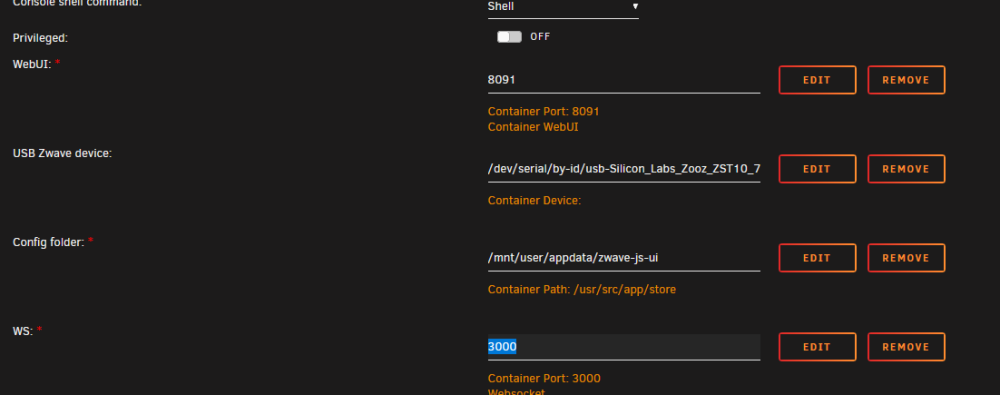
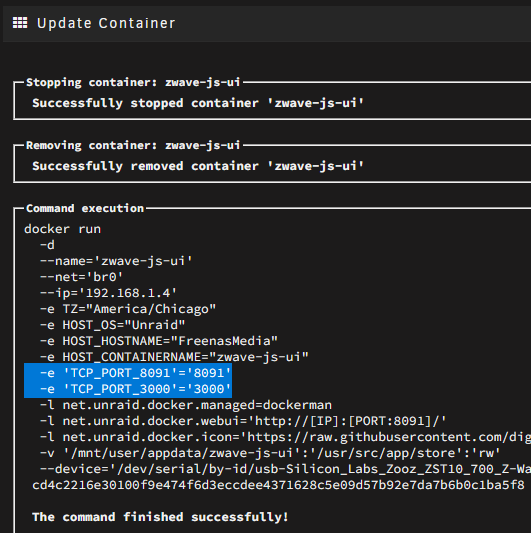
I am trying to setup my new z-wave devices with zwave-js-ui container. That is working, but I am unable to use websockets due to the port not mapping. Below is an example of my Domoticz container, in which I have 3 mapped ports that all are showing. And in the zwave entry, only the 8091 shows. I can get it to map 3000if I change this to bridge mode, but I can't do that as I need this to access the MQTT container that is also on br0. Also when I edit and save the container, you can see the 3000 port is in the docker run command:

-
Ah, rad. I should have checked. Thanks!
-
Thanks a ton for this plugin! One request - can you add iperf3 in there? I use that for quick network tests.
-
Parity is rebuilding and all files appear to be available. Here is what I did: * Stopped the array. * Manually ran the below on the un-mountable disk xfs_repair -L /dev/sdb1 *I had to run this with -L as without it it would not run. *Generate New Config with the same assignments. After these steps it started the parity rebuild, and all the shares are still available. So far, all the files seem to be there, but if there is any corruption I will just have to deal with it at this point.
-
That is the problem, disk1 wasn't disabled until I started the array. The system automatically started rebuilding at the same time.
-
Yes, the diagnostic files were taken before the parity sync completed. When I downloaded the diagnostic they were both showing red. I guess I will try doing a new config, but I am just worried I will lose data from both drives. Maybe I will just try to figure out a way to get the files off of them in Windows first.


