





rykr
Members
-
Joined
-
Last visited
Everything posted by rykr
-
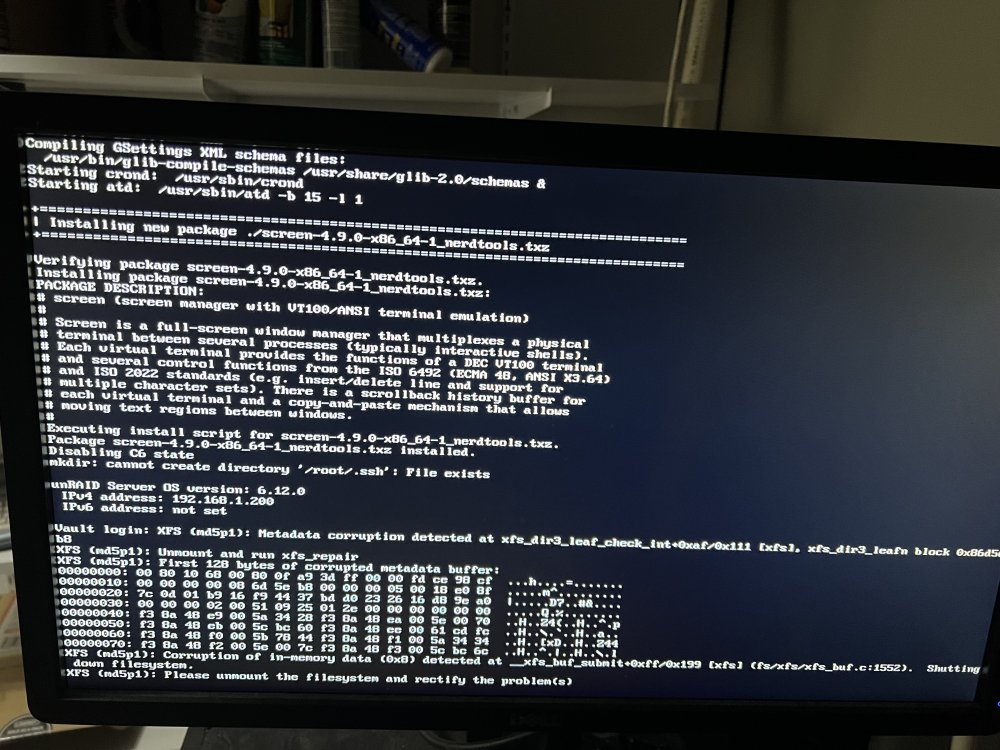
Any idea what this means and how I can fix it?
-
Alright got it going. I think what was happening is I was trying to stop the array too soon after starting. Maybe this is new in 6.12 but starting too soon for me caused it not be able to shutdown. I waited like 30 min after starting it and then stopped it, and it stopped ok. Disk clear happening now. Thanks!
-
I already rebooted several times so I don't think I will have digs to help. I created a new config and marked parity as valid and the array came online. Now my problem is that I can't stop the array to add my new drives. It gets stuck trying to mount /mnt/disk1. I'm guessing this is a new problem with 6.12. Forcing a reboot doesn't help. The system restarts with the array down and I can't do a new config with the new drives because then the parity is most def not valid. But if I start the array marking the parity as valid, then I can't stop it again. *shrug*
-
I"m right int hat I can do a new config and select that the parity is valid (which I know it is since the array has not been started since the parity build completed) and it will avoid a parity rebuild?
-
So I finally got my dual parity rebuilt and all was good. All disks check out, all green. Shut down server, connect another 8TB drive and bring up system so I can start pre-clearing it and now disk 4 in my array is disabled, contents emulated. No smart errors, no nothing. Just disabled. Any idea what my have caused that?
-
ok, checked BIOS update. There was one but only from 1 month ago with next to nothing in changelog. Didn't apply. Updated to 6.12-rc7 which was very smooth. I already have a 4 port external card so I moved two of my drives off the APU Sata ports from the board to the card. Now there is 4 drives connected to the chipset sata ports on the board and 4 drives connected to the external card. Restarted parity sync. Fingers crossed. If this fails, may look at board upgrade. Any suggestions? Should I go with one of the dual proc older Xeon boards?
-
Thanks. I'll check those
-
Also a lot of stuff like this: Jun 9 11:31:16 Vault kernel: ata5.00: failed command: READ FPDMA QUEUED Jun 9 11:31:16 Vault kernel: ata5.00: cmd 60/08:00:80:29:19/00:00:84:02:00/40 tag 0 ncq dma 4096 in Jun 9 11:31:16 Vault kernel: res 40/00:01:00:00:00/00:00:00:00:00/00 Emask 0x4 (timeout) Jun 9 11:31:16 Vault kernel: ata5.00: status: { DRDY } Jun 9 11:31:16 Vault kernel: ata5.00: failed command: READ FPDMA QUEUED Jun 9 11:31:16 Vault kernel: ata5.00: cmd 60/08:08:40:77:18/00:00:80:01:00/40 tag 1 ncq dma 4096 in Jun 9 11:31:16 Vault kernel: res 40/00:01:00:4f:c2/00:00:00:00:00/00 Emask 0x4 (timeout) Jun 9 11:31:16 Vault kernel: ata5.00: status: { DRDY }
-
lots of line like Jun 9 11:32:18 Vault kernel: md: disk3 read error, sector=2045235784 Jun 9 11:32:18 Vault kernel: md: disk3 read error, sector=2045235792 in the log
-
Here ya go. vault-diagnostics-20230609-1217.zip
-
I've checked smart status on the drives and done short tests. Drives appear ok? They also have have fans blowing on them and do not appear to be hot.
-
I have a 26TB array that is out of space. It has dual parity using 2 8TB drives. I bought 2 14TB drives. I replaced one of the 8TB parity drives with one of the 14TB drives and started the array and it started doing a parity re-sync. It ran ok for a couple of hours and now I'm getting a crazy number of read errors on 3 of the 4 data drives. What could possibly be going on here?

-
I went ahead and started rebuiding the array. I ran some smart tests on the 2TB drive and it failed them all so I assumed it is not healthy enough to do anything with. I'm going to try a PCB swap on the 8TB drive to see if I can save it.
-
ok, one last comment. smartctl appears to list no failed tests. I can't rebuild it on itself since I missing a second drive. However the array has been used for some time with this drive disabled so *if* unraid writes data to the emulated disk then it's a no go. The parity would be required to reconstitute the 2tb and could not be used to rebuild the 8tb. So, I'm guessing that even if I could force the drive to be re-enabled, I still could not rebuild the 8tb.
-
ok, I understand that. What I was saying is that JorgeB asked me this question "[were there writes] To other drives or that emulated disk?" to which I answered how would I know if unraid wrote to the "emulated" disk? I know it always said the use of the drive was practically zero. It always had like 0% use in the dashboard before it was disabled. But if unraid wrote to the emulated disk I would not know it.
-
well, tell me if I'm wrong here. When you attempt to write a file to the array, unraid will determine which disk the file should go to. It will then write the entire file to that disk (assuming no cache here). I'm assuming that once the drive went disabled, unraid would no longer choose that disk as a write target so the only writes that were done to the disk are the two small folders that are there. Is that right? If that is write then there have been no writes to that disk since it became disabled.
-
Well, how would I know if unraid wrote to the emulated disk? All I know is I can mount the disk and see the contents.
-
there has been quite a bit written to the array after the 2TB drive was disabled but I was assuming the drive was zero'ed when it went in so other than the files that are on it, the other sectors would be zero. is that not the case? What is the method you are talking about?
-
Yeah, it's marked as disabled in the system. It's failed some smart tests so I'm guessing the drive has failed some reads and writes. I was just hoping that since unraid cleared the drive when installing it and basically never used it. It read 0% used the whole time . I think there is two small folders on there. I just checked with df and it shows 1% used on that drive. I was just hoping that there might be some way of re-enabling the drive just for the purpose of emulating the missing 8TB drive from parity. I guess you are saying that there is zero way to re-enable the drive. My only hope is that data salvage can recover the files from the missing 8TB drive?
-
Theoretically, if I could dd read the sectors from the 2TB drive and write them to a new 2 TB drive and could edit the super.dat file to use the new 2TB drive instead of the old one, then it would see just one drive missing (the 8TB that own't power on) and it will emulate that drive contents. This would allow me to reconstruct the missing drive onto another one. Or is this just fantasy? I know it has to be able to read all the sectors from the 2TB drive to do anything. Are there any CLI tools to rebuild drives?
-
ok, but it is mountable. Is there no way I can force unraid to recognize it's there even though I won't be reading and writing to it?
-
I got an array that includes 4 data drives. 2 8TB, 1 4TB, and 1 2TB drive. The 2 TB drive recently became disabled but it had been having some smart errors for some time and Unraid was basically not using it. The drive is still mountable and there is essentially nothing on it. Two small folders. first off, I know I should have replaced the 2TB disabled drive right away but that is water under the bridge now. Yesterday, I upgraded the server to a faster Am4 board and cpu and moved the drives into an R4000 chassis. Everything came up but one of the 8TB data drives will not power on. I've already talked to data recovery people but that's going to be at least $400-$500 assuming it's an electrical problem and not a mechanical one. What I'm wondering is if there is some magic I can perform given that the 2TB disabled drive has really nothing on it and nothing has been done with the array since the 8TB drive won't power on (since the array won't start). If I can somehow replace the 2TB drive so that unraid can emulate the contents of the 8TB drive that won't power on, then I can just replace it and avoid the data recovery fee.

