





MNM87
Members
-
Joined
-
Last visited
-
I cant see any shares anymore after this update tower-diagnostics-20250924_0455.zip
-
Hello i have a problem with the mover not running. when i press move nothing happens. It has worked before without any problems. In fix common problems i have a error: Share cache is identically named to a disk share. But what does that mean? i cant really see any identical names. tower-diagnostics-20240818-0857.zip
-
Here it is 🙂 tower-diagnostics-20230717-1203.zip
-
Hello i am trying to remove one cache drive from cache pool. my pool is raid 1. i did following without luck: I want to remove cache 3 cache 3 removed then i press yes i want to do this and START Now i get this error: cache - too many missing/wrong devices unraid Any ideas how to solve this? 🙂




-
Hello is there a way to get a list of files in a folder that contains other folders with files (a complete list of all the files that are in the folders) and then get it arranged by file size?
-
Thank you so much! 😄
-
I just send him a message with the diagnostic and a link to this thread and the other one, and asking if its possible to add a quirk for this drive. Thank you very much for you help, its very much appreciated!! 😀
-
I have just been searching around and i found this thread: Is it possible that LT (i have no idea what LT stands for) can make a quirk for this ssd in a feature release?
-
I think they have different id's. here is some pictures. Do you know what the problem can be if its not the id?


-
I am sorry you are right. here is the diagnostics. Do you know if there any way to manually give them id? nas-diagnostics-20230210-2037.zip
-
Hello i just bought 2 ssd's (MKNSSDTS2TB-D8) but i can only see one in unraid. i can see bought in bios. before i had a kingston in one of the m2 slots and if i use the kingston and one of the new drives it works fine. I also tried the other new ssd with the kingston and then it works fine to. its just when i add bought new it only shows one drive. I think its maybe because unraid cant tell the difference between the 2 drives. Any idea how to make it work? 🙂
-
I forgot to mention if i restart unraid i can see and start the vm's but i cant connect to them with vnc remote. if i go to vm manager and stop and start the vms i cant do anything. it just gives me the LIBVIRT SERVICE FAILED TO START error. I dont know if it has anything to do with it, but before this happen i installed tvheadend plugin and messed a little with it then uninstalled it again.
-
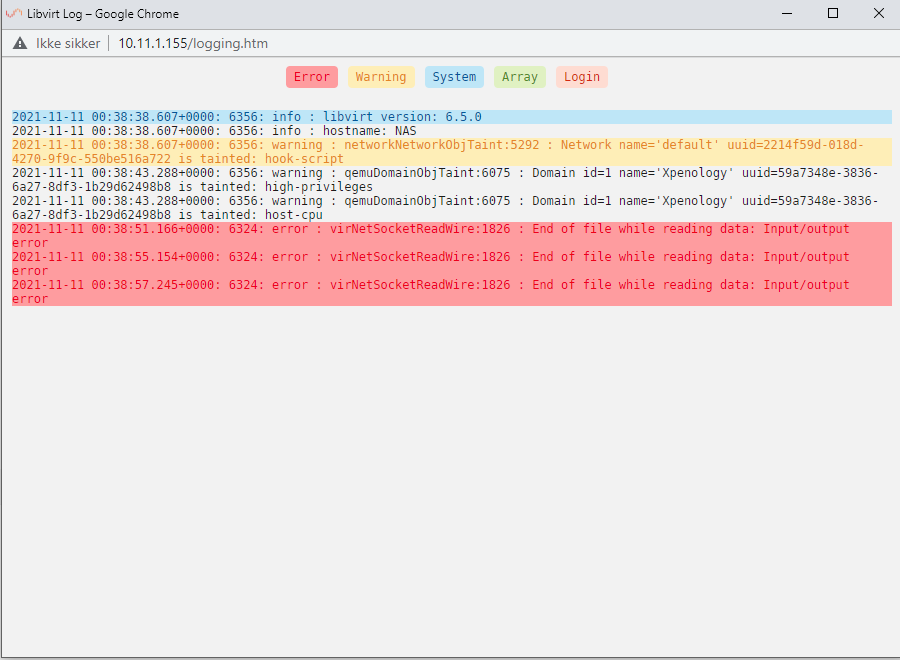
Hello suddenly i cant access my VM's. when i press VMS i get this message: VMS will not start: Libvirt Service failed to start When i go to settings and VM Manager to view the log, this is what i get: I have tried to downgrade from version 6.10.0 to 6.9.2 without any luck. any ideas what it can be? nas-diagnostics-20211111-0156.zip
-
Yes you are properly right. its just weird because before i never had a problem with that and now it happen to every new docker i install. For me it nice to just go there using smb and edit a config file
-
Hello my usb drive broke yesterday, but i had a backup. I installed the backup on my new usb flash drive and everything seemed to work fine except when i install a new docker container, i cant access the folder in appdata from that container through smb. do anyone have a fix for this? 🙂 nas-diagnostics-20211031-1723.zip


