



Skip to content
View in the app

A better way to browse. Learn more.

Unraid

A full-screen app on your home screen with push notifications, badges and more.

To install this app on iOS and iPadOS
  1. Tap the Share icon in Safari
  2. Scroll the menu and tap Add to Home Screen.
  3. Tap Add in the top-right corner.
To install this app on Android
  1. Tap the 3-dot menu (⋮) in the top-right corner of the browser.
  2. Tap Add to Home screen or Install app.
  3. Confirm by tapping Install.

dotSlash

Members
  • Joined

  • Last visited

  1. unraid-diagnostics-20210818-2110.zip
  2. will do after parity check finished. few more hours to go.
  3. i will replace power and sata cable after the parity check finished.
  4. so I run another parity check, and the error number is getting higher and higher.
  5. I mean the server was running fine for about 2 days before I discovered the new added disk was disable. Here is the errors.
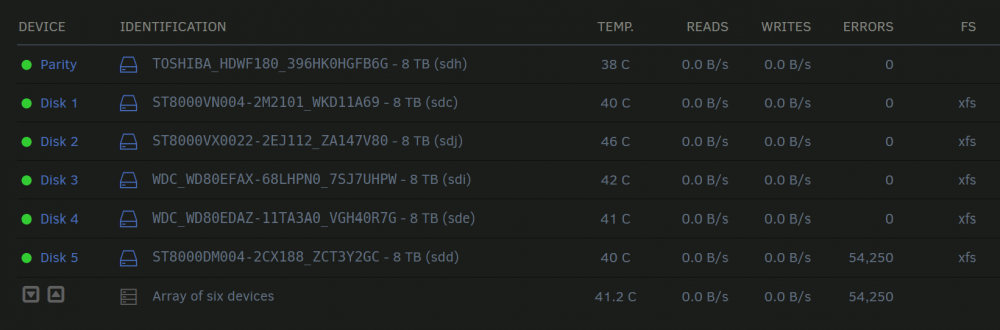
  6. Just added a 8tb hdd to my 5 disk stash, the disk was all good when in disclosure. after two days the disk appeared disable, so I did a parity check on it. 54,250 Errors! but theres little to nothing data on the disk yet. Checked the SMART test and all passed. Should I be worried? Anything I need to do? unraid-diagnostics-20210815-1649.zip

Account

Navigation

Search

Search

Configure browser push notifications

Chrome (Android)
  1. Tap the lock icon next to the address bar.
  2. Tap Permissions → Notifications.
  3. Adjust your preference.
Chrome (Desktop)
  1. Click the padlock icon in the address bar.
  2. Select Site settings.
  3. Find Notifications and adjust your preference.