Usual-Noob
Members
-
Joined
-
Last visited
-
Yes sir, Just trying to add enough to make sure if something breaks down I'm covered. I use the Docker with AirVPN enabled and a TorGuard Socks5 Proxy - you have that correct. -Usual-Noob
-
Usual-Noob changed their profile photo
-
Usual-Noob joined the community
-
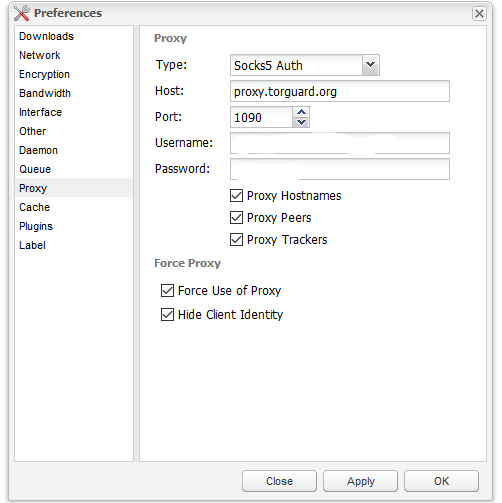
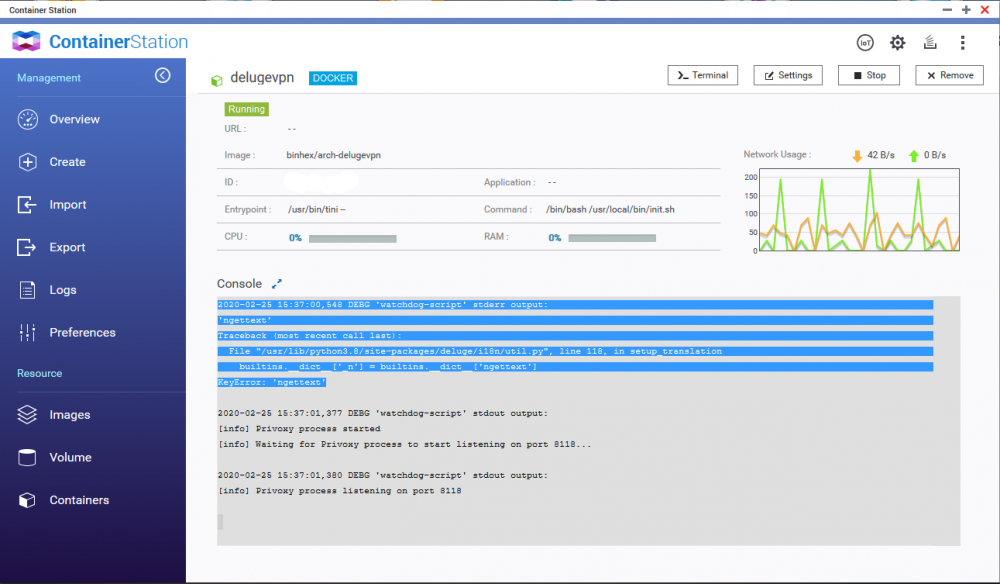
I have a question about my current configuration – I’m not having a issue with connectivity and I’m not overly concerned about speed but more hoping for a definitive answer if I have done enough to keep off the radar of my ISP and away from threating letters. Currently I’m using: AirVPN for the Docker container TORGuard for Socks5 proxy Image: https://ibb.co/jw31t7D The WebUI parked behind a Reverse Proxy (apache / Lets encrypt) The Docker container is on a QNAP NAS and sits behind an ASUS RT-AC5300 router. When I check my configuration with IPLeak It shows that the IP has been obfuscated, I have also checked with TORGuard to verify the IP has been obfuscated and both tests prove positive that the IP is being changed/masked/obfuscated The only “Error” in the log that is visible when launching the container is: Image: https://ibb.co/gwRm8h0 DEBG 'watchdog-script' stderr output: 'ngettext' Traceback (most recent call last): File "/usr/lib/python3.8/site-packages/deluge/i18n/util.py", line 118, in setup_translation builtins.__dict__['_n'] = builtins.__dict__['ngettext'] KeyError: 'ngettext' I have tested some small torrents to verify connectivity and all seems to work just fine. I do take a substantial hit on speed with the layers of security but I would rather be safe and slower than unsecure and shutdown. My question is how do I prove that I’m secure enough to use this set up full time without bleeding/leaking and getting into trouble. I am aware this solely depends on the sustained connection of the VPN / Socks5 proxy but hypothetically if there were no fear of the VPN dropping how can I test that this setup is a ready to go to work. Thank you for any comments, help, support and ideas. - Usual-Noob