IcEDFiRE
Members
-
Joined
-
Last visited
Everything posted by IcEDFiRE
-
Yes, I know the dongle acts as the license verification. However, that can change (especially since we're using UNRAID Connect now), similar to what other software vendors (when they used sentinel dongles for licensing) had to do when VDIs became more popular. No hyperscaler would agree to attach a 3rd party USB dongle to their servers, so not really an option is it? I understand that it isn't designed for that, that's why I said it might be a branch they might be willing to explore (in the future). Most of the code base is already there, and most probably the only thing stopping it from being deployable in a public cloud at the moment is the USB dongle.
-
Thanks, will look into it
-
Hi, I don't use UNRAID as a NAS (it started that way, but things changed), instead I continued using it for its easy-to-use, very detailed GUI, especially in terms of Containers, VMs and Community Apps (and of course the community behind it). The hardware UNRAID is running on is ageing and I was wondering if it's possible to shift my setup to a Cloud VM (Azure, AWS or Oracle). I don't have important or personal data on this system, so I'm not worried about that. Given that UNRAID uses a USB to boot, what are the options? I've seen some posts where some managed to run UNRAID in Hyper-V, so I would guess that if that VHD is uploaded to Azure, it should work too, right? I'm only aware of one other OS that gives what UNRAID gives, and still, it's not as polished, so it would be great to have this option available and might be a new branch in the development of UNRAID. Any help, pointers, or maybe alternatives are welcome.
-
Hi, I've set the NAS portal to be accessible via NGINX Proxy Manager with traffic also passing via CloudFlare. Lately, when traffic is passing through CloudFlare, the graphs on the Overview page do not work. Even the progress when installing a new Docker doesn't show. When CloudFlare is bypassed everything starts working properly. I'm putting this here just in case someone has experienced it and found a solution to it. I've tried a couple of config overrides in CloudFlare to no avail. Thanks.
-
Thank you very much for your replies.
-
I understand, thank you very much. Is there a plan to support SSDs in the Array? Or maybe a way to chose to either have Array Only, Pool Only or Both? Also, is RAID 5 still considered experimental in BTRFS? Thanks.
-
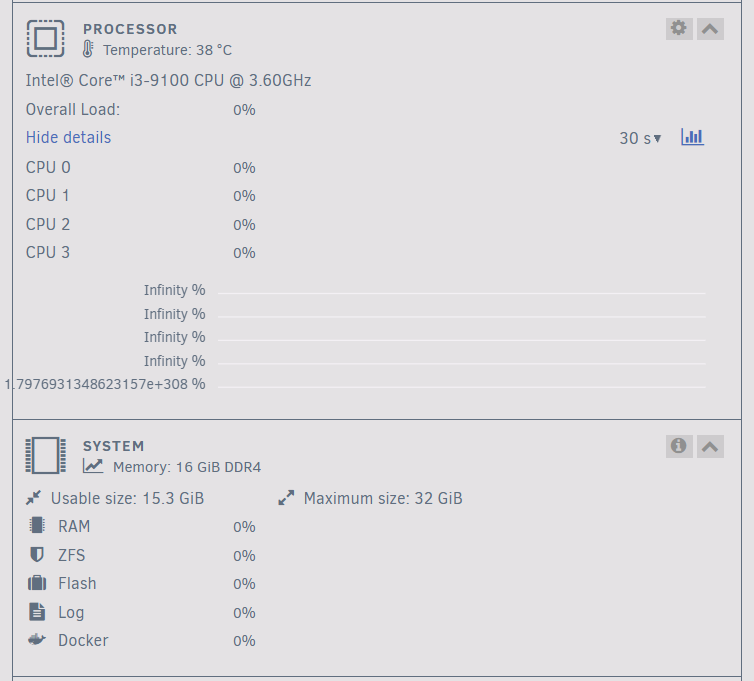
Hi all, I recently wanted to replaced my drives from 2x 2TB HDDs (In Array) and 2x 128GB SSDs (In Pool) to 3x 2TB SSDs (In Array). However, upon reading some other forums, it seems that having SSDs in an array is not supported due to the TRIM function. I have hence created a pool with the 3 disks and used an old SSD as a single drive in the array just so the array can start (maybe this should be fixed in the future to allow the array to start with just pool disks). The issue I am seeing is that the pool is correctly marking the pool as 3TB in size (6TB / 2). I have 110GB used and the free space is being marked as 1.94TB. Where's the other 1 TB? Thanks.