





dunnno
Members
-
Joined
-
Last visited
-
Well, found the problem. Since we can use a plain Redis container, I happen to already have one running for Paperless. So I was asking TA to use that Redis container. But a Redis container cannot be used by two other containers at the same time. I have to install a second plain Redis container for the exclusive use of TA. Here is the answer
-
Yep, TA_HOST is http://LanIP:MyPort. Isn't redundant with the other port variable "Container Port: 8000" which I set to MyPort as well ?
-
Either with or without http:// in TA_HOST variable results in this error. Or if I misunderstood, where are you talking about ? My TubeArchivist docker is only local, not open to the world.
-
Hi all, updated to v0.5.0 or reinstalling from scratch v0.5.0 always gives me those errors in the log. The webui works, videos playback as well, but I'm unable to refreshing the subscribed content or add video with a link, nothing happens. FWIW, official setup guide said that we can get rid of the tube archivist-redis own docker, and that the official redis docker works fine. -------------- celery@a079048d37d5 v5.4.0 (opalescent) --- ***** ----- -- ******* ---- Linux-6.6.78-Unraid-x86_64-with-glibc2.36 2025-03-12 20:42:54 - *** --- * --- - ** ---------- [config] - ** ---------- .> app: tasks:0x14958db71550 - ** ---------- .> transport: redis://LanIP:6378// - ** ---------- .> results: redis://LanIP:6378/ - *** --- * --- .> concurrency: 4 (prefork) -- ******* ---- .> task events: OFF (enable -E to monitor tasks in this worker) --- ***** ----- -------------- [queues] .> celery exchange=celery(direct) key=celery [tasks] . check_reindex . download_pending . extract_download . index_playlists . manual_import . rescan_filesystem . restore_backup . resync_thumbs . run_backup . subscribe_to . thumbnail_check . update_subscribed . version_check [2025-03-12 20:42:55,392: WARNING/MainProcess] /root/.local/lib/python3.11/site-packages/celery/worker/consumer/consumer.py:508: CPendingDeprecationWarning: The broker_connection_retry configuration setting will no longer determine whether broker connection retries are made during startup in Celery 6.0 and above. If you wish to retain the existing behavior for retrying connections on startup, you should set broker_connection_retry_on_startup to True. warnings.warn( [2025-03-12 20:42:55,410: INFO/MainProcess] Connected to redis://LanIP:6378// [2025-03-12 20:42:55,412: WARNING/MainProcess] /root/.local/lib/python3.11/site-packages/celery/worker/consumer/consumer.py:508: CPendingDeprecationWarning: The broker_connection_retry configuration setting will no longer determine whether broker connection retries are made during startup in Celery 6.0 and above. If you wish to retain the existing behavior for retrying connections on startup, you should set broker_connection_retry_on_startup to True. warnings.warn( [2025-03-12 20:42:55,418: INFO/MainProcess] mingle: searching for neighbors [2025-03-12 20:42:55,455: CRITICAL/MainProcess] Unrecoverable error: ContentDisallowed('Refusing to deserialize untrusted content of type pickle (application/x-python-serialize)') Traceback (most recent call last): File "/root/.local/lib/python3.11/site-packages/celery/worker/worker.py", line 202, in start self.blueprint.start(self) File "/root/.local/lib/python3.11/site-packages/celery/bootsteps.py", line 116, in start step.start(parent) File "/root/.local/lib/python3.11/site-packages/celery/bootsteps.py", line 365, in start return self.obj.start() ^^^^^^^^^^^^^^^^ File "/root/.local/lib/python3.11/site-packages/celery/worker/consumer/consumer.py", line 340, in start blueprint.start(self) File "/root/.local/lib/python3.11/site-packages/celery/bootsteps.py", line 116, in start step.start(parent) File "/root/.local/lib/python3.11/site-packages/celery/worker/consumer/mingle.py", line 37, in start self.sync(c) File "/root/.local/lib/python3.11/site-packages/celery/worker/consumer/mingle.py", line 41, in sync replies = self.send_hello(c) ^^^^^^^^^^^^^^^^^^ File "/root/.local/lib/python3.11/site-packages/celery/worker/consumer/mingle.py", line 54, in send_hello replies = inspect.hello(c.hostname, our_revoked._data) or {} ^^^^^^^^^^^^^^^^^^^^^^^^^^^^^^^^^^^^^^^^^^^^ File "/root/.local/lib/python3.11/site-packages/celery/app/control.py", line 389, in hello return self._request('hello', from_node=from_node, revoked=revoked) ^^^^^^^^^^^^^^^^^^^^^^^^^^^^^^^^^^^^^^^^^^^^^^^^^^^^^^^^^^^^ File "/root/.local/lib/python3.11/site-packages/celery/app/control.py", line 106, in _request return self._prepare(self.app.control.broadcast( ^^^^^^^^^^^^^^^^^^^^^^^^^^^ File "/root/.local/lib/python3.11/site-packages/celery/app/control.py", line 776, in broadcast return self.mailbox(conn)._broadcast( ^^^^^^^^^^^^^^^^^^^^^^^^^^^^^^ File "/root/.local/lib/python3.11/site-packages/kombu/pidbox.py", line 346, in _broadcast return self._collect(reply_ticket, limit=limit, ^^^^^^^^^^^^^^^^^^^^^^^^^^^^^^^^^^^^^^^^ File "/root/.local/lib/python3.11/site-packages/kombu/pidbox.py", line 388, in _collect self.connection.drain_events(timeout=timeout) File "/root/.local/lib/python3.11/site-packages/kombu/connection.py", line 341, in drain_events return self.transport.drain_events(self.connection, **kwargs) ^^^^^^^^^^^^^^^^^^^^^^^^^^^^^^^^^^^^^^^^^^^^^^^^^^^^^^ File "/root/.local/lib/python3.11/site-packages/kombu/transport/virtual/base.py", line 997, in drain_events get(self._deliver, timeout=timeout) File "/root/.local/lib/python3.11/site-packages/kombu/transport/redis.py", line 591, in get ret = self.handle_event(fileno, event) ^^^^^^^^^^^^^^^^^^^^^^^^^^^^^^^^ File "/root/.local/lib/python3.11/site-packages/kombu/transport/redis.py", line 573, in handle_event return self.on_readable(fileno), self ^^^^^^^^^^^^^^^^^^^^^^^^ File "/root/.local/lib/python3.11/site-packages/kombu/transport/redis.py", line 569, in on_readable chan.handlers[type]() File "/root/.local/lib/python3.11/site-packages/kombu/transport/redis.py", line 979, in _brpop_read self.connection._deliver(loads(bytes_to_str(item)), dest) File "/root/.local/lib/python3.11/site-packages/kombu/transport/virtual/base.py", line 1017, in _deliver callback(message) File "/root/.local/lib/python3.11/site-packages/kombu/transport/virtual/base.py", line 639, in _callback return callback(message) ^^^^^^^^^^^^^^^^^ File "/root/.local/lib/python3.11/site-packages/kombu/messaging.py", line 650, in _receive_callback decoded = None if on_m else message.decode() ^^^^^^^^^^^^^^^^ File "/root/.local/lib/python3.11/site-packages/kombu/message.py", line 201, in decode self._decoded_cache = self._decode() ^^^^^^^^^^^^^^ File "/root/.local/lib/python3.11/site-packages/kombu/message.py", line 205, in _decode return loads(self.body, self.content_type, ^^^^^^^^^^^^^^^^^^^^^^^^^^^^^^^^^^^ File "/root/.local/lib/python3.11/site-packages/kombu/serialization.py", line 255, in loads raise self._for_untrusted_content(content_type, 'untrusted') kombu.exceptions.ContentDisallowed: Refusing to deserialize untrusted content of type pickle (application/x-python-serialize) auto_start: False
-
Hi all, woke up this morning to see this 1st time ever error on my server. Here is the diagnostic zip file. Do we know which process was killed and what caused this, and of course, how to prevent this to happen again ? Side info, I have a disk that has read error, SMART it's ok though, dunno if it could be related. Edit : typo. tower-diagnostics-20250216-1100.zip
-
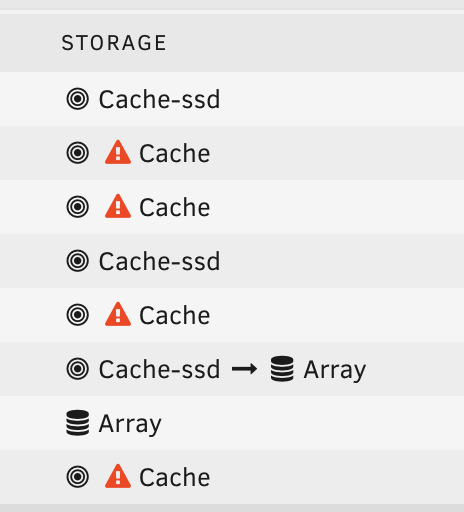
Ok then, I bought a second ssd to get 2 for the cache. I was at a thousand kms to know that XFS does not support multiple devices, only a pro like you can tell me, and really, really thank you for that. I was painfully, excruciatingly ready to press the format button in order to make it work again . I have all my appdata and cached files which hadn't moved yet and docker.img on that drive. The appdata backup and the mover were due to run the day after, so I was about to lose a week of data (·•᷄ࡇ•᷅ ) So, what do you advise, set everything that is "Cache-ssd ==> Array" to "Array" and when it's done, add the second SSD cache drive and format them all ? EDIT: Ok sorry for the bother with what follows, saw ppl had the same problem, made a dummy change on each guilty shares, and the warnings are gone. Also, now the SSD is back online, some shares (many) that were Storage : "Array" now show : This share is invalid; It references storage that does not exist How to get them back correctly ? is it because of the emulated disk ?
-
Hi, it's using XFS, I chose it for it to be the same as every other disks. blkid: /dev/sdb1: UUID="d750a070-5ce9-4bb0-b24e-053dbe713ac7" BLOCK_SIZE="512" TYPE="xfs" PARTUUID="a512dafd-ed4b-48d8-aebd-f390245eec53" /dev/sda1: LABEL_FATBOOT="UNRAID" LABEL="UNRAID" UUID="310F-19E0" BLOCK_SIZE="512" TYPE="vfat" /dev/loop1: TYPE="squashfs" /dev/sdf1: UUID="fb012c0b-202a-489a-b5b0-c452bbcb76e3" BLOCK_SIZE="512" TYPE="xfs" PARTUUID="59b3f132-5f43-4eb5-9369-c89877bc243b" /dev/sdd1: UUID="57f793ec-c3d9-4c87-8c6a-3e56c7119913" BLOCK_SIZE="512" TYPE="xfs" PARTUUID="6010d587-c548-47e6-8db1-9407a8c5035f" /dev/sdg1: PARTUUID="eb5247a1-ecbe-4d5b-a2a5-c45ff8f8a533" /dev/loop0: TYPE="squashfs" /dev/sde1: UUID="e095ab19-780e-46b0-9e6b-e68c526f6fe2" BLOCK_SIZE="512" TYPE="xfs" PARTUUID="dabef6fe-6fe9-4314-bc1b-d46d203023d7" /dev/sdc1: UUID="a79678e3-18be-4874-be36-22dc2ef19e46" BLOCK_SIZE="512" TYPE="xfs" PARTUUID="3a7ca85f-1a5a-4b81-90d3-d0533ff17cf1" /dev/nvme1n1p1: UUID="de8d3c83-75e7-47a0-91c2-8f749577fd42" BLOCK_SIZE="512" TYPE="xfs" PARTUUID="94f82380-01" /dev/sdh1: UUID="ef88f827-4745-4fb7-9582-53e66ef18aac" BLOCK_SIZE="512" TYPE="xfs" PARTUUID="baaccf17-fefd-4e2a-8340-3497468dcd04"
-
here is the diag, I've an emulated device as well, dunno why. tower-diagnostics-20241223-2245.zip
-
Hi all, I tried following what that post solved but it was unsuccessful, it still show as unmountable. I'm lost here, I don't know what to do.
-
Thanks itimpi. So how do I set it up to be able to access the dashboard only through Connect and not by typing my IP:Port in a browser ?
-
Hi, i wanted to access the admin panel from outside my lan. So I setup the Connect plugin as much as I understood (followed the docs.unraid tuts). At some point the tutorial asked to open a port from my router in order to make the admin panel available from the outside world. That was one red flag for me as I'm scared sh*tless that the admin panel login page was available for anyone to see (and exploit ?). I did it anyway hoping that going through all the tutorial it's not gonna be needed at the end. So, once I think I've done everything that was asked, I closed off the port from my router. Consequently, the admin panel isn't reachable from the Connect page anymore. So here are the questions : what is the point of having a Connect plugin and access the admin panel through an iframe in the Unraid page when the admin panel is straight reachable typing MyHomeIP:MyOpenPort ? Or is there anything I missed to make the admin panel reachable ONLY from the Connect page ? I really want to access it only through the Connect page.
-
Thanks a bunch @JorgeB. I followed the tuts over there in order to restore one by one the docker apps. ***OFFICIAL GUIDE*** Restoring your Docker Applications in a New Image File
-
Hi all, My docker .img is stored on a disk I happened to swap yesterday for a bigger one. I thoroughly followed the protocol there https://docs.unraid.net/legacy/FAQ/replacing-a-data-drive/ and all seems good. My new replacement disk is working and has got that .img docker file. But as docker is enabled in the settings, no docker apps show in the docker menu : "No Docker containers installed". Do i have to do anything else to make them appear again ? If it's relevant and maybe for restoring anything, the former disk I can plug in the former disk.
-
Pls tell me what you've done
-
Can you or anybody enlighten me to install it ? I read the howto, but it's not clear enough for me As i understand it I have to add a variable into swag config, DOCKER_MODS, and that's all I can catch. I can't get a hand on adding a "a mapping of 81:81 to swag's docker run command or compose", and also a "rewrite of dashboard.domain.com to your server's IP address". for the latter one, I don't even know if I need to add an A to domain name.
