





James Dietrich
Members
-
Joined
-
Last visited
-
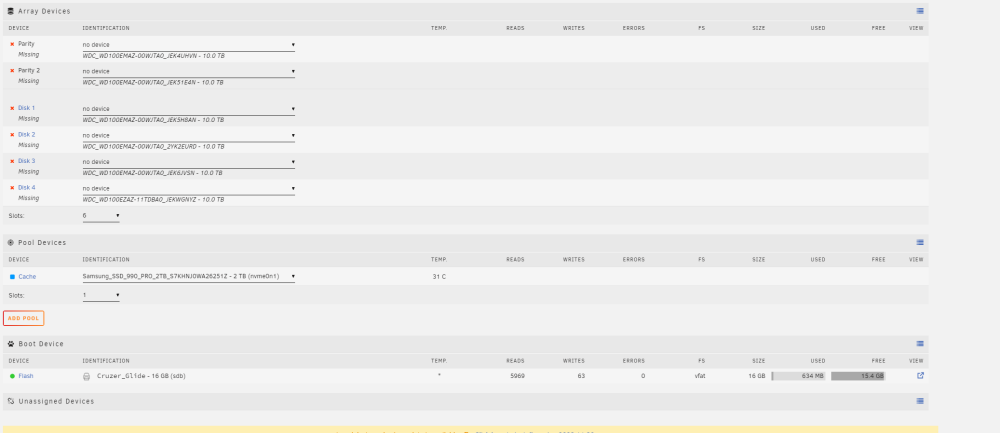
Edit: Found the problem. When I swapped power connections to the new PSU, I rubbed off the tape I had over pin 3 of my shucked WD drives. Problem compounded swapping power cables multiple times until I couldn't read anything. I had forgotten the tape was even there. I recently had my cache nvme disk quit on me, and replaced it with a 2 TB Samsung 990 Pro. While I was at it, I swapped power supplies and added an additional storage disk to my array. The new disk showed up as expected under unassigned devices, as did the cache drive, but when I came back up I noticed one of my existing drives in my array was listed as missing. Fearing a bad disk, to isolate the problem I tried swapping the drive to a different SATA port, and then to a different port and cable from the psu. Nothing worked, and worse, I started losing disks from the array every time I booted. Now none of the array disks appear anywhere, but I do see the cache and the unassigned new disk. I have a pro license, so I haven't exhausted any disk limit, and I can't see why a bad SATA port or bus on the mobo would be down, if the new disk shows up correctly. Could it even be possible I skunked 6 out of 6 disks in an array? I tried a new USB stick with a 30-day trial install just in case it was a problem with my config getting mixed up, but that shows the same problem. I'm interested in testing the drives in a different machine, but I don't have another linux box and will likely need to get a USB to SATA drive mount and some software to read XFS...anybody have any suggestions on what may have caused this, or what next troubleshooting steps should be?
-
...what I don't understand is, why it gets farther without Elasticsearch even addressed correctly, than it does when it has an addresss...If you give it an address for elasticsearch, then all of a sudden it can't even get to the point it pings elasticsearch, which makes no sense to me.
-
I've tried both the 25 and 26 versions. I have Elasticsearch 7.17.2 and PV (.25 or .26)running on static IP's from my regular subnet and the config edited to reflect Elasticsearch's IP both on the custom subnet and on my regular subnet. I can get PV to start on a completely clean install, default config it will complain about access to Elasticsearch, but at least it will load, create directories, create a backup, etc. Upon editing the config file to reflect the address for Elasticsearch, PV will run to the point it says "registered plugins []" and crash for .26, and report something about not finding gianna on .25 pineapple or whatever lead named it.
-
Never mind, I guess: I read further and found the instructions on how to identify the parity drives. I re-configured the array drives and left "parity is valid" unchecked. It's rebuilding parity now, on the correct drives, and all my shares are available, apparently (although I'm going to leave the whole thing alone until parity is re-built). My whole worry was making sure I didn't trigger a data re-build from bad or mismatched parity data. Thanks for looking out, though. For anyone else that loses a USB AND the backup, and all you need to do is re-mount your existing shares in the array without writing over them from bad parity/drive mismatches, read to the bottom of this page: https://wiki.unraid.net/Manual/Changing_The_Flash_Device Doing this will start your shares array up again, but trigger a parity data rebuild. The key is identifying the parity drive(s) and assigning them correctly to parity slots before you start the array. If you put a parity drive in a data slot, or trigger a rebuild of your data from mismatched parity, you absolutely destroy data, so the important thing is to identify parity drives first, then start the array with parity drives in parity slots and leave "parity is valid" UNCHECKED.
-
I recently had my array suffer a power outage where my USB boot drive apparently suffered errors. I went to restore it from a backup copy to a new device, but the backup folder I ostensibly saved my usb backup was empty. I was able to create a new USB stick with my credentials on it and boot the array, but it shows up as a list of unassigned disks. It looks like all disks survived and report correctly, and two of six disks are still marked parity. How do I re-assign the disks such that my shares are re-built, knowing I don't have a working backup .cfg to tell me how each disc was assigned?
